



















March 15, 2024
No more AdSense
Ads.... I get it. With TV, having to watch commercials was the cost of getting free content. Until streaming came and pretty much replaced cable TV and its double-whammy of commercials AND charging more and more for the service. When Netflix started streaming, you got a lot of content without commercials for a very modest monthly fee. Now, there are dozens of major streaming providers and they all want a steadily increasing monthly fee.
Print news and print magazines are pretty much dead. And they still haven't figured out how to charge for content. Hiding everything behind paywalls ticks people off. And let's not even get into those hideous "subscriptions" for every app and every site. Who thought trying to trick people into subscribing for every little app was a good idea? Who needs hundreds of unmanageable monthly payments that often are almost impossible to cancel? What a nightmare. But you can't expect content to be free, and so we've come to grudgingly accept that nothing is ever truly free.
Banner ads and such initially seemed an acceptable way to go. Unless they take over and become simply too obnoxious. Until there's more click-bait than actual content. And so on. It's a real disaster for all sides.
I thought about this long and hard when we launched RuggedPCReview.com almost two decades ago. Even back then, the handwriting was on the wall. Creating content costs time and money, and there had to be a reasonable, optimal way to make it all work out for all involved.
The solution we came up with back then was use a technology sponsorship model where companies that felt our content was worthwhile and needed, and with which they wanted to be associated with and seen with because it could generate business and impact purchasing decisions. Technology sponsors would get banner ads on our front page, and also on the pages that dealt with their products.
However, since it took time to build a sponsorship base that covered our costs, we also set up Google’s AdSense in some strategic locations. Google actually had called me personally to get on our sites. So we designated two small, tightly controlled ad zones in many of our page layouts where Google was allowed to advertise with advertising that we approved.
That initially worked well and for a while contributed a little (but never much) to our bottom line. But as the years went by, Google got greedier and the whole world began packing their websites with Google ads and ads and links and popups and what-all by Google competitors. That soon led to the click-bait deluge that’s been getting worse and worse and worse. And with it, online ads paid less and less and less until it was just a tiny fraction of what it once was, despite way more traffic on our sites.
Then began the practice of advertisers to post ads any size they felt like instead of staying within their designated zones, making web pages look ugly, bizarre, and almost unreadable. That, too, got worse and worse and worse, until it was totally unacceptable. Like it was when cable TV shows and movies were more commercials than content. Enough is enough. We simply didn't want to see our carefully crafted pages clobbered and mutilated by out-of-control Google ads.
So we finally pulled the plug on all remaining Google AdSense ads. A sad ending of an approach that began as an effort to advertise responsibly and to the benefit of both sides. As a result, we now have many hundreds of pages with blanks where the (initially well-behaved) Google ads used to be. We'll eventually find a use for that space. Maybe we'll use some to advertise for ourselves, to get new companies to sponsor our work.
As for Google.... please don't be evil, you once said you were not going to be. You initially did such good work with your terrific search engine. It really didn't have to end the way it is now. Too many ads everywhere, search results that are almost all ads and can not longer be trusted. And now Google has ChatGPT to contend with, the AI that does respond with just what you ask for. Of course, AI may soon also be turned into just another ad delivery system, and even worse one.
And so the quest for the best way of being compensated for the creation of quality content, one that works for the creators and the advertisers and the consumers, continues.
Posted by conradb212 at 7:33 PM
November 13, 2023
The Thunderbolt disaster
Back in September 2023, Intel very quietly introduced Thunderbolt 5. Intel had shown demos of it even in late 2022, but it won't be until sometime in 2024 before we'll actually start seeing Thunderbolt 5. And even then, gamers will likely get it first, because speed and bandwidth is what Thunderbolt excels at, and that's what gamers need. We're talking bi-directional transfer speed of up to 80Gbps, which is VERY fast.
Then there's resolution. It's been nearly a decade since 4k TVs passed old 1080p "full HD" models, and it's only a matter of time until 8k is here, at least with TVs. PC monitors are lagging behind a bit, with just Apple and LG using 5k screens and monitors, and laptop screens are farther behind yet. But 8k screens will eventually arrive and they will need high speed connection. Thunderbolt 5 will be ready for that. But other than that, what's the case for Thunderbolt 5?
Judging by how Thunderbolt 4 made out, not much. Thunderbolt started as a joint effort between Intel and Apple, combining the PCI Express and DisplayPort signals. Thunderbolt 1 and 2 had special connectors and were primarily used on Apple products. Thunderbolt 3 switched to the reversible USB-C connector, the same as, well, USB uses.
But it wasn't until Thunderbolt 4 appeared in 2020 that the world took notice, sort of. And that was mostly because Intel (stealth-)marketed Thunderbolt 4 as a "one wire solution." The sales pitch was that you could just plug a laptop or tablet into a Thunderbolt 4 dock, and, voila, duel external screens, all the peripherals and also all the charging you needed were right there, including that of the laptop or tablet itself. All of that with just one wire between the laptop and the TB4 dock. Some of our readers were very excited about that.
Except that, as we soon found out, it didn't always work. At RuggedPCReview.com, we tested a good number of high-end new rugged devices that supported Thunderbolt 4 and found that things are far from as simple as they should be.
The problem was that Thunderbolt 4 relies on a good deal of software, configuration and driver footwork. And on just the exact right cables. Far from being a universal plug-and-play standard, the Thunderbolt 4 controllers in computers and docks must first establish "handshakes" between them, figuring out what is and what it not supported, and to what degree. In our testing, almost every machine had one issue or another with different Thunderbolt 4 docks. And since Thunderbolt 4 also enlists the CPU in helping out, we saw overheating in some machines and sometimes substantial drops in performance.
As a result, there was lots of confusion about TB4/USB-C ports, what you could plug in and what they actually delivered. And TB4 was and is super-finicky about cables. And there is now the mounting problem of figuring out which USB port is a Thunderbolt 4 port (and what, exactly that is and means), and which is just a "regular" USB port and, if that, whether it can or cannot provide charging and how much.
Charging, too, was a problem, and often still remains a problem. Laptops, for example, may require so and so many watts to charge, and if a TB4 dock can't deliver that, there will be no charging. Sometimes even if the TB4 dock does meet the wattage requirement. That's because the laptop and the dock may not be able to negotiate a "power contract." And without that, no charging. So you never know if a dock or charger will actually work with TB4. That's very different from USB charging where, for the most part, you can charge anything with any USB charger.
Without that universal charging, what sense does it even make to have TB4 charging? Out there in the field, you want to be sure that your gear can be charged with ANY USB charger.
After lots of testing, we approached the TB4 folks at Intel directly. And got nowhere with our questions. That's not the way it's supposed to be.
It's over two years later now, December 2023. TB4 ports are on most new higher-end Windows laptops and tablets, together with regular USB-C ports. They still have all sorts of icons on them, incomprehensible to most, and sometimes they work and sometimes they don't. That, too, is not how it's supposed to be. And even if everything worked, Thunderbolt docks cost A LOT more than standard USB docks. It all kind of adds up to wondering how anyone ever thought this was a good idea.
Posted by conradb212 at 4:27 PM
April 27, 2023
Should we add pricing and "Best of"?
It's in the nature of tech sites such as RuggedPCReview.com to periodically review the operation and see if it's perhaps time to expand sections, add new things, update or retire this and that, and so on. It's then also time to review the tools and utilities used to manage the site, or perhaps switch to an entirely different system altogether.
As far as the latter goes, every three years or so we've contemplated switching from our "hand-coded" approach that goes back to the very beginning of RuggedPCReview.com almost two decades ago, to a more integrated website management system. That usually means WordPress, which is by far the leader in site creation and management. And each time the answer was a definite "no way." WordPress, of course, is powerful and has massive third-party support. It's a great system for many types of websites, but ours isn't one of them. We'll review that decision again, but I doubt that we'll come to a different conclusion.
But there are other things to consider.
One of them is if we should add price to the comprehensive spec sheet at the end of every one of our product reviews. That sounds like an obvious thing to do, but it really isn't. Pricing is so very relative. There's MSRP, the manufacturer's suggested retail price. There's "street" price. There are quantity discounts. And price always depends on configurations and options. Manufacturers often list a "starting at" price, and we've occasionally done that as well. But with computers, and especially rugged ones with all of their possible deployments and applications, "nicely equipped" can cost twice as much or more than the "starting at" price. Should we simply inquire with the manufacturer and see what they would like for us to list? Perhaps, and we've done that. Or should we just stay with "inquire"?
There's also the fact that, as fairly specialized and usually relatively low-volume products, rugged computing systems are not inexpensive. In an industry that's dealing with customers often contemplating purchasing much lower priced consumer electronics in a protective case, adding to "sticker shock" before prospective customers even consider total cost of ownership of rugged systems is not what we're after.
So much for the price issue. There's something else we've considered off and on. Publishing period "Best of" listings and awards. Everyone does that these days. Google "Best of xyz" and there's any number of web pages listing whatever they consider best. The fact alone that those lists almost always have Amazon buying buttons next to the products, i.e. the site gets a commission, will make you wonder about the legitimacy of such "Best of" lists.
Even relatively legitimate publications are doing those "Best of" lists and awards, and many of them are, well, questionable at best. We're seeing once legitimate and respected sites and publications now do "Best of" lists and awards where you truly have to wonder how they came to their conclusions. Cheap, basic white-box products that aren't even in the same class beating legitimate, well-established market leaders? Yup, seen it. Merrily mixing products that aren't even competing in the same category? Yup. Watering awards systems down so much that literally everyone gets some award? Yes. Hey, if you're the only semi-enterprise class 11.475-inch tablet available in ocean-blue and with two bumper options, you're the best of that category and deserve an award. Because who does not want to be "award-winning"?
Questions, questions.
Posted by conradb212 at 5:36 PM
October 3, 2022
Was Intel 11th generation "Tiger Lake" the milestone we thought it was?
In the wonderful world of technology, there are few things where progress is as mind-blowingly fast as in electronics. Today you can get an iPhone with 100,000 times the storage capacity of the hard disk in an early IBM PC. And the clockspeed of the CPU in that early PC was a thousand times slower than that in a modern PC. That incredible pace of technological progress has revolutionized the world and our lives, opened up new opportunity and made things possible that weren't even dreamed of just a few decades ago. But that progress also means greatly accelerated obsolescence of the computing products we're using.
That electronic obsolescence would't be so bad if the software on our computers remained more or less static, but that's never the case. Every increase in computing power and storage capacity is quickly soaked up by more complex and more demanding software. Loaded with current software, a state of the art PC of five years ago is slow, and one built ten years ago is barely able to boot.
While the rapid advance is good news for many consumers who, even at a cost, love to have the latest and greatest and don't mind getting new gear every year or two, it's bad news for commercial, industrial and government customers that count on significantly longer life cycles. For them, rapid obsolescence either means extra cost to stay up to date, or fall behind, sometimes hopelessly so.
I wrote about that predicament some time ago in a post called "Intel generations" -- how the rapid succession of Intel Core processor families has made obsolescence an ongoing, costly problem.
And one that isn't going away anytime soon. That's why for manufacturers and consumers alike it's always great when a technology comes along that won't quickly be obsolete or replaced by something different. But that doesn't happen often, and so it's good to at least have milestones -- things that, while not representing the be-all and end-all, at least are here to stay for a while, giving customers a temporary reprieve from rapid obsolescence.
With Intel processors, that's a "generation" that's particularly good, particularly solid, and unlikely to be rendered obsolete at least for a bit longer. Instead of a year, maybe three years or four.
Intel's 6th generation "Skylake" was such an example. Skylake was both the last generation of Core processors that still supported earlier versions of Microsoft Windows, as well as having a microarchitecture that remained in use until the 11th generation. 8th generation "Coffee Lake" was another such milestone, being the first that brought quad-core processor to mobile computers -- a big step forward.
But it was the "Tiger Lake" 11th generation that (so far) trumped them all with the first new microarchitecture since Skylake, the long awaited switch to 10nm process technology, scalable thermal design power, Intel Iris Xe integrated graphics, Thunderbolt 4 support, and more. What made Tiger Lake so special? Well, for the first time ever, Intel allowed manufacturers to "tune" processors to optimally match their hardware as well as the requirements of their target customers.
Whereas prior to the 11th generation, mobile Core processors were delivered with a set default TDP -- Thermal Design Power -- and could only be tweaked via the Power Plans in the OS, "Tiger Lake" allowed OEMs to create power plans with lower or higher TDP with Intel’s Dynamic Tuning Technology. No longer was the thermal envelope of a processor a fixed given. It was now possible to match the processor's behavior to device design and customers' typical work flows.
Most manufacturers of rugged mobile computers took advantage of that. Here at RuggedPCReview.com we began, for example, seeing a significant difference in device benchmark performance when plugged in (battery life not an issue, emphasis on maximum performance) versus when running on battery (optimized battery life and sustained performance over a wider ambient temperature range). Likewise, device design decisions such as whether to use a fan or rely on less effective passive cooling could now be matched and optimized by taking that into consideration.
As a result, virtually all of the leading providers of rugged laptops and tablet computers switched to Tiger Lake as upgrades or in entirely new designs, leading to unprecedented levels of both performance and economy. A true milestone had been reached indeed.
But not all was well. For whatever reasons, the new technologies baked into Intel's 11th gen Tiger Lake chips seemed either considered too classified and proprietary to reveal, or too complicated to be properly implemented. Even the hard-core tech media seemed mostly at a loss. Our extensive benchmarking showed that tweaking and optimizing seemed to have taken place, but not always successfully, and most not communicated.
A second technology integrated into Tiger Lake fared even worse. "Thunderbolt" had been a joint efforts between Intel and Apple to come up with a faster and more powerful data transfer interface. In time Thunderbolt evolved to use the popular reversible USB Type-C connector, combining all the goodness of the PCIe and DisplayPort interfaces, and also supporting the super-fast USB 4 with upstream and downstream power delivery capability.
In theory that meant that a true "one wire" solution became possible for those who brought their mobile computer into an office. Tiger Lake machines would just need one USB 4 cable and a Thunderbolt 4 dock to connect to keyboards, mice, external drives, two external 4k displays as well as charging via Thunderbolt 4, eliminating the need for a bulky power brick.
In practice, it sometimes worked and sometimes didn't. Charging, especially, relied on carefully programmed "power contracts" that seemed hard to implement and get to work. Sometimes it worked, more often it didn't.
Then there was the general confusion about which USB port was which and could do what and supported which USB standards. End result: Thunderbolt 4's potential was mostly wasted. We contacted Intel both with 11th gen power mode and Thunderbolt 4 questions, but, after multiple reminders, got nothing more than unhelpful boilerplate responses. And let's not even get into some Iris Xe graphics issues.
So was Intel's "Tiger Lake" 11th generation the milestone it had seemed? For the most part yes, despite the issues I've discussed here. Yes, because most rugged mobile computing manufacturers lined up behind it and introduced excellent new 11th gen-based products that were faster and more economical than ever before.
It's still possible that power modes and Thunderbolt 4 become better understood and better implemented and explained, but time is against it.
That's because rather than building on the inherent goodness of Tiger Lake and optimizing it in the next two or three generations as Intel has done in the past, the future looks different.
Starting with the "Alder Lake" 12th generation of Intel Core processors, there are "P-cores" and "E-cores" -- power and economy cores, just like in the ARM processors that power most of the world's smartphones. How that will change the game we don't know yet. As of this writing (October 2022) there are only very few Alder Lake-based rugged systems and we haven't had one in the lab yet.
But even though "Alder Lake" is barely on the market yet, Intel is already talking about 13th generation "Raptor Lake," available any day now, 14th generation "Meteor Lake" (late 2023), 15th generation Arrow Lake (2024) and 16th generation "Lunar Lake." All these will be hybrid chips that may include a third type of core, and with Lunar Lake Intel is shooting for "performance per watt leadership."
It'll be an interesting ride, folks, but one with very short life cycles.
Posted by conradb212 at 8:28 PM
April 19, 2022
If I were on the board of a rugged device provider...
If I were on the board of a rugged device provider, here's what I would ask them to consider.
Folks, I would say, there are truly and literally billions of smartphones out there. Almost everyone uses them every day, including on the job. Many are inexpensive and easily replaced. Almost all are put in a protective sleeve or case.
That is monumental competition for makers and vendors of dedicated rugged handhelds. To get a piece of the pie, to make the case that a customer should buy rugged devices instead of cheaper consumer devices, you have to outline why they should. Outline, describe, and prove.
You should point at all the advantages of rugged devices. And not just the devices themselves, but also why your expertise, your experience, the extra services you provide, the help you can offer, the connections you have that can help, all of that you must outline and present. The potential payoff is huge. As is, I see a lot of missed opportunity.
So here are a few things I’d like for you to think about:
Rugged-friendly design
As immensely popular as consumer smartphones are, they really are not as user-friendly as they could be. Example: the smartphone industry decided that it’s super-fashionable to have displays that take up the entire surface of the device, and often even wrap around the perimeter. The result is that you can barely touch such devices without triggering unwanted action.
Another example: they make them so sleek and slippery as to virtually guarantee that they slip out of one’s hand. And surfaces are so gleaming and glossy that they are certain to crack or scratch. Rugged handheld manufacturers must stay away from that. Yes, there is great temptation to make rugged handhelds look just as trendy as consumer smartphones, but it should not come at the cost of common sense.
Smartphone makers love flat, flush surfaces without margins around them and without any protective recess at all. And even many rugged device manufacturers make their devices much too slippery. Make them grippy, please. So that they feel secure in one’s hand, and so that you can lean them at something without them slipping and falling.
Make sure your customers know just how tough your product is!
I cringe every time I scan the specifications of a rugged device, and there’s just the barest minimum of ruggedness information. Isn’t ruggedness the very reason why customers pay extra for more robust design? Isn’t ruggedness what sets rugged devices apart from consumer smartphones? So why not explain, in detail, what the device is protected against? And how well protected it is? I shouldn’t even have to say that. It is self-evident. Simply adding statements like “MIL-STD compliant” to a spec sheet is wholly insufficient. So here’s what I’d like to see:
It's the MIL-STD-801H now!
For many long years, the MIL-STD-801G ruled. It was the definite document that described ruggedness testing procedures. It was far from perfect, because the DOD didn’t have rugged mobile device testing in mind when they created the standard. But that’s beside the point. The point is that MIL-STD-810G has been replaced with MIL-STD-810H. Yet, years after the new standard was introduced, the majority of ruggedness specs continue to refer to the old standard. Which may make some customers wonder just how serious the testing is. So read the pertaining sections of the new standard, test according to the new standard, and get certified by the new standard rules.
Add the crush spec
Years ago, when Olympus still made cameras (you can still buy “Olympus” cameras, but they are no longer made by the actual company), the company excelled with their tough and rugged adventure cameras. Olympus “Tough” cameras sported ruggedness properties that met and often exceeded those of rugged handhelds, including handling depths of up to 70 feet even with buttons, ports and a touch screen. Olympus went out of its way to highlight how tough their products were, explained what it all meant, and included pictures and videos.
And they included one spec that I don’t think I’ve ever seen in a rugged handheld, but that was part of almost all Olympus adventure camera specs -- the “crush spec.” How much pressure can a device handle before it gets crushed? Makes perfect sense. On the job it’s quite possible to step on a device. Sit on it, crush it between things. How much can it handle? Consider adding “crush resistance” to the specs.
Always include the tumble spec
The drop spec is good, but after most drops, devices tumble. Which is why a few rugged handheld makers include the tumble spec. It’s different from the static drop test in that it quantifies how many “tumbles” – slipping out of one’s hands while walking with the device – it can handle. That’s a good thing to know. And it should be included in every rugged handheld spec sheet.
Aim for IP68
IP67 is generally considered the gold standard for ingress protection in rugged mobile computers. No dust gets in, and the device can handle full immersion. Within reason, of course, and with IP67 that means no more than three feet of water and no longer than 30 minutes.
Problem is that there are now any number of consumer smartphones that claim IP68 protection. While IP68 isn’t terribly well defined even in the official standard (it essentially says continuous immersion but not how long and how deep), the general assumption of course is that IP68 is better than IP67. And it just doesn’t feel right that a fragile iPhone has an IP68 rating whereas most rugged handhelds max out at IP67. So I’d give that some thought and aim for a good, solid IP68 rating for most rugged handhelds.
Ruggedness information: Set an example
With all those vague, non-specific, all-encompassing “MIL-STD tested!” claims by rugged-wannabes, it is surprising how little specific, solid, detailed ruggedness information is provided by many genuine vendors of true rugged devices. Ruggedness testing is a specific, scientific discipline with easily describable results. The specs of each rugged device should have a comprehensive list of test results, in plain English. And that should be backed up with making detailed test results available to customers. A brief “Tested to MILD-STD requirements” simply is not enough.
Better cameras!
Almost every smartphone has at least two cameras built in these days – a front-facing one for video calls and a rear-facing one to take pictures – and many have three or four or even more. And that’s not even counting IR cameras, LiDAR and others. The cameras in almost all smartphones are very good and a good number are excellent.
Sadly, the majority of cameras in rugged handhelds aren’t very good, ranging from embarrassingly bad to sort of okay, with just a very few laudable exceptions. That is not acceptable. Cameras in rugged tools for the job should be just as good or better than what comes in a consumer phone. Users of rugged handhelds should be able to fully count on the cameras in their devices to get the job done, and done well. That is not the case now, and that must change. Shouldn’t professional users get professional gear, the best?
Keep Google contained
Sigh. Google owns Android, and Android owns the handheld and smartphone market for pretty much every device that’s not an iPhone. We’re talking monopoly here, and Google is taking advantage of that with an ever more heavy-handed presence in every Android device. During setup of an Android phone or computer users are practically forced to accept Google services, and Google products and services are pushed relentlessly. Compared to early Android devices, the latest Android hardware feels a bit like delivery vehicles for Google advertising and solicitation. That’s an unfortunate development, and providers of rugged handhelds should do whatever they can to minimize Google’s intrusions and activities on their devices.
But, you might say, isn’t there Android AOSP (“Android Open System Project”) that is free of Google’s choking presence? Yes, there is AOSP, or I should say there was. While AOSP still exists, Google has gone out of its way to make it so barren and unattractive that it feels like a penalty box for those who refuse to give Google free reign over their devices. None of the popular Google apps are available on AOSP, there is no access to the unfortunately named Google Play Store. AOSP users who want to download apps must rely on often shady third party Android app stores. And backup is disabled on AOSP. Yes, no backup. Some has changed as of late, but AOSP remains a sad place. Your customers deserve better. Find a solution!
Android updates…
Android’s rapid-fire version update policy has long been a source of frustration. That’s because unlike Apple or Microsoft OS software, Android OS updates may or may not be available for any given Android device. Have you ever wondered why so many rugged Android devices seem to run on old versions of Android? That’s because they can’t be upgraded. Customers often need to wait until a tech update of a device that comes with a newer version. The situation is so bad that vendor guarantees that a device will support the next two or three versions is considered an extra. It shouldn’t be that way. Yes, each new rev of an operating system is usually bigger and bulkier than the prior one, and thus makes hardware obsolete after a while. But not being able to upgrade at all? Unacceptable.
What IS that emphasis on enterprise?
Google likes to talk about Android for the enterprise, an effort to make Android devices more acceptable for use in enterprises. That means extra security and conforming to standard workplace practices. The problem is that it’s not terribly clear what exactly that means. Google’s Android Enterprise page says “The program offers APIs and other tools for developers to integrate support for Android into their enterprise mobility management (EMM) solutions.” All good buzz words, but what do they actually mean? I think rugged handheld providers should make every effort to spell out exactly for their customers what it means.
Add dedicated/demo apps
Among Google’s many bad habits with Android is the constant renaming and reshuffling of the user interface. From version to version everything is different, features are moved around, grouped differently, and so on. Sometimes just finding a necessary setting requires way too much time locating. Rugged handheld vendors should help their customers as much as they can by offering/creating demo apps, group important features, turn off Google’s often intrusive and self-serving defaults, and also create/package apps that truly add value to customers.
Custom cases or sleeves
The case of the case is a weird one. Consumer smartphones are, for truly no good reason, as slender, fragile and glitzy as possible, so much so that almost all users get a protective case that guards against scratching and breaking. The smartphone industry has delegated ruggedness to third party case vendors. A very weird situation.
That said, decent cases do protect, and sometimes amazingly well. So much so that there’s any number of YouTube videos of iPhones in cases shown to survive massive drops, again and again. Rugged handhelds have ruggedness built in. They don’t need a case. But not many claim a drop spec higher than four feet. Which is most peculiar, because when you use such a device as a phone and it drops while you’re making a call, it’ll fall from more than four feet. Five or six feet should definitely be standard in a rugged handheld. But that may require more protection, and that means a bigger, bulkier case.
So why not take a cue from those few very smart suppliers that offer custom protective sleeve that add extra protection for just a few dollars? Just in case a customer needs the extra protection.
Dare to be different
On my desk I have six handhelds. Apple and Android. Premium and economy priced. Rugged and non-rugged. They all look the same. Glossy black rectangles with rounded corners. There’s nothing inherently wrong with that, but why not dare to be different? Dare to feature functionality rather than make it blend in. Dare to have a brand identity. Sure, if a billion and a half phones are sold each year that all look like glossy black rectangles, it takes guts to be different, to not also make a glossy black rectangle. Maybe deviate just a little? Make some baby steps?
And that’s that. A few things to consider if you design, make, or distribute rugged handhelds. The complete global acceptance of handheld computers for virtually everything has opened vast new markets for rugged handhelds. A share of that can be yours, a potentially much larger one than ever before. But you have to differentiate yourself and emphasize your strengths and the compelling advantages of your products.
Make it so.
Posted by conradb212 at 8:57 PM
February 20, 2022
Intel’s 12th generation “Alder Lake” Hybrid processors
Contemplations about a whole new future of mobile chips in rugged laptops and tablets.
It isn’t easy to keep up with Intel’s prolific introduction of ever more processors, processor types and processor generations. Or to figure out what truly matters and what’s incremental and more marketing than compelling advancement. That’s unfortunate as Intel, from time to time, does introduce milestone products and technologies. With their 12th generation of Core processors the company is introducing such a milestone, but it isn’t quite clear just yet what its impact will be.
So what is so special about the 12th generation, code-named Alder Lake? It’s Intel’s first major venture into hybrid processors. Most are familiar with the hybrid concept from vehicles where the combination of an electric and a combustion engine makes for more economic operation — better gas mileage. But what does “hybrid” mean in the context of processors? Better gas mileage, too, but in a different way. Whereas hybrid vehicles employ two completely different technologies to maximize economy — electricity and gasoline — hybrid processors use the same technology to reach the goal of greater economy.
Specifically, Intel combines complex high-performance cores — p-cores — with much simpler economy cores — e-cores — to get the best of both worlds, high performance AND economical operation. This means that this kind of “hybrid” is a little different from the “hybrid” in cars.
In hybrid vehicles the combustion engine shoulders most of the performance load whereas the battery-driven electric motor helps out and may also power the car all by itself at low speeds. Part of the kinetic energy inherent in a moving vehicle can be recaptured when braking by charging the battery, making overall operation even more economical. This by now very mature technology greatly improves gas mileage — my own hybrid vehicle, a Hyundai Ioniq gets around 60mpg. While mostly employed to boost economy and reduce emissions in the process, hybrid technology can also be used to increase performance. There are sports cars where electric motors optimize and boost peak performance, and still help make overall operation more economical.
Hybrid technology, by the way, is not the only similarity between automotive and computer processor performance. Just like vehicles use turbochargers to boost performance, Intel uses “turbo boost” to achieve higher peak performance in its processors. It’s not really the same, but close enough.
In combustion engines, a turbo charger uses exhaust pressure that would otherwise go to waste to increase intake pressure and thus the engine’s performance. Higher performance requires better cooling and meticulous monitoring so that the engine won’t blow up. Whereas turbo engines initially catered primarily to peak performance, turbos are now commonly used to COMBINE better economy with robust performance on command. Relatively small 2-Liter 4-cylinder turbo motors have become ubiquitous.
In computer processors, “turbo boost” simply means increasing the clock frequency of the processor while very closely monitoring operating temperature. A chip can only run at “turbo” speed for so long until it needs to slow down and cool down.
How does “hybrid” in computer processors come into play? In essence by combining different types of computing cores into one processor. The most common approach is combining performance cores and economy cores, but it could also be combining cores designed for different kinds of work. In Intel’s 12th generation, the company combines high performance cores — the latest and greatest versions of its “Core” branded processing cores — with much simpler economy cores — the kind used in Intel’s low-end “Atom” chips. How much simpler are those “economy” cores? Well, when you look at a magnification of an Alder Lake chip, you see squares that are the performance cores and then the same size squares that includes four economy cores.
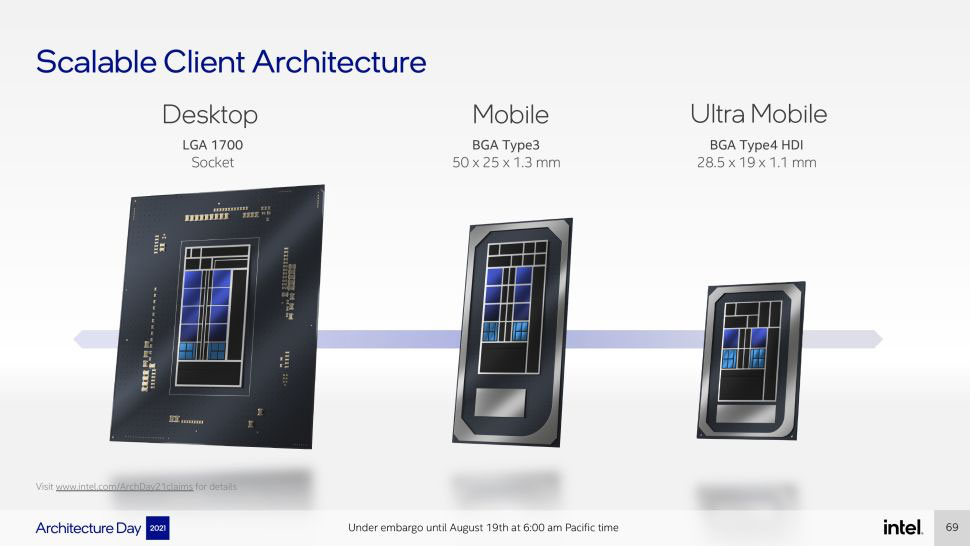
Given Intel’s practice of offering high-end Core chips and lower-end Atom chips, why combine the two? After all, while the high-end Core chips clearly use much more electricity when they are under full load, their power conservation measures have become very effective. So much that when systems just idle along, Core-based computers often use LESS power than Atom-based systems. Since many computer idle along most of the time, does a complex hybrid system really make sense? It can, and Intel certainly has its reasons for banking on the hybrid approach.
One such reason undoubtedly is that the ARM processors that power almost all of the world’s billions of smartphones have been using hybrid technology for many years. When you look at the tech specs of your octa-core smartphone you’ll most likely find that it has four economy cores and four performance cores, or perhaps even three types of cores. That’s because in mobile systems battery life matters just as much (or more) than the performance needed to effortlessly drive the latest apps. Intel doesn’t want to fall behind in those optimization technologies. Apart from that, as there are more and more server farms and other mega-processing systems, cooling and power consumption are becoming ever more pressing issues. The era of gas guzzlers is over there, too, and it’s time to optimize both performance AND economic operation.
Hence the Alder Lake hybrid chips.
Forget all about the way things used to be. Four cores no longer automatically means a total of eight threads. The total number of threads now is the number of power cores plus the number of threads (only power cores can have threads) plus the number of economy cores. An Alder Lake chip may have 14 cores and a total of 20 threads, those consisting of six performance cores, which means 12 threads, plus eight economy cores. Or a lower-end chip may have eight cores and 12 threads, consisting of four power cores, their four extra threads, and four economy cores.
But what about the thermal design power (TDP) of those new chips, you may ask — TDP being the maximum heat expressed in watts that the system has to be able to handle, and also sort of a measure of the general performance level of an Intel chip. Well, with Alder Lake there is no more TDP. The single number TDP had already been split into a TDP-up and TDP-down with the “Tiger Lake” 11th generation of Core processors, so that the former Intel U-Series of mobile chips that traditionally had had a 15 watt TDP were now listed as a manufacturer-configurable 12/28 watts. Alder Lake disposes of TDP entirely and lists “Processor Base Power,” “Maximum Turbo Power,” and “Minimum Assured Power” instead, all expressed in watts.
What does that mean? Well, the Processor Base Power is the maximum heat, expressed in watt, that the chip generates running at its base frequency. The Maximum Turbo Power is the heat the chip generates when it’s running at its maximum clock frequency, and that can easily be way more than the heat generated at the base frequency. Another difference is that prior to Alder Lake, Intel specified in a value they named Tau how long a processor could run at top turbo speed before it had to throttle back to cool down. Tau is no longer there. Does that mean it’s now up to manufacturers to make sure systems don’t overheat? I don’t know.
Now let’s move on to figuring out what those performance and economy cores are going to be doing. The overall idea is that the power core handle the heavy loads whereas the economy cores efficiently do routine low-load things that the performance cores shouldn’t be bothered with. Theoretically that makes the chips both faster and more powerful (because the power cores can fully concentrate on the heavy-loads) but also more economical (because it’s those miserly economy core that do the trivial everyday stuff without having to engage the power-hungry performance cores).
But who makes the decision of what ought to run where and when? Chip manufacturers on the hardware side and OS vendors on the software side have had to deal with that issue ever since the advent of multi-core processors long ago. That was relatively easy as long as all processors were the same, and became a bit more difficult when Intel also introduced hyper-threading (which makes one hardware core act like two software cores) a couple of decades ago. A scheduler program decided what should run where for best overall performance. With hybrid chips that contain different types of cores the task becomes considerably more difficult.
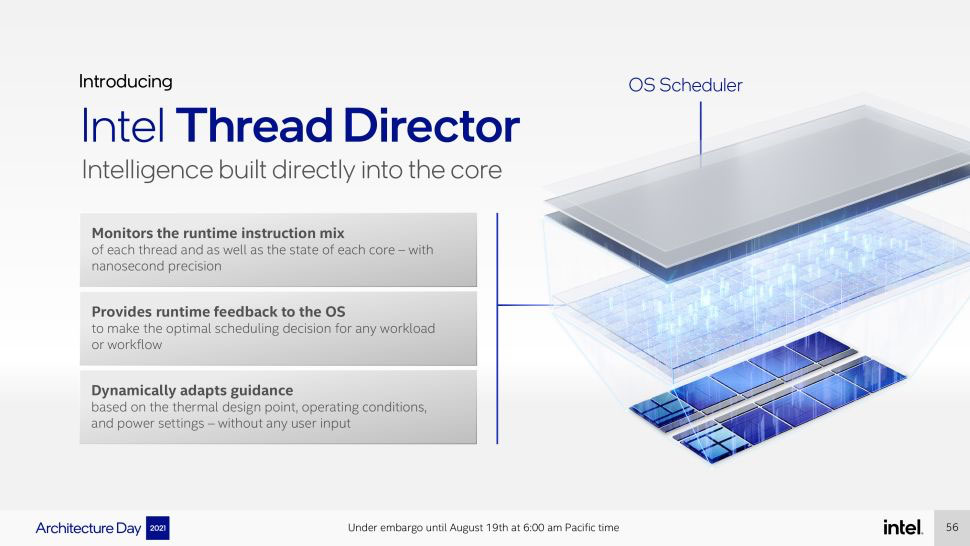
The scheduler program must now make sure that everything runs as quickly as possible AND as economically as possible. And for that to happen, Intel and Microsoft worked together on a hardware/software approach. On the hardware side, Intel Alder Lake chips have a special embedded controller — a Thread Director — that keeps track of a myriad of metrics and passes on that information to the operating system scheduler program that then uses all that information to make intelligent decisions. This teamwork between hardware and software, however, requires Windows 11. Alder Lake chips can, of course, run Windows 10, but to take full advantage of Intel’s new hybrid technology, you need Windows 11.
What does all of this mean for rugged computers?
On the mobile side, there’s the potential for longer battery life as well as better overall performance. However, a lot of things need to fall into place and work perfectly for that to happen in real life. We’ll know more once we get a chance to benchmark the first Alder Lake-based systems.
On the embedded systems and industrial/vertical market side, there’s even more intriguing potential. As is, many industrial PCs are built to provide “targeted” performance, i.e. just as much as is needed for the often completely predictable workloads and no more. That works fine and lowers the cost of hardware, but it can be frustrating when workloads increase or unexpectedly peak, and the performance just isn’t there. Other industrial PCs need all the peak performance they can get, but many are underused and just idling along much of the time. Alder Lake theoretically makes it possible to have a new generation of multi-purpose systems that can combine multiple types of workload into one single hardware box, with the Thread Director optimally assigning high-load and low-load assignments to the proper cores.
And for some very special applications that require both real-time and general purpose computing, these new chips could be used in conjunction with special-purpose operating systems that support virtual machines, doing different kinds of work on each, or groups, of the different types of processor cores.
When will all this be available? In stages. As of this writing (February 18, 2022), Intel’s website only shows eight Alder Lake mobile processors (plus a variety of desktop and embedded versions). However, more were announced the beginning of 2022, including a good number of P-Series and U-Series versions. P-Series chips are tagged “For Performance Thin & Light Laptops” whereas U-Series chips go under “Modern Thin & Light Laptops.” And Intel clarified the relationship between the old TDP and the new ways of naming things in its voluminous February 2022 documentation of the Alder Lake platform: “Processor Base Power” is just renamed TDP, TDP Down “Minimum Assured Power,” and TDP Up “Maximum Assured Power.”
This would place the 12th generation P-Series processors with a Processor Base Power/TDP of 28 watts higher than the 11th generation U-Series chips, most of which were listed as 12/28 watt designs with presumably a legacy TDP of 15 watts. P-Series chips have eight economy cores and two to six performance cores, for a total of 12 to 20 threads.
The 12th generation U-Series on the other hand seems to have two power levels, one with 9 watt legacy TDP and the other 15 watt legacy TDP, so the former would be more like the legacy Y-Series chips, and the latter would more or less correspond to what used to be the U-Series processors’ long-standing 15 watt TDP. If we assume that the 15 watt Processor Base Power/TDP will be the ones found in most higher-end mobile rugged devices, then we’re looking at Celeron, Pentium, i3, i5 and i7 chips with four to eight economy cores and one or two performance cores, and six to 12 total threads. That lineup is lacking a quad performance core chip and is not too terribly exciting, more like a hybrid of Atom and a couple of Core cores.
This may mean that P-Series mobile chips may carry the torch for high-performance rugged laptops and tablets, with eight economy cores and two to six performance cores. Only time and benchmark results will tell.
It ain’t business as usual, and it should be interesting to see how it all pans out.
For Intel's explanation of how their 12th generation Core hybrid technology works, see here.
Posted by conradb212 at 9:38 PM
January 11, 2022
Thunderbolt 4 and other tech issues
Here at RuggedPCReview we see new stuff every day. New rugged handhelds, tablets and laptops. New technologies, new trends, updates, enhancements, new standards, new priorities. Most makes sense, but not everything. And sometimes we come across issues that are hard to figure out. This past year we've had three of them.
One was Intel's apparent decision to hand over more processor configuration leeway to hardware manufacturers in its 11th generation of Core processors. Instead of Intel setting all the parameters to keep chips from overheating, systems designers can now tweak the chips for their articular platforms and markets. As a result, standard performance benchmarks can no longer predict as accurately how a particular device compares to its competition.
Another was a peculiar limitation on Intel's highly touted new Iris Xe graphics that came with that same 11th generation of Core processors. The confusion there was that those graphics apparently depended on not only the type of memory installed in a machine, but also of the number and use of memory card slots.
And a third surrounded, again with the introduction of Intel's 11th generation of Core processors, the inclusion of Thunderbolt 4 capability into the chips. There, it quickly became apparent to us that Thunderbolt 4 was a finicky and rather vague thing that, for now, worked in some hardware and with some peripherals but not in others.
Each of these three issues has a direct impact on customers. Which makes the vagueness surrounding these enhancements baffling. Finding solid information on each of those three areas was and is next to impossible. Intel won't talk; questions sent to the appropriate Intel group are generally either ignored or, after several reminders, brushed off with a brief general statement that answers nothing.
That leaves us in the unenviable position of knowing that something is wrong or, at least, needs detailed explanation, without being able to get enough information to authoritatively report on it. Article drafts wait and wait for answers from Intel and other sources. That's not a good situation. Because some issues cannot wait or be ignored. They directly affect enterprise, IT and personal purchasing decisions.
Say, for example, that your mobile workforce uses rugged laptops and tablets in the field and then brings them to the office for uploading, processing, analyzing, reporting or whatever. They want to plug the laptop or tablet into a couple of big screens, a keyboard, a mouse, and whatever else, without dealing with a dozen cables and connectors. That's where Thunderbolt 4 (potentially) comes in. Intel describes it as a "one wire solution." All you need is plug that field laptop or tablet into a Thunderbolt 4 dock, and, voila, duel external screens, all the peripherals you need, and also all the charging you need, including that of the laptop or tablet itself. All of that with just one wire between the laptop and the TB4 dock.
Except that it may or may not work.
Yes, over the past twelve month we've tested a good number of high-end new rugged devices that support Thunderbolt 4 and found that things are far from as simple as they should be. And that's not even including the mounting problem of figuring out which USB port is now a Thunderbolt 4 port (and what, exactly that is and means), and which is just a "regular" USB port and, if that, whether it can or cannot provide charging and how much.
The problem seems to be that what Thunderbolt 4 can deliver depends on some pretty fancy software, configuration and driver footwork. Far from being a neat, universal plug-and-play standard, the Thunderbolt 4 controllers in computers and docks must first establish "handshakes" between them, figuring out what is and what it not supported, and to what degree. In our testing, almost every machine had one issue or another with different Thunderbolt 4 docks. And figuring out where the problem lies isn't easy.
The result? A new machine may not support multiple external screens via Thunderbolt 4 at all. Or it may not charge at all. Or it may charge sometimes. Trying to make it work takes time. Too often, marketing claims are one thing, making it all work behind the scenes is another. It's all very opaque. It shouldn't be that way.
Posted by conradb212 at 3:04 PM
January 5, 2022
On Image-Stabilizing Binoculars
If you use binoculars on the job, or anywhere else, you simply have to check out the image-stabilization kind. It makes a HUGE difference. Let me explain why and how.
A good set of binoculars is often part of the gear used on the job or in the field, helping with surveys, surveillance, assessments, exploration, search & rescue and more. And a set of binoculars is almost standard equipment for anyone into wildlife observation or just generally getting a closer look at scenery or points of interest.

For all those reasons almost everyone has a set or at least has used a set, and thus is familiar with the one inevitable problem with binoculars — holding them still enough to actually see what you’re looking at. You can get a closer look with binoculars via the 7x to 12x magnification that the vast majority of them offer, but due to the inevitable slight jitters that come with holding binoculars even by the most steady-handed individuals, it’s frustratingly difficult to actually focus on something.
That’s because the human eye has different kinds of vision. While the full viewing angle of human vision is around 210 degrees, the visual field is more like 120 degrees or so, the central field of vision an even narrower 50 to 60 degrees, and what’s called “foveal vision” — the truly sharp focal point — is just one or two degrees. What does that mean?
There are various definitions of those different fields of vision, but it generally boils down to this: while the design of the human eyes and their placement in the human head technically offers a very wide viewing angle between both eyes, what we actually comprehend falls within a much narrower angle. Our “peripheral” vision is mostly limited to registering movement. We can tell that there is movement, but not what it is. The context we’re in may add information: on a highway the movement is likely a another vehicle and walking down the street it’s likely another person, but in order to verify that we need to move our eyes to take a closer look, i.e. bring that movement within a narrower viewing angle.
The more information we need for the brain to actually identify objects and how they fit in, the narrower the required viewing angle. Movement and light intensity registers within the full viewing angle, but for us to know what something really is, it must be within a much narrower angle. In familiar settings we often know what something is without actually looking at it. But our eyes continuously dart around to “bring things in focus” so we really and truly “know” what something is.

To illustrate this, try this experiment: Focus on just a single letter in what you are reading right now. While maintaining that focus on that one single letter, can you tell what the letters to the right and left of it are? Those immediately to the right and left you probably can, and you can likely tell what the word is, but without deviating the focus from that one letter, can you tell with certainty what the letter three or four positions to the left or right is? Without moving the pinpoint focus on that one letter, and without backing into it by knowing what the word is, you can’t.
That is because for us to fully see and comprehend something, it must fall into the sharp central spot of our foveal vision. And herein lies the problem with binoculars. The foveal viewing angle is so narrow that even the slightest movement makes our sight shift away from that focal point we need to truly see and comprehend. To illustrate, try reading on your smartphone while you shake it even just a bit. You can’t, at least not easily. And while binoculars magnify and bring us closer to objects, they also magnify that shaking — the very slightest movement shifts things out of our foveal vision and thus out of really seeing, understanding and comprehending a thing.
Try using a set of binoculars when you’re a passenger in a moving car. Try focussing on something with binoculars from a moving boat. Not possible. Even sitting or standing completely still, you can see that bird or deer or detail in the distance, but can you really “see” it and concentrate on it? You can’t. It’s what makes it difficult to look at stars or the moon through a tripod-mounted telescope: their even greater magnification means that even the inevitable slight touch of your head against the eye piece jitters what you’re looking at out of your foveal viewing area.
Enter image stabilization.
Advanced cameras use various methods of image stabilization to get a sharp picture even while being held with an unsteady hand or while shooting a moving object. The two primary methods used in cameras are “digital” and “optical.” The former usually refers to changing the camera settings to shorter exposure, the latter to camera sensors measuring the jitter and counterbalancing the lens to stabilize the image.
Cameras have increasingly better image stabilization. But binoculars, being purely optical devices, have none. And that’s why even the best binoculars are often useless unless they are mounted on a tripod. You can bring things close, but you can’t actually see — process and comprehend — detail.
But image stabilization is available in binoculars, and it makes all the difference in the world. It comes as little surprise that even though optics specialist Zeiss introduced image-stabilization in binoculars some three decades ago, it’s traditional camera makers, such as Canon, that are at the forefront in image-stabilized binoculars.
I don’t know what the overall market share of image-stabilized binoculars is compared to standard binoculars, but it must be small enough to fly under the radar of most. I’ve had binoculars since the late 1960s, but even when I bought my most recent set a couple of years ago I had no idea that image-stabilized ones even existed. Maybe the higher cost has something to do with it. But I did discover them and now have a Canon 12x36 IS III binocular with advanced optical image stabilization built in. What a difference! Like night and day.
Here’s what the Canon 12x36 IS III looks like (left), and the complex stabilization mechanism that’s inside Canon binoculars.
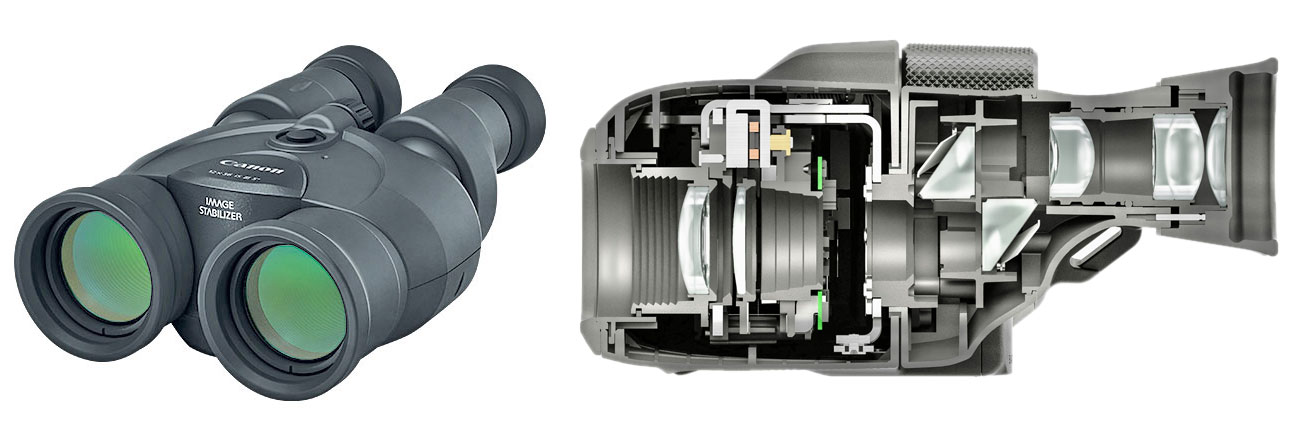
After decades of accepting the inherent limitations of standard binoculars as just the way things are, image-stabilization changes everything. Instead of seeing birds or deer from close-up but not actually “seeing” and being able to concentrate and process what you're seeing, with image-stabilization it's like watching things on a movie or TV screen.
The video below was taken by using a smartphone adapter hooked up to the Canon 12x36 IS III. The video starts out with the normal shaking that comes with holding binoculars with 12x magnification. Then the stabilization button is pushed for comparison.
controls="controls"/>
The difference is tremendous. Just push that button and the Canon's anti-shake technology does the rest. Let the button go and stabilization turns off (to save battery). You can use such stabilized binoculars from a boat or any other moving vehicle. It’s one of those things that you have to see and experience yourself. The absence of shaking means what you’re looking at stays within your foveal vision, the sharp central vision that makes us humans see, experience and comprehend. And that’s what it’s really all about.
How different are stabilized binoculars? While most conventional sets look more or less the same, image-stabilized ones look distinctly different because instead of just lenses, IS binoculars also house the stabilization mechanisms and the batteries to drive it. So it’s a bit like the difference between an old film SLR camera and a new digital one that includes all the electronics and the batteries.
Overall, if you use binoculars on the job and are often frustrated by their inherent limitations, try one with image stabilization. You’ll instantly become a believer. — Conrad Blickenstorfer, January 2022.
Posted by conradb212 at 10:43 PM
November 4, 2021
The Ingress Protection Rating
About ruggedness testing and why the ingress protection rating of mobile computers is especially important
What sets rugged handheld computers and tablets apart from standard consumer products is their ability to take the kind of punishment that comes with using a device on the job and in the field where conditions can be harsh. As a result, the specification sheets of virtually all rugged devices include the results of certain ruggedness tests. How much of that data is supplied varies from manufacturer to manufacturer. It can be very comprehensive or just touch upon the basics.There are arguments to be made for both approaches – a lot or just a bit. Ruggedness testing data can be very dry and not always easy to interpret. “Operating 10 G peak acceleration (11 ms duration),” for example, doesn’t easily convey how much shock a device can handle before it breaks. Or it can be too vague, like “MIL-STD-810H compliant,” where said standard is over a thousand pages of densely packed tech info, and simply referring to it doesn’t say anything.
There is, however, a happy medium – device specs that include the few items that matter most, and then have more comprehensive data on file for customers who ask for it or really need it. But what are those few specs that really matter? The general answer is, as is so often the case when it comes to ruggedness – it depends. If you work in or around commercial freezers and need to use your device all day long, you need to know what temperatures it can handle. If you’re a pilot and fly unpressurized planes, you need to know if air pressure differences are an issue. If you work at a port or in a boat, salt fog resistance is important. And so on.
Of all the ruggedness specs, there are two that matter most and are of most importance to almost every user.
One is the “drop spec,” i.e. from what height can a device be dropped and still survive the fall unharmed. Virtually every device will be dropped at some point, and so the drop spec matters. What should that height be? That depends on the device. A handheld computer will most likely be dropped using it while holding it in one’s hands, and that’s generally about four feet. A smartphone may be dropped while holding it to one’s ear. So that’s five or even six feet.
The other is “ingress protection” – whether a device leaks. The rating is given as a two digit number, for example, IP52 or IP67. Like almost every standard, ingress protection is defined in a very technical publication, here in international standard EN 60529 (British BS EN 60529:1992, European IEC 60509:1989). Wow. And you can’t just look up the standard and read it. So let’s talk about the IP rating a bit.
In essence, the rating is used to define the level of sealing of electrical enclosures against intrusion by foreign bodies, like tools, dirt, and dust in the first number, and moisture and liquid in the second. How are those levels of “intrusion” defined?
On the solids side there are six levels. They range from protection against large physical objects like hands or other solid objects more than two inches in diameter, all the way to being completely dust-tight. For handheld computers, levels 1 through 4 hardly ever apply, because there are no open holes to the interior. Levels 5 and 6, however, do matter. 5 is partial protection against harmful amounts of dust getting in, and 6 means no dust is getting in at all.
On the liquids side it’s a bit more complicated. There are nine levels on that side, and all can apply to handheld computers. The lowest protection level – 1 -- guards against vertically falling droplets getting in, like rain or condensation dripping. The highest level – 9 – means protection against the kind of high-pressure, high-temperature jet sprays used for wash-downs or steam-cleaning procedures. In between are seven levels of increasing protection against water drops, splashes, low and high pressure jets from various angles, and then on to complete immersion for certain amounts of time and pressure.
So far so good, and for the most part this rating system makes sense. I say “for the most part” because, like many such systems and documents, the EN 60529 ingress protection rating standard covers a very broad range of items, ranging from very small to very large. That means that some rating levels may apply to some electrical items but not to others. For example, both on the solids and liquids side, some of the levels may allow “limited ingress” or “partial protection,” which may be okay for some gear but not for others. For example, a little bit of water getting inside a massive piece of equipment may be of no consequence, whereas for a small item like a watch or a handheld computer it’d be fatal for the device.
Now let’s take a look at the range of IP ratings for different types of rugged mobile computers.
Ruggedized laptops generally fall into one of two classes, semi-rugged and fully rugged. Most semi-rugged laptops used to have either no rating or an IP5X rating. 5 means partial protection against harmful dust getting in and X means no protection. That has gradually changed over the past few years, with semi-rugged laptops from leading vendors now carrying IP53 protection -- partial protection against harmful dust, and protection against water spray up to 60 degrees from vertical, which pretty much means getting rained on. Fully rugged laptops from leading providers now generally carry IP65 protection, meaning they are totally dust-tight and can also handle low pressure water jets from any angle. The latter albeit with the dreaded “limited ingress permitted with no harmful effects” qualifier that is entirely relative.
Ruggedized tablets also come in semi-rugged and fully rugged versions, but the terms aren’t used as rigidly as with laptops. It’s also easier to seal tablets because they have neither a keyboard nor as many ports as laptops. That said, a tablet considered “semi-rugged” may have an IP54 rating -- partial protection against harmful dust and protected against water splashes from all directions. Fully rugged tablets should have at least an IP65 rating – totally dust-tight and able to handle low pressure water jets from any direction. But to stand out, an IP67 rating is necessary. That means totally dust-tight and able to handle full immersion for a limited time and depth. That’s because laptops rarely fall into a puddle or pool, but with tablets that can happen.
Rugged handheld computers require higher ratings yet. They can go anywhere and are being used anywhere. Which means they may dropped anywhere and can fall into almost anything. That means at least an IP67 rating: totally dust-tight and protected against full immersion. A few years ago IP67 was still rare with rugged handhelds. Now it is, and should be, the minimum requirement. And it is what most of the leading providers of such handhelds offer.
What about IP68 and IP69? IP68 comes in where IP67 is too limiting – on the liquid side IP67 “only” requires being able to handle full immersion for up to 30 minutes and depths no more than a meter (3.3 feet). It’s quite possible for a handheld to exceed those limits in an accident, and it’d be good to have a bit more leeway to retrieve expensive equipment before it is destroyed.
That’s where IP68 comes in. It provides protection against longer and deeper immersion. The caveat here, though, is that it’s up to the manufacturer to decide how long and how deep. That is causing many less reputable outfits to claim IP68 protection without explaining the testing parameters. And the vagueness isn’t limited to just questionable sources. Apple, for example, claims their late model Apple Watches have a water resistance rating of 50 meters (164 feet) under ISO standard 22810:2010, but qualify that by saying the watches are water-resistant but not waterproof, and that even water resistance may diminish over time. So it’s “caveat emptor” in many cases – the buyer is responsible to figure out what the claim means.
IP69 really shouldn’t be on this scale, as it is mostly used just for specific road vehicles that need to be hosed down with high-pressure, high-temperature jet sprays. So IP69 doesn’t mean it’s better than IP68; it’s a different type of rating and rarely applies to mobile devices.
All the above said, it should be clear by now that IP ratings matter. Ignoring them can mean instant damage or destruction by not observing the limits. If you sit an IP5X laptop into a puddle of water it’s most likely light-out for the device.
Even with suitably high ratings it pays to apply common sense. Just because a device is rated capable of handling certain exposure doesn’t necessarily mean you should be careless or test the limits. That’s because, as Apple points out with the watch, “water resistance may diminish over time.” That can happen when seals age or get damaged, protective port covers and plugs are not properly closed and locked. And even when common sense suggests that one better not put a claim to the test.
So that’s the deal with Ingress Protection. Dust and liquids don’t go with electronic gear. Keeping them out matters. And the IP rating tells you how protected your device is. Do pay attention.
Posted by conradb212 at 8:44 PM
August 22, 2021
The Intel Iris Xe Graphics mystery
When things hidden in fine print can mean the difference between your computer being fast or sluggish
Until about a decade ago, most computer processors did not include graphics. Graphics were part of the chipsets that worked in tandem with CPUs, and if that wasn't good enough, there were separate graphics cards. Around 2010, wanting to play a bigger part in graphics, Intel began integrating graphics directly into the CPU, and that's the way it's been ever since. Intel's integrated graphics are plenty good enough for most work, but there are tasks and industries that need more graphics firepower. CAD (Computer-Aided Design), high-end imaging, 3D graphics are examples that need more graphics punch. And computer gamers will tell you that there's never enough graphics performance for their ever more complex games.That's where modern-day graphics cards come. Some are big, heavy add-on cards with their own fans and power supplies, costing thousands of dollars. Others are simpler and more affordable, and some are just modules. Rugged laptops and high-end tablets often have "discrete" graphics options. These have their own memory and power source, and provide significantly higher performance than the graphics integrated into CPUs.
Being sensitive to the demand for more graphics power, Intel has been enhancing the graphics integrated into their processors for years, often using them to distinguish processors from one another. Higher-end integrated graphics often carried the "Iris" name, and the Intel "Tiger Lake" 11th generation processors we're now seeing in high end rugged laptops and tablets come with integrated Intel Iris Xe graphics. Intel considers that a good step up from the Intel UHD Graphics in earlier processor generations. The "Xe" indicates a new and more powerful instruction set architecture.
Why this whole preamble? Because things are getting a bit confusing.
I noticed this when we recently reviewed some of the latest rugged laptops and tablets based on Intel 11th gen Tiger Lake chips. When we ran our usual suite of performance testing benchmarks, machines that should have yielded comparable graphics performance did not. We saw differences of up to 30% where there should have been none. This turned out to be not the only weirdness in "Tiger Lake" performance, but whereas we had clues about those, the discrepancy in graphics power was a puzzler.
Then we came upon a press release announcing an upgraded version of Panasonic's Toughbook 55, long a favorite in the market for semi-rugged laptops. The release mentioned "optional Intel Iris Xe graphics." That sounded weird because both of the Intel Tiger Lake chips available for the Toughbook 55 have integrated Iris Xe Graphics; it's not like you get an optional module or something like that. So I inquired with Panasonic's PR agency about that.
The response was that "Intel Iris Xe Graphics requires two memory cards installed. Any unit that has just one memory card installed will have just Intel UHD."
That still seemed weird and we sent follow up questions. The response was a reference to fine print at the bottom of Intel's spec sheet for the processors included in the Toughbook. The fineprint said:
"Intel® Iris® Xe Graphics only: to use the Intel® Iris® Xe brand, the system must be populated with 128-bit (dual channel) memory. Otherwise, use the Intel® UHD brand."
Clear as mud. So I googled that. Wikipedia described the Xe architecture as the successor to the Intel UHD architecture. References indicated that 11th generation "Tiger Lake' chips all used the new Xe core. A Lenovo document said "Intel Iris Xe Graphics capability requires system to be configured with Intel Core i5 or i7 processor and dual channel memory. On the system with Intel Core i5 or i7 processor and single channel memory, Intel Iris Xe Graphics will function as Intel UHD graphics."
That still didn't answer how it all fit together. Then I came across a YouTube video where a guy ran the same 3DMark Time Spy graphics benchmark side-by-side on two Dell laptops that were identical except that one had two 8GB RAM modules and the other a single 16GB RAM module. Well, the one with the two 8GB sticks was a full 30% faster than the one with the single 16GB module. So, same amount of memory, but one configuration is 30% faster, which, depending on the task, can make a world of difference.
More googling revealed other specs that said "Integrated Iris Xe graphics functions as UHD Graphics" when just one RAM slot is populated, but "Integrates Iris Xe graphics" when two slots are used.
Sooo, apparently much of the performance of Intel Tiger Lake systems depends on that "the system must be populated with 128-bit (dual channel) memory" fine print. What IS dual channel memory? From what I can tell, most modern motherboards have two 64-bit channels between the processor and memory. By using two (presumably identical) RAM modules, the bandwidth between memory and the CPU is doubled.
Apparently that doubling of bandwidth amounts to Iris Xe running as it should. And if that condition isn't fulfilled, graphics can and will be a lot slower. Seems like something customers should be made aware, majorly. And not via fine print with weird statements like that "Otherwise, use the Intel® UHD brand" or that a "unit that has just one memory card installed will have just Intel UHD."
What's remarkable is that all my googling didn't yield a single authoritative technical explanation as to why and how that rather important dual-channel mandate works and why. Even the smart reddit and Quora techies seemed mostly baffled.
It's now clear to me why one of the 11th gen machines we tested had much slower graphics with the same chip: it only had one RAM slot; dual-channel is not possible with it.
Folks, there are things that you need to tell customers, because it's important. And not in tiny print or nebulous statements.
Posted by conradb212 at 8:41 PM
July 20, 2021
Thunderbolt 4
Is it the crowning "one wire" connectivity and charging answer to the increasingly fragmented USB landscape?
by Conrad H. Blickenstorfer
With computers, no matter what kind of computer, connectivity is everything. If there's no cell service or no WiFi, one is disconnected from the world. And it's pretty much the same with wires and cables. Unless you have the right ones with the right plugs you're out of luck.
That was a very big deal in the early days of PCs when PCs and peripherals connected either with a serial or a parallel cable. That sounds simple, but it wasn't. While the connectors were more or less standard, different companies often assigned different functions to different pins and one needed a special "driver" to make it work. Sometimes dip switches were involved or little adapter boxes where you could set the proper connections between all the wires.
That went on for a good decade and a half after PCs first appeared. In the mid 1990s USB, the Universal Serial Bus, appeared and promised to put an end of all that incompatibility and frustration. The intent of USB was to bring simple "plug and play" functionality. If the PC and the peripheral both had USB ports, you simply connected them and it worked. In real life it wasn't that easy. USB, too, needed drivers and it took a good many years for most things to be truly "plug and play."
USB now
It's now a quarter of a century later and USB is still with us. USB is everywhere. The Universal Serial Bus has indeed become universal. Pretty much every device has one or more USB ports.
And yet, USB isn't really completely universal. As technology advances and makes computers more and more powerful, the original USB standard soon was no longer quick and flexible enough to meet emerging demands. The original USB 1.0 standard wasn't very fast and could only transfer in one direction at a time. USB 2.0 was faster but still couldn't transmit data both ways simultaneously.
That was fixed in USB 3.0 (you can tell that a USB port is version 3.0 or better by its blue plastic tab inside the connector) and USB 3 also went from just four wires in a cable to nine. USB 3.0 was also faster and could transmit video. USB 3.1 was faster yet, up to 800 times as fast as the original USB port. But why stop at that? And so USB 3.2 was up to twice as fast as USB 3.1.
But speed was not all that came with USB 3.1 and 3.2; they also fixed one of the inherent nuisances of the original USB concept: you could only plug it in one way. So since USB ports are often in fairly inaccessible and/or dimly lit locations, one had a 50% chance of successfully plugging a cable in on the first try. Very frustrating. That's now changing with the USB Type-C port. The Type-C plug is not only smaller and has new pins for even more functionality, it doesn't matter which way you plug it in because it has a duplicate set of those pins.
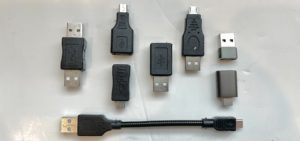 Conceptually, the combination of the reversible Type-C plug and the great speed of the USB 3.1 and USB 3.2 standards is a big step forward. The problem is just that there are still billions and billions of older plugs (including USB Type B and the various mini and micro USB plug versions), which means having the right cable with the right plugs on either end remains a very real problem.
But wait, there's more. Apple has always done things differently and that includes ports and interfaces. Sometimes Apple yielded when staying with proprietary technologies became too much of a limitation (as was the case with adopting USB), but often Apple doesn't shy away from using less common but faster and more powerful interfaces.
Thunderbolt
Thunderbolt, a joint effort between Intel and Apple, is one of them. About a decade ago Apple began adding Thunderbolt ports. The first two versions, Thunderbolt 1 and Thunderbolt 2 sort of combined the PCI Express and DisplayPort signals and used a unique (and non-reversible) connector. Thunderbolt 3, which boosted the speed and capabilities of PCIe and DisplayPort, switched to using the USB Type-C connector. The latest version, Thunderbolt 4, again uses the USB Type-C connector, but supports USB 4 with up to 40 Gbit/s (5 GB/s) throughput as well as dual 4K displays. Thunderbolt 4 cables can be up to two meters (6.6 feet) long whereas the USB 4 limit is less than three feet.
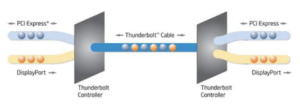 So now we have a situation where USB 4 mandates the USB Type-C port, supports PCI Express and DisplayPort, and can (but does not have to) support the same high 40 Gbit/s throughput. Both use the USB Type-C port and the same standards. So what's different?
Well, anything named Thunderbolt must be fully certified to pass all of the required Thunderbolt features and speeds. USB 4, on the other hand, only supports one display, may support only lesser speeds, and USB 4 devices do not need to be certified.
So what does all of that mean to you, the consumer? For the most part, laptops and tablets will continue to have the standard Type-A USB port. Depending on the device, those may be USB 2.0 or USB 3.0 ports, with the former having a black plastic insert and the latter a blue one. USB 3 ports will be listed as supporting one of the several USB 3.x version. Most new laptops and tablets will also have one or more USB Type-C ports and the specs will say what version and generation of the USB standard they support. So USB 3.1 Gen 1 would mean up to 5Gbit/s and USB 3.1 Gen 2 up to 10Gbit/s. With USB 3.2 it's always Type-C ports. Gen 1 and Gen 2 are the same 5 and 10Gbit/s, but there are now also Gen 1x2 and Gen 2x2 with up to 20Gbit/s transfer speed. Augh!
And there's more yet: There are also so called “alternate modes” in USB 3.1 and USB 3.2 that allow standard USB Type-C connectors to carry non-USB data by using some of the extra pins. These alternate modes may support DisplayPort, HDMI, MHL (Mobile High-Definition Link), Thunderbolt 3 or others.
And what can you expect from a USB Type-C port that is specifically labeled as Thunderbolt 4? Since Thunderbolt 4 must have minimum requirements certified, you get support of two external displays (up to 4k, or one 8k), 40Gbit/s data transmission, 32Gbit/s with PCIe, and 10Gbit/s with USB 3.2 connections.
Putting Thunderbolt 4 to the test
We put all this to the test with one of the early Thunderbolt 4 docks, the Anker PowerExpand 5-in-1 Thunderbolt 4 Mini Dock. It's a handy 5 x 3 x 0.75 inch box with three powered USB Type-C downstream ports, a 10Gbit/s USB Type-A port, and an upstream port to connect to the computer that delivers 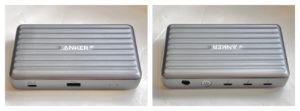 40 gbit/s data transfer, dual display support, and up to 85 watt charging power. It can do that by having its own and rather large 100 watt power brick.
We tried this with a Getac F110 tablet and a Getac K120 2-in-1, both new state-of-the-art rugged devices equipped with Thunderbolt 4 and running on Intel 11th gen Core processors, as well as a 2020 Apple MacBook Air.
Plugging the Anker dock into the Thunderbolt 4 port of the two Windows computers, we found the following:
What you can do with a PC’s USB-C Thunderbolt 4 port:
- Lets the PC drive a 2nd screen via USB-C to DisplayPort cable
- Lets the PC drive a 2nd screen via USB-C to HDMI cable
- Very fast file transfers (we used the Anker cable as well as an Accell USB4 40Gbps cable)
- Works with and powers external DVD reader
- Works with mice and keyboards
- Charges phones and tablets
What you can do with a Thunderbolt 4 dock connected to PC’s USB-C Thunderbolt 4 port:
- Drives two extra screens via USB-C or HDMI cables
- Works with USB docks
- Works with USB keys
- Works with and powers external DVD reader
- Works with mice and keyboards either through dock Type-A or Type-C ports
- Charges phones and tablets
What you don't necessarily get with Thunderbolt 4 is a guarantee that you can charge your device through the USB-C Thunderbolt 4 port. While Thunderbolt 4 cables can support up to 100 watts and the Anker dock can provide up to 85 charging watts, the Getac machines did not accept charging, even though the Anker power supply is actually rated at 100 watts. 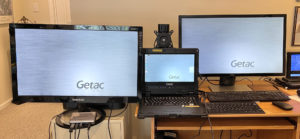 That’s because 15 watts of the dock’s power supply go to internal use and only 85 watts are available for upstream charging, and the Getac laptops want 90 watts. Charging the MacBook Air, on the other hand, worked fine. Discussion with Getac suggests that the Thunderbolt 4 "handshake" between the computer and the dock is such that if the wattage requirements are not met exactly, charging will not happen.
For now, Thunderbolt 4 doesn’t come cheaply. On the PC side it requires either a Thunderbolt controller or an 11th gen “Tiger Lake” mobile Core processor that already includes the Thunderbolt 4 controller. Docks also require a Thunderbolt controller, making it a higher-end feature, and that’s why even the small 5-in-1 Anker dock costs a hefty $200. For that it can charge and support phones as well as tablets and laptops (though that may depend on the individual device), provide very fast data transfer, support two external screens as well as whatever lesser USB keys, card readers or other peripherals you may want to attach to it. It did provide a true "one wire" solution for our MacBook, but, at least with the Anker 5-in-1 mini Thunderbolt 4 dock, not the two Windows computers which required more power than our test Anker Thunderbolt 4 5-in-1 dock could provide to allow upstream charging.
It is not immediately clear why Thunderbolt 4 should refuse charging unless a USB-C power source provides the same wattage as a laptops original charger. With a less powerful USB-C charger, charging might take longer, but so what?
As is, Thunderbolt 4 offers a lot, but sadly not a guarantee that everything works smoothly and effortlessly.
Addendum August 23, 2021:In the meantime we've had a chance to review another rugged mobile device built on Intel 11th generation Core processors and having a Thunderbolt 4 port. The semi-rugged Panasonic Toughbook 55 Mk2 could be charged both with the Anker 5-in-1 and the Anker 12-in-1 Thunderbolt docks.
I had also approached Intel's Thunderbolt 4 group with questions. Their response was:
"Thunderbolt charging is based on a robust, industry standard which is well adopted across the PC and Dock market and enables the PC and charger to negotiate to a variety of common charging levels. While Thunderbolt 4 can provide charge at multiple power delivery levels and many PC manufactures have chosen to support charging at multiple charging levels, some PC makers may choose to only support specific charging rates."
Posted by conradb212 at 8:36 PM
