

February 2022 Interview with Rick Hwang, President of Rugged & Video Solutions Business Group at Getac

Getac's Mighty Class of 2021
January 2021 Interview with Rick Hwang, President of Rugged & Video Solutions Business Group at Getac

Getac V110 at Cirque du Soleil

Getac 25th Anniversary at 2014 Miramar Air Show

Getac FedEx TechConnect

TDI Panamericana 2011 team using Getac V100 on 16,000 mile endurance challenge
|

|

|
|
GETAC F120
Getac's AI-ready successor to the F110 raises the bar for rugged tablets
(by Conrad H. Blickenstorfer -- photography by Carol Cotton)
When Getac launched the F120 on September 2, 2025, it was the world's first fully rugged Copilot+ PC in a tablet form factor. The new F120 also became the successor to Getac's long-running F110 line, a rugged tablet platform that had evolved through seven generations and was ready for retirement.
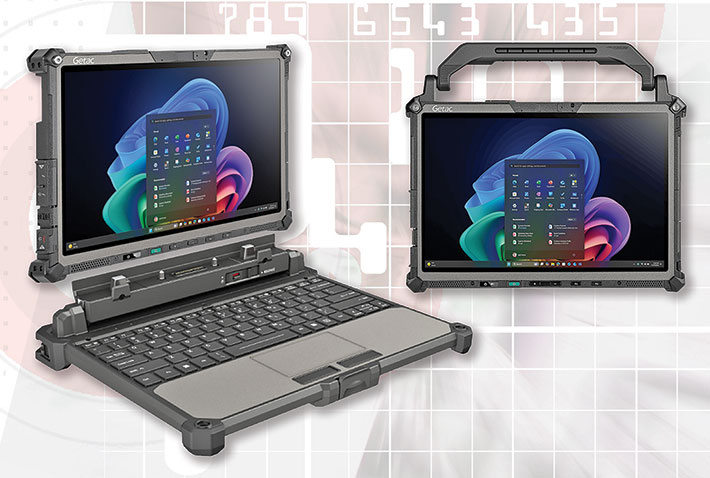
At the introduction of the the original Getac F110 in the fall of 2013, the company's goal was to provide enterprise, industrial, and government customers with one of the thinnest and lightest fully rugged tablets available. The F110 featured a comparatively large display for its time, and it was immediately apparent that Getac had carefully designed it for professional field use.
This was not simply a fortified consumer tablet, nor was it a slimmed-down version of the large, heavy rugged tablets that had dominated the market for years. Instead, the F110 represented a complete rethinking of what a field-deployable tablet could be: a device that could withstand bumps, drops, and harsh environmental conditions while still delivering state-of-the-art performance and functionality. That concept proved remarkably durable, and the F110 remained a cornerstone of Getac's rugged tablet lineup for more than a decade.
Getac Rugged Windows Tablets: Where the F120 fits in
Getac could easily have referred to the new F120 as the eighth generation of the long-running F110 platform, because in many ways that is exactly what it is. But simply calling it the F110 Gen 8 would not have fully reflected what Getac intended the tablet to represent. Previous F110 generations primarily brought faster processors, updated components, and incremental refinements while retaining the same overall concept and mission. With the F120, Getac took a more substantial step.
|
|
Getac F120 vs predecessor F110 G7
|
|
|
Model
|
F120 (2025)
|
F110 G7 (2024)
|
|
|
CPUs
|
Intel Core Ultra 2 V series
|
Intel "Raptor Lake" 13th gen
|
|
|
NPU
|
yes (up to 48 TOPS)
|
no
|
|
|
Graphics
|
Intel Arc
|
Intel UHD
|
|
|
Mass storage
|
Up to 2TB PCIe NVMe SSD
|
Up to 2TB PCIe NVMe SSD
|
|
|
Display
|
12.2-inch 1920 x 1200
|
11.6-inch 1920 x 1080
|
|
|
Luminance
|
1200 nits
|
1200 nits
|
|
|
Max battery
|
2 x 31.5 watt-hour
|
2 x 30.6 watt-hour
|
|
|
IP rating
|
IP66
|
IP66
|
|
|
Wi-Fi/BT
|
7 BE201/BT 5.4
|
6E AX211/BT 5.3
|
|
|
WWAN
|
4G LTE, 5G Sub-6
|
4G LTE, 5G Sub-6
|
|
|
Cameras
|
5mp/13mp
|
5mp/8mp
|
|
|
USB Type-A
|
1 x USB 3.2 Gen 2
|
1 x USB 3.2 Gen 2
|
|
|
USB Type-C
|
2 x Thunderbolt 4
|
1 x Thunderbolt 4
|
|
|
Size
|
11.80 x 8.15 x 0.87 inches
|
12.4 x 8.15 x 0.98 inches
|
|
|
Volume
|
83.7 cubic inches
|
99.0 cubic inches
|
|
|
Weight
|
Starting at 3.11 lbs
|
Starting at 3.29 lbs
|
|
|
OS
|
Windows 11
|
Windows 11
|
|
|
Memory
|
16-32GB LPDDR5x
|
8-32GB DDR5
|
That step reflects the growing role of artificial intelligence in mobile computing. AI does not replace traditional computing; rather, it adds new capabilities such as real-time monitoring, language translation, contextual assistance, image analysis, and decision support. Much of that work is still performed in the cloud, but an increasing amount can now be handled locally on the device itself, even without network connectivity.
That step reflects the growing role of artificial intelligence in mobile computing. AI does not replace traditional computing; rather, it adds new capabilities such as real-time monitoring, language translation, contextual assistance, image analysis, and decision support. Much of that work is still performed in the cloud, but an increasing amount can now be handled locally on the device itself, even without network connectivity.
Intel's Core Ultra processors — the ones used in the F120 — include dedicated neural processing units, or NPUs, specifically designed to accelerate certain AI workloads while freeing the CPU and GPU for other tasks. This emerging approach to edge AI is still evolving, and while its long-term impact remains uncertain, it is already influencing the design of both hardware and software. Getac clearly viewed it as significant enough to position the F120 not merely as another update to the F110, but as the beginning of Getac's AI-era rugged tablet platform.
As Getac stated during the F120's introduction, the tablet was "designed to meet the needs of field professionals who want to harness the power of edge AI to optimize efficiency in challenging working environments."
The comparison table to the right summarizes the key differences between the new F120 and its predecessor, the seventh and final generation of the F110.
Display size remains an important consideration in field computing. Microsoft Windows generally works best with displays large enough to accommodate its comprehensive user interface and broad range of applications. Today's field workers increasingly rely on sophisticated software that benefits from additional screen real estate. Larger displays, however, typically require a larger device footprint and often a bigger battery. There is no universally ideal tablet size, which is why Getac offers several rugged tablet platforms covering a range of screen dimensions and use cases.
The table below shows Getac's current lineup of rugged Windows tablets and 2-in-1s. Their displays measure from 10.1 to 14.0 inches diagonally. While that may seem like a small difference, when it comes to tablets, it is not. What appears to be a small difference on paper can have a significant impact in daily use. A form factor that is ideal for one application or user may be less suitable for another.
|
Getac Rugged Windows Tablets Lineup
|
|
Model
|
UX10
|
F120
|
V120
|
K120
|
G140
|
|
|

|
|
Display size
|
10.1-inch
|
12.2-inch
|
12.2-inch
|
12.5-inch
|
14.0-inch
|
|
Resolution
|
1920 x 1200
|
1920 x 1200
|
1920 x 1200
|
1920 x 1080
|
1920 x 1200
|
|
Pixels/inch
|
224 ppi
|
186 ppi
|
186 ppi
|
176 ppi
|
162 ppi
|
|
Luminance
|
1000 nits
|
1200 nits
|
1000 nits
|
1200 nits
|
1000 nits
|
|
Size (inches)
|
11.00 x 7.65 x 0.92
|
11.80 x 8.15 x 0.87
|
11.89 x 8.82 x 1.41
|
12.97 x 9.37 x 0.94
|
13.34 x 9.40 x 0.93
|
|
Volume
|
77.4 cu-in
|
78.0 cu-in
|
147.9 cu-in
|
114.2 cu-in
|
116.6 cu-in
|
|
Weight
|
2.53 pounds
|
3.11 pounds
|
4.63 pounds
|
3.75 pounds
|
3.95 pounds
|
|
CPUs
|
Core Ultra V-Series
|
Core Ultra V-Series
|
Core Ultra H-Series
|
13th gen Core
|
AMD Ryzen AI
|
|
CPU Code
|
Lunar Lake
|
Lunar Lake
|
Arrow Lake
|
Raptor Lake
|
Krackan Point
|
|
Max RAM
|
32GB LPDDR5x
|
32GB LPDDR5x
|
64GB DDR5
|
64GB DDR5
|
64GB DDR5
|
|
Max storage
|
2TB PCIe NVMe SSD
|
2TB PCIe NVMe SSD
|
2TB PCIe NVMe SSD
|
2TB PCIe NVMe SSD
|
2TB PCIe NVMe SSD
|
|
Op. temp
|
-20° to 145° F
|
-20° to 145° F
|
-20° to 145° F
|
-20° to 145° F
|
-20° to 145° F
|
|
IP rating
|
IP66
|
IP66
|
IP66
|
IP66
|
IP66
|
Note that the above table does not include all of Getac's rugged tablets. The company also offers the Android-based 8-inch ZX80 and 10-inch ZX10. In addition, the 14-inch A140 remained listed on Getac's website as of June 2026, though it has effectively been succeeded by the newer G140. We also included the V120 with its rotating display that folds into a tablet, even though Getac categorizes it as a laptop.
One thing that has not changed in this class of professional Windows tablets is the expectation of full PC performance. To be truly useful in the field, a rugged tablet must offer the computing power required to run the same software and workflows users depend on in the office. If it cannot, it becomes a secondary device rather than a primary work tool. The best rugged tablets are equally at home in the field, in a vehicle, at a desk, or wherever work needs to get done.
Design and construction
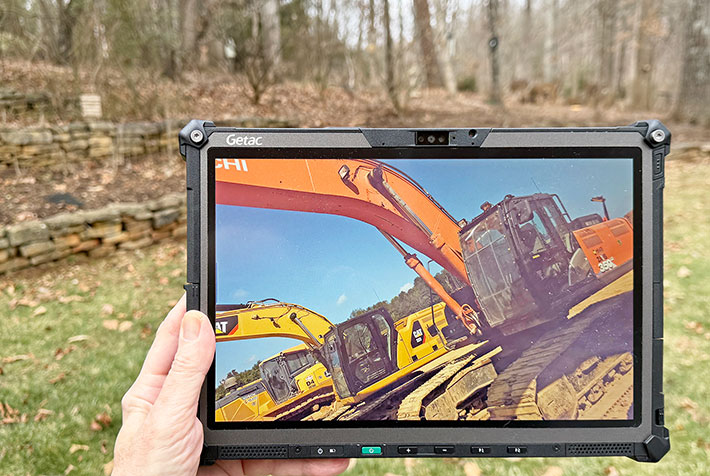
There are a number of ways to design a 2-in-1 hybrid mobile computing device, but most professional Windows systems fall into one of two categories. "Convertibles" use display hinges that allow the device to function either as a traditional laptop or, by rotating the display, as a tablet. Getac's own V120 is an example of that approach. "Detachables," by contrast, separate the tablet and keyboard, and that is the design approach Getac chose for the F120.
Separating the tablet and keyboard creates several engineering challenges. Because the tablet portion contains the display, processor, memory, storage, battery, and much of the system electronics, it is inevitably thicker and heavier than a conventional laptop display. The attachment mechanism must also be strong enough to provide a stable and secure connection between the tablet and keyboard.
The Getac F120 was clearly designed as a tablet first and foremost. While it can be used with a keyboard, it does not depend on one. The keyboard is an optional accessory rather than an integral part of the system, allowing the F120 to function as a fully capable rugged tablet whether attached to a keyboard, mounted in a vehicle dock, carried in the field, or used as a standalone device.
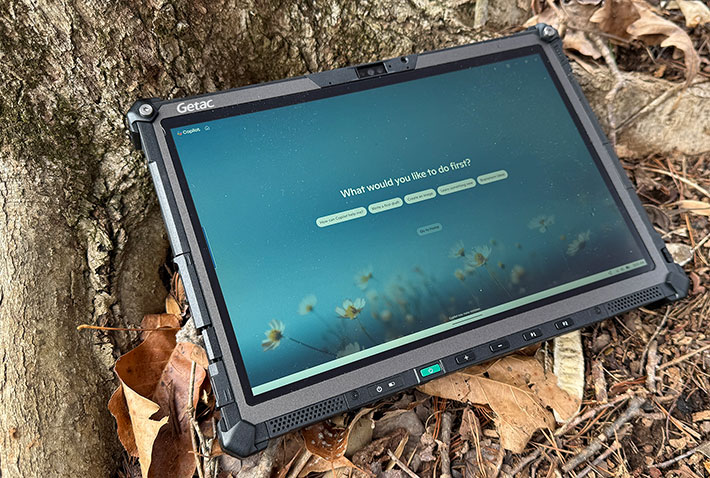
Below you can see what the F120 tablet looks like from the front and all for sides.
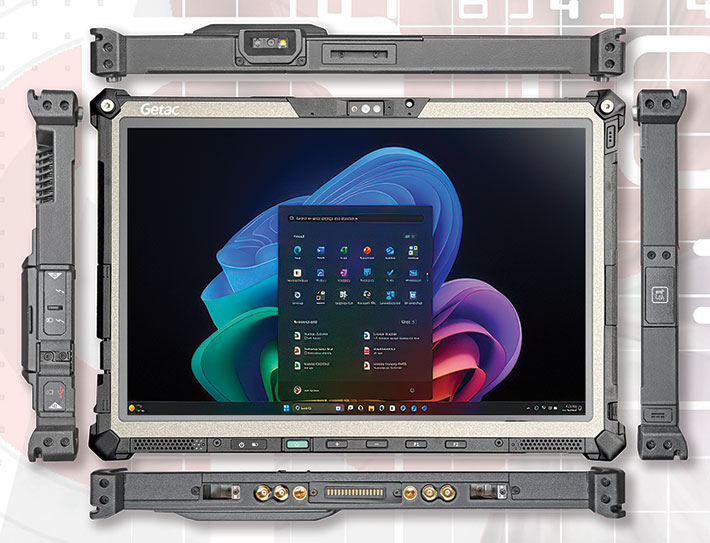
Measuring 11.8 x 8.15 inches and just 0.87 inches thick, the F120 is quite compact for a fully rugged tablet designed to survive six-foot drops and the rigors of field use.
Unlike most consumer tablets, where the display occupies almost the entire front surface, the front of the F120 provides room not only for the 12.2-inch display but also for indicator lights (power, battery, and wireless status), six hardware buttons (power/sleep, audio rocker, two programmable buttons, and a scan button), and protective margins around the display.
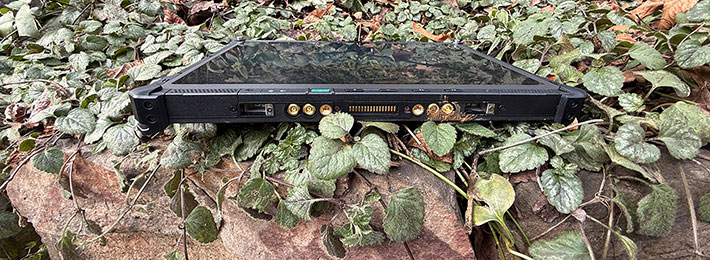
The left side houses most of the interface ports (discussed below), the top accommodates one of several expansion options, and the bottom contains the docking connectors, RF pass-through connectors, and attachment points for the optional keyboard. Our evaluation unit included the optional 1D/2D barcode scanner. Other available top-mounted modules include a MicroSD card reader, a serial port, or an RJ45 LAN port.
Despite its relatively compact size, Getac made room for a useful complement of ports and expansion options.
In terms of wired connectivity, the F120 offers fewer ports than Getac's larger G140 tablet. Most connectors are concentrated along the left side of the unit (shown below with the protective covers removed). From left to right:
- A USB 3.2 Type A port
- An optional SIM card slot protected by a metal cover plate
- Two Thunderbolt 4 Type-C ports with locking screw holes
- A user-accessible SSD compartment

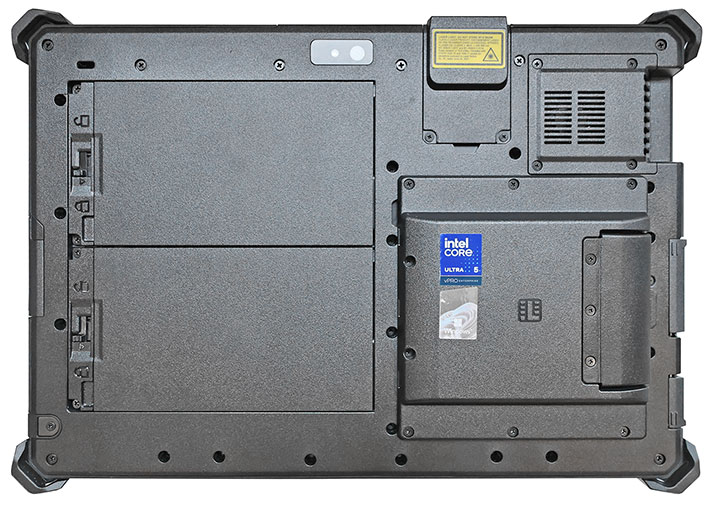
The image below shows the backside of the F120. The left half of the rear panel is occupied by the tablet's two batteries. The battery compartments do not require separate covers; each battery fits flush into the back of the tablet and can be removed quickly via sliding lock mechanisms. Environmental sealing is provided by small O-rings surrounding each battery's power connector. In the F110, there was a place for the stylus or optional digitizer pen to snap into. That, sadly, is gone on the new F120. Users who rely heavily on a pen will now need to secure it via a tether or other accessory.
The F120's rear-facing documentation camera with flash is mounted near the center of the upper rear panel. To its right is an expansion area that can accommodate either a 1D/2D barcode reader (as installed in our evaluation unit), a DB9 serial port, an RJ45 jack, or a MicroSD card slot. Further to the right is the location of the optional Smart Card Reader. Not shown along the right side of the tablet is the optional fingerprint reader. Alternatively, customers may choose an HF RFID reader or a USB 2.0 port in that location.
A central concern in the design of high-performance Windows tablets is thermal management. PC electronics, and especially processors, generate substantial amounts of heat, and that heat must be dissipated effectively to prevent overheating, thermal throttling, and potential component damage. Internal temperatures are monitored by sensors throughout the system, and excess heat is removed either actively with fans or passively through heat spreaders and heatsinks.
Fans are inexpensive, lightweight, and capable of moving large volumes of air, and their speed can be adjusted dynamically as cooling demands change. However, fan noise can be intrusive, fans can become clogged with dust and debris, and — like all mechanical components — they can eventually fail. Heatsinks, on the other hand, operate silently and require no active management, but they generally require more space and mass and can become quite hot during operation.
Like most high-performance Windows tablets, the Getac F120 includes a small cooling fan. It needs active cooling because it is a powerful device, but it does not require a large fan thanks to sophisticated thermal management and the increasing power efficiency of modern processors. Today's CPUs deliver vastly higher performance than earlier generations while generating comparatively less heat per unit of computing power.
The thermal images below were captured with the integrated thermal camera of a Ulefone Armor 28 Thermal rugged handheld while the F120 was running the demanding 3DMark benchmark suite.
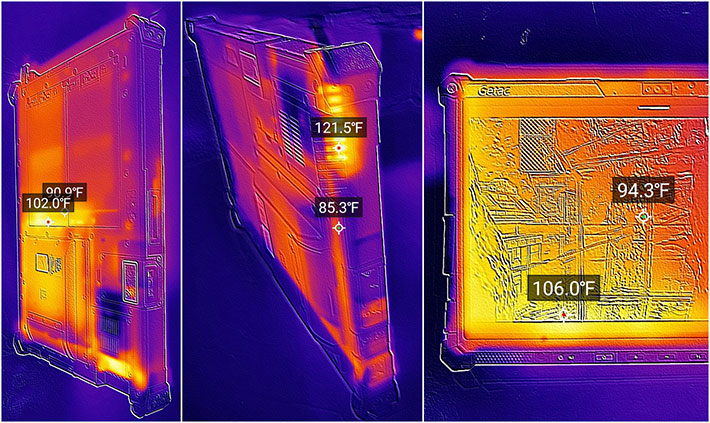
The thermal images show how the F120 heats up indoors in our lab under heavy load, and which areas reach the highest temperatures. The front of the tablet remains relatively cool, not even reaching the mid-80s Fahrenheit during the benchmark run. The hottest location is the fan exhaust, where we measured 121.5°F. Other parts of the tablet reached temperatures ranging from about 85°F to 106°F.
Overall, the observed temperatures were somewhat higher than those we recorded on the sixth and seventh generations of the F110. That is not entirely surprising, given the different processor power envelopes involved. The F110 G6 used a processor rated at 12 watts base and 28 watts maximum power, the F110 G7 at 15 and 55 watts, and the new F120 at 17 and 37 watts.
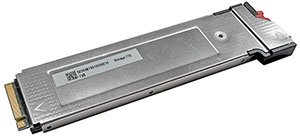 One of the key technologies that helped make modern tablets practical was the transition from rotating hard drives to solid-state storage that began around 2010. SSD pricing was initially high, but costs have fallen dramatically over time. The switch enabled thinner, lighter, and far more reliable tablets while simultaneously increasing storage capacities and dramatically improving data transfer performance. One of the key technologies that helped make modern tablets practical was the transition from rotating hard drives to solid-state storage that began around 2010. SSD pricing was initially high, but costs have fallen dramatically over time. The switch enabled thinner, lighter, and far more reliable tablets while simultaneously increasing storage capacities and dramatically improving data transfer performance.
The image to the right shows the F120's PCIe NVMe storage module. If required, it can be removed from the tablet in a matter of seconds, a capability that may be important to government agencies, military organizations, and enterprises with stringent security requirements. To prevent casual removal or theft, the module is secured by a small Phillips screw unless rapid access is needed.
Performance: state-of-the-art processor technology
Intel "Lunar Lake" Core Ultra Series 2 power
Like the smaller UX10, the new Getac F120 is powered by Intel's "Lunar Lake" Core Ultra Series 2 processors, marketed as the Core Ultra 200V series. Lunar Lake represents Intel's latest architectural evolution in its mobile processor lineup and reflects the growing importance of AI acceleration in modern mobile computing.
Selecting the appropriate processor is one of the most consequential decisions in mobile system design. Customers expect maximum performance, long battery life, minimal weight, and competitive pricing — objectives that rarely align perfectly. Every platform involves tradeoffs.
Historically, much of Getac's F1x0 series tablets' appeal has been their ability to deliver substantial computing power in a compact 12-inch form factor. With the new F120, the company once again substantially advances performance, but but the definition of performance has evolved.
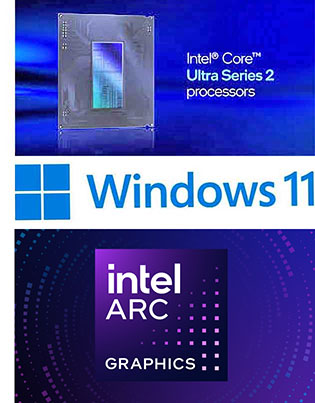 In earlier generations, processor comparisons largely revolved around clock speeds, core counts, and thread counts. Over time, graphics performance gained importance, leading to increasingly capable integrated GPUs. Now, with AI-driven utilities and applications becoming central to modern workflows, a third compute engine has taken on prominence: the NPU (Neural Processing Unit). In earlier generations, processor comparisons largely revolved around clock speeds, core counts, and thread counts. Over time, graphics performance gained importance, leading to increasingly capable integrated GPUs. Now, with AI-driven utilities and applications becoming central to modern workflows, a third compute engine has taken on prominence: the NPU (Neural Processing Unit).
NPUs are optimized specifically for AI inference workloads — running trained AI models rather than creating them. Their performance is measured not in clock frequency, but in TOPS (Tera Operations Per Second), a metric reflecting parallel AI processing capability. Microsoft's Copilot+ PC specification requires an NPU capable of at least 40 TOPS, a threshold that the Core Ultra 200V series comfortably exceeds.
Intel's traditional numbered generation branding became increasingly difficult to interpret as architectural changes accelerated. Meteor Lake introduced the Core Ultra brand and Intel AI Boost NPUs, marking the company's first major step toward dedicated AI acceleration in mainstream mobile processors.
Core Ultra Series 2 processors are segmented for different usage profiles. The H series targets maximum performance, the U series serves thin-and-light systems, and the V series combines high efficiency, strong integrated graphics performance, and advanced AI capabilities. In addition, some variants incorporate standard integrated graphics, while others feature the considerably more powerful Intel Arc architecture.
The result is a far more differentiated processor landscape than in previous generations — one in which CPU, GPU, and NPU capabilities must all be considered.
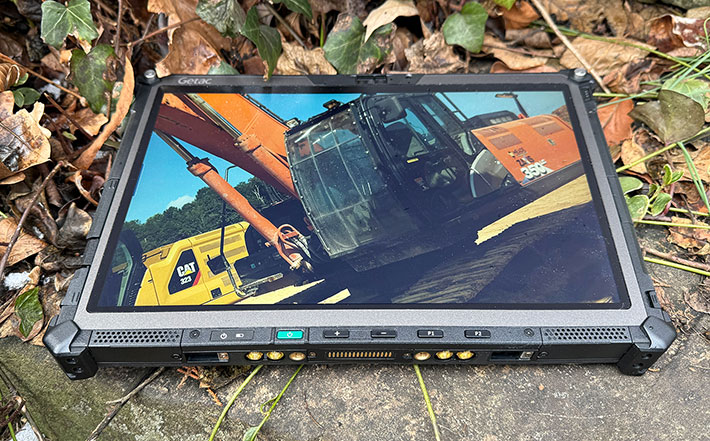
As is customary for Getac, the F120 is offered with multiple processor configurations. All available options are mobile V-series Core Ultra 200V designs, clearly positioning the system for AI-accelerated mobile computing.
The NPUs across all supported processor options satisfy Microsoft's Copilot+ PC requirement, delivering between 40 and 48 TOPS of dedicated AI acceleration. In addition, because many edge-AI applications leverage the GPU — either independently or alongside the NPU — each processor integrates Intel Arc graphics capable of contributing between 54 and 66 TOPS of AI acceleration.
Taken together, this gives the V-series-powered F120, along with the similarly configured Getac UX10, the highest peak theoretical AI throughput in Getac's current portfolio. While some higher-core-count processors deliver greater conventional CPU performance, they often provide substantially lower AI acceleration. For example, certain 24-core mainstream processors peak at roughly 36 TOPS, whereas V-series processors with just eight cores can reach aggregated theoretical AI throughput figures as high as 118 TOPS when NPU and GPU capabilities are combined.
The table below outlines the eight processor options currently available for the Getac F120 and summarizes their key specifications.
|
Intel CPU
|
Core Ultra 7
|
Core Ultra 7
|
Core Ultra 7
|
Core Ultra 7
|
Core Ultra 5
|
Core Ultra 5
|
Core Ultra 5
|
Core Ultra 5
|
|
Model
|
268V
|
266V
|
258V
|
256V
|
238V
|
236V
|
228V
|
226V
|
|
Peak TOPS
|
118
|
118
|
115
|
115
|
97
|
97
|
97
|
97
|
|
P-Cores
|
4
|
4
|
4
|
4
|
4
|
4
|
4
|
4
|
|
Low Power E-Cores
|
4
|
4
|
4
|
4
|
4
|
4
|
4
|
4
|
|
Total Cores
|
8
|
8
|
8
|
8
|
8
|
8
|
8
|
8
|
|
P-cores Max Turbo
|
5.00 GHz
|
5.00 GHz
|
4.80 GHz
|
4.80 GHz
|
4.70 GHz
|
4.70 GHz
|
4.50 GHz
|
4.50 GHz
|
|
Smart Cache
|
12MB
|
12MB
|
12MB
|
12MB
|
8MB
|
8MB
|
8MB
|
8MB
|
|
Thermal Design Power
|
17/37 watts
|
17/37 watts
|
17/37 watts
|
17/37 watts
|
17/37 watts
|
17/37 watts
|
17/37 watts
|
17/37 watts
|
|
Integrated graphics
|
Intel Arc 140V
|
Intel Arc 140V
|
Intel Arc 140V
|
Intel Arc 140V
|
Intel Arc 130V
|
Intel Arc 130V
|
Intel Arc 130V
|
Intel Arc 130TV
|
|
GPU Peak TOPS
|
66
|
66
|
64
|
64
|
53
|
53
|
53
|
53
|
|
Graphics max speed
|
2.00 GHz
|
2.00 GHz
|
1.95 GHz
|
1.95 GHz
|
1.85 GHz
|
1.85 GHz
|
1.85 GHz
|
1.85 GHz
|
|
NPU Peak TOPS
|
48
|
48
|
47
|
47
|
40
|
40
|
40
|
40
|
|
Intel vPro
|
Enterprise
|
Enterprise
|
NA
|
NA
|
Enterprise
|
Enterprise
|
NA
|
NA
|
A review of the table highlights one immediately noticeable characteristic: the relatively modest core count. All F120 processor options are limited to eight cores, whereas other Core Ultra Series 2 variants scale up to 24 cores. Some recently introduced Getac rugged systems likewise offer configurations with up to 16 cores. The distinction reflects different design priorities. V-series processors emphasize a balanced, AI-centric architecture, while H-series systems — such as the Getac B360 G3 and the Getac V120 — prioritize higher CPU core and thread counts for compute-intensive workloads. That said, in practical field deployments, sustained performance under thermal and power constraints often matters more than peak multi-core throughput.
The V-series architecture combines NPUs that satisfy Microsoft's 40-TOPS Copilot+ PC requirement with high-performance Intel Arc graphics. For highly mobile platforms where power efficiency, thermal constraints, and edge-AI capability are critical, this architecture provides a practical balance. It offers operational flexibility and readiness for emerging on-device AI, computer vision, and real-time analytics applications.
Despite the broad selection of CPU options, the differences among them are relatively incremental. All employ an eight-core architecture without Hyper-Threading, resulting in eight processing threads. All include hardware-accelerated Intel Arc graphics. Variations lie primarily in clock speeds, cache sizes, memory ceilings, and GPU tiering, resulting in measurable but not dramatic performance differences. Ultra 7 variants use Arc 140V graphics and therefore deliver somewhat higher graphics and AI throughput than Ultra 5 models, which employ Arc 130V graphics.
How does the Getac F120 perform relative to its primary 12-inch rugged tablet competitors? The benchmark results below provide the answer:
|
Getac F120 Benchmarks and Comparisons
|
|
Manufacturer
|
Getac
|
Getac
|
Dell
|
Durabook
|
Panasonic
|
RuggON
|
|
Model
|
F120
|
F110 G7
|
Pro Rugged 12
|
U11
|
TB 33
|
SOL 7
|
|
Year tested
|
2025
|
2024
|
2026
|
2023
|
2024
|
2025
|
|
Type
|
Tablet
|
Tablet
|
Tablet
|
Tablet
|
Tablet
|
Tablet
|
|
Display size
|
12.2"
|
11.6"
|
12.0"
|
11.6"
|
12.0"
|
12.0"
|
|
Resolution
|
1920x1200
|
1920x1080
|
1920x1200
|
1920x1080
|
2160x1440
|
2160x1440
|
|
Luminance
|
1,060
|
1,070
|
1,320 nits
|
1,080
|
1,220
|
1,075 nits
|
|
Processor Type: Intel
|
Core Ultra 7
|
Core i7
|
Core Ultra 7
|
Core i7
|
Core i5
|
Core Ultra 5
|
|
Processor Model
|
i7 268V
|
1365U
|
i7 268V
|
1250U
|
1245U
|
i5 225U
|
|
Performance cores
|
4
|
2
|
4
|
4
|
2
|
2
|
|
Efficient cores
|
0
|
8
|
0
|
4
|
8
|
8
|
|
LP efficient cores
|
4
|
0
|
4
|
0
|
0
|
2
|
|
Max Turbo Speed
|
5.00 GHz
|
5.20 GHz
|
5.00 GHz
|
4.70 GHz
|
4.40 GHz
|
4.80 GHz
|
|
Thermal Design Power (TDP)
|
17/37 watts
|
15/55 watts
|
17/37 watts
|
9/29 watts
|
15/55 watts
|
15/57 watts
|
|
Cooling
|
fan
|
fan
|
fan
|
fanless
|
fan
|
fan
|
|
PassMark 9.0
|
6,328
|
6,221
|
6,216
|
4,154
|
5,761
|
4,687
|
|
CrystalMark
|
565,380
|
453,174
|
601,180
|
318.914
|
433,823
|
473,760
|
|
PCMark 10 Overall
|
7,448
|
5,403
|
7,283
|
4,051
|
3,858
|
5,470
|
|
-- PCMark10 Essentials
|
10,370
|
10,318
|
10,438
|
8,370
|
7,388
|
9,026
|
|
-- PCMark10 Productivity
|
10,793
|
7,564
|
9,571
|
6,052
|
4,895
|
8,821
|
|
-- PCMark10 Content Creation
|
10,018
|
5,485
|
10,492
|
3,561
|
4,313
|
5,580
|
|
PCMark10 Drive
|
1,950
|
1,578
|
2,026
|
1,723
|
2,061
|
1,539
|
|
PCMark10 Battery (Hours)
|
14:03 hrs
|
8:58 hrs
|
13:51 hrs
|
5:41 hrs
|
7:51 hrs
|
9:11 hrs
|
|
PCMark10 Battery (whr/hr)
|
4.48
|
6.81
|
5.14
|
6.42
|
5.61
|
7.60
|
|
3DMark Time Spy
|
4,113
|
1,504
|
4,543
|
1,033
|
1,443
|
1,539
|
|
GeekBench 5 Single Core
|
1,998
|
1,872
|
2,868
|
1,394
|
946
|
1,592
|
|
GeekBench 5 Multi Core
|
9,817
|
5,657
|
11,062
|
4,181
|
4,619
|
6,054
|
|
GeekBench 5 Open CL
|
33,393
|
16,237
|
31,566
|
10,259
|
14,001
|
12,547
|
|
GeekBench AI OpenVINO CPU FP8
|
7,521
|
NA
|
8,356
|
NA
|
NA
|
5,430
|
|
GeekBench AI OpenVINO GPU FP8
|
31,253
|
NA
|
32,209
|
NA
|
NA
|
8,728
|
|
GeekBench AI OpenVINO NPU FP8
|
36,958
|
NA
|
49,248
|
NA
|
NA
|
11,953
|
What do the benchmarks show? Primarily that system performance is a constantly moving target. What represented top-tier performance only a short time ago can quickly become baseline. Progress is no longer driven solely by higher clock speeds, increased core counts, or smaller lithography. Modern platforms increasingly derive performance from a coordinated combination of CPU, GPU, and NPU resources. As a result, we observe substantial gains in certain workloads, while others show more incremental improvement.
It is important to emphasize that benchmark tables such as the one above should not be interpreted as definitive rankings. Many systems are available with multiple processor options, and some may have been refreshed since their last evaluation in the RuggedPCReview.com test lab. The results should therefore be viewed as indicators of the performance class associated with specific processor generations, architectural designs, clock frequencies, and thermal envelopes.
Even though V-series processors prioritize AI-oriented acceleration, the Getac F120 remains a strong conventional performer. In our testing, it consistently outperformed earlier-generation platforms, in some cases by very substantial margins. Its Intel Arc graphics subsystem delivers a level of integrated graphics performance that only a few years ago often required optional discrete GPUs in rugged systems.
As for AI performance, the long-term balance between GPU-accelerated and NPU-accelerated workloads is still evolving. At present, V-series-equipped systems such as the F120 offer substantial AI inference capability through the combined strengths of Arc graphics and integrated NPUs. At the same time, they maintain competitive performance in traditional CPU-bound tasks.
Equally significant is the F120's energy efficiency. In our PCMark 10 Battery testing, our review unit averaged an exceptionally low 4.48 watt-hours of battery capacity consumed per hour of operation. The benchmark data illustrate one of the most significant aspects of the F120 platform. Traditionally, increases in mobile computing performance came at the expense of battery life. The F120 largely avoids that tradeoff. Relative to the previous-generation F110 G7, it delivers substantially higher overall performance, dramatically improved graphics capability, and significantly longer battery life. Much of that gain can be attributed to the efficiency of Intel's Lunar Lake architecture, which combines strong CPU and GPU performance with remarkably low power consumption.
|
|
Getac V120/F120 "H" vs "V" Series CPUs
|
|
|
Model
|
Getac V120
|
Getac F120
|
|
|
Intel CPU (see full specs)
|
Core Ultra 7
|
Core Ultra 7
|
|
|
Model
|
265H
|
268V
|
|
|
P-Cores
|
6
|
4
|
|
|
E-Cores
|
8
|
0
|
|
|
Low Power E-Cores
|
2
|
4
|
|
|
Total Threads
|
16
|
8
|
|
|
P-cores Max Turbo
|
5.30 GHz
|
5.00 GHz
|
|
|
LP E-cores Max Turbo
|
2.50 GHz
|
3.70 GHz
|
|
|
Thermal Design Power
|
28/115 watts
|
17/37 watts
|
|
|
Max RAM
|
128GB
|
32GB
|
|
|
Integrated graphics
|
Intel Arc 140T
|
Intel Arc 140V
|
|
|
GPU Peak TOPS
|
75
|
66
|
|
|
Graphics max speed
|
2.30 GHz
|
2.00 GHz
|
|
|
NPU Peak TOPS
|
13
|
48
|
|
|
PCMark 10 Overall
|
7,805
|
7,448
|
|
|
PassMark 9 Overall
|
7,692
|
6,328
|
|
|
3D Mark Time Spy
|
4,073
|
4,113
|
|
|
Watt-hours/hour
|
8.65
|
4.48
|
|
|
GeekBench AI OpenVINO GPU quantized
|
26,900
|
31,253
|
|
|
GeekBench AI OpenVINO NPU quantized
|
15,018
|
36958
|
The Getac F120's very strong performance and efficiency naturally raise an interesting question. The Getac V120 laptop and the Getac F120 tablet differ in form factor, but perhaps less than one might assume. The V120 is a rugged convertible laptop with a rotating 12-inch display, whereas the F120 is a dedicated 10-inch tablet that can function as a laptop when paired with its optional keyboard dock. Traditionally, rugged laptops, tablets, and 2-in-1 systems often shared the same processor class. In this generation, however, the V120 employs Intel H-series processors, while the F120 uses V-series equivalents. What distinguishes the two?
Quite a bit. The comparison table to the right summarizes key technical specifications and selected benchmark results. At first glance, the V120 appears to have the advantage: it offers twice as many CPU cores, higher peak clock frequencies, and operates at higher power levels — all factors that contribute to strong performance in conventional CPU-centric benchmarks.
However, it is the F120 that carries Microsoft's Copilot+ PC designation. The reason lies in the processor architecture. The V-series CPUs used in the F120 integrate more capable NPUs that satisfy Microsoft's 40-TOPS requirement, whereas the H-series processors in the V120 do not reach that threshold. Both systems incorporate Intel Arc graphics.
In practice, the V120 maintains a modest lead in most traditional CPU-bound benchmarks. The F120, however, remains remarkably competitive and even surpasses the V120 in certain graphics and AI-related tests. Perhaps the most surprising finding is how little conventional performance the F120 sacrifices despite operating within a dramatically smaller power envelope. While the V120's H-series processor offers substantially more cores, higher clock speeds, and much higher power limits, overall benchmark results remain surprisingly close. In AI-accelerated workloads that leverage the NPU, the F120 holds a clear advantage. Additionally, due to its lower thermal design power, the F120 operates far more efficiently — averaging just 4.48 watts under light workload conditions, about half the average draw measured for the V120.
Ultimately, Getac has optimized these two platforms for distinct missions. The thicker, heavier V120 convertible emphasizes maximum CPU throughput for demanding field applications, while the slimmer, lighter F120 prioritizes mobility, energy efficiency, and readiness for AI-driven workflows at the edge.
Power draw and battery life
Battery life remains one of the most important considerations in any mobile computing platform. For field users, it can be every bit as important as performance. We've already mentioned above that the Getac F120 appears to be exceptionally power-efficient, drawing less battery power than comparable 12-inch rugged tablets. Battery life, of course, depends on two things: how much power a device consumes, and how much battery capacity it carries onboard.
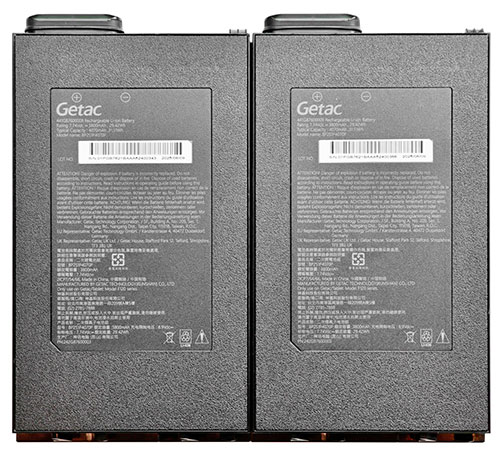 As configured from the factory, the F120 comes with dual 11.4 Volt / 4,070mAH / 31.51 watt-hour batteries. The resulting combined capacity of 63 watt-hours is adequate for most deployments, though it is not especially large by current rugged-tablet standards. If more runtime is required, Getac offers optional 11.61 Volt / 4,200mAH / 47.25 watt-hour batteries for a total of 94.5 watt-hours. That is substantial battery capacity for a 12.2-inch tablet, but it comes at additional cost as well as some increase in size and weight. The extended batteries are approximately 0.7 inches thick and no longer fit flush into the tablet, and each weighs 7.23 ounces instead of the standard battery's 5.15 ounces. As configured from the factory, the F120 comes with dual 11.4 Volt / 4,070mAH / 31.51 watt-hour batteries. The resulting combined capacity of 63 watt-hours is adequate for most deployments, though it is not especially large by current rugged-tablet standards. If more runtime is required, Getac offers optional 11.61 Volt / 4,200mAH / 47.25 watt-hour batteries for a total of 94.5 watt-hours. That is substantial battery capacity for a 12.2-inch tablet, but it comes at additional cost as well as some increase in size and weight. The extended batteries are approximately 0.7 inches thick and no longer fit flush into the tablet, and each weighs 7.23 ounces instead of the standard battery's 5.15 ounces.
The standard F120 batteries measure each about 2-7/8 x 5-1/4 and they are less than half an inch thick. Unlike the F110 batteries, the new one in the F120 no longer have an integrated power meter where five green LEDs indicate the charge level.
As far as available battery capacity goes, the F120's combined 63 watt-hours exceed those of one major direct competitor, the Panasonic Toughbook 33, which offers a combined 44.2 watt-hours as standard equipment. The Dell Pro Rugged 12, however, comes standard with two 35.6 watt-hour batteries for a total of 71.2 watt-hours. In all three systems, dual batteries enable hot-swapping.
Of course, battery capacity alone does not determine runtime. Equally important is how efficiently a system uses the available energy. This is where the F120 particularly stands out. Despite carrying less battery capacity than the Dell Pro Rugged 12, the F120 actually achieved slightly longer runtime in our testing. Equipped with the standard 63 watt-hour battery set, it delivered over 14 hours in our PCMark 10 battery benchmark while averaging just 4.48 watt-hours of battery consumption per hour of operation. That was the lowest energy consumption and the longest runtime of any 12-inch-class rugged tablet in this comparison group.
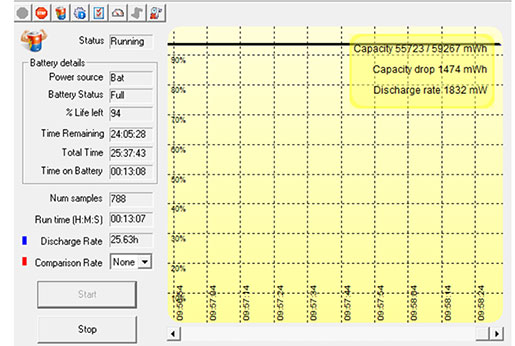 We also tested power draw of the Getac F120 by running our standard BatteryMon benchmark. With Windows Power setting set to "Best Power Efficiency," and the display backlight set to its lowest and almost unreadable setting, we saw a minimum of just 1.9 watts. That's theoretically good for 33.2 hours with both standard batteries! We also tested power draw of the Getac F120 by running our standard BatteryMon benchmark. With Windows Power setting set to "Best Power Efficiency," and the display backlight set to its lowest and almost unreadable setting, we saw a minimum of just 1.9 watts. That's theoretically good for 33.2 hours with both standard batteries!
With the backlight set to roughly 50% for comfortable indoor viewing, we saw a minimum of 3.5 watts, theoretically good for 18.0 hours with both batteries. And with the backlight set to maximum brightness, we saw a minimum power draw of 9.8 watts, theoretically good for 6.4 hours.
|
Getac F120 BatteryMon Power Draws (at idle)
|
|
Backlight level
|
Darkest
|
50%
|
Brightest
|
|
Max Battery
|
1.9 watts (33.2 hrs.)
|
3.5 watts (18.0 hrs.)
|
9.4 watts (6.7 hrs.)
|
|
Max Performance
|
2.2 watts (28.6 hrs.)
|
3.9 watts (16.2 hrs.)
|
9.8 watts (6.4 hrs.)
|
We then switched the Windows Power setting set to "Best Performance." That way, with the display backlight set to its lowest setting, we saw a minimum of still only about 2.2 watts. With the backlight set to 50% for comfortable indoor viewing, we recorded 3.5 watts, and with the backlight set to maximum brightness, power draw rose to 9.8 watts, theoretically good for 6.4 hours with both standard batteries.
These results are considerably better than what we saw in the final G7 version of the predecessor F110. The chips in the F110 had 15/55 watt thermal design power ratings, whereas Core 7 Ultra chips in the new F120 are rated at 17/37 thermal design power. So the lower TDP wattage ceiling may explain part of the much greater power efficiency of the new tablet.
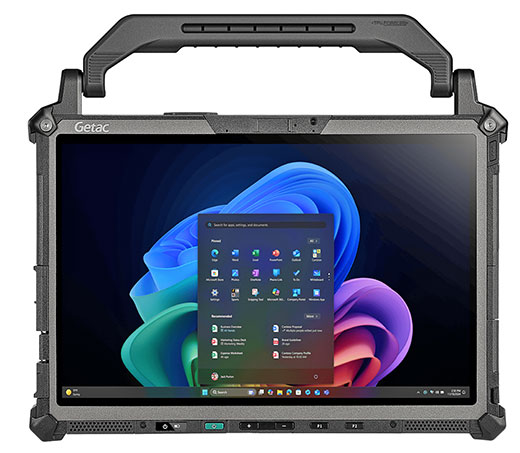 As always, real-world battery draw will vary, just as gas mileage in a car does. Minimum draw in a test lab is not an accurate predictor of actual battery life. Intel's Core processors are becoming ever more sophisticated at conserving power, but there are some laws of physics that cannot be easily circumvented. As always, real-world battery draw will vary, just as gas mileage in a car does. Minimum draw in a test lab is not an accurate predictor of actual battery life. Intel's Core processors are becoming ever more sophisticated at conserving power, but there are some laws of physics that cannot be easily circumvented.
To measure, as close as it is possible, real world battery life, we used UL Solutions' PCMark 10's Battery test. This demanding test shows how long a charge lasts with the system never sleeping and constantly being exercised with a variety of typical tasks. In that test, with two batteries, the predecessor Getac F110 G7 lasted 8:58 hours, enough to make it through a full standard shift with continuous use of the system. That result also translated into power consumption of 6.81 watt-hours per hour, or 8.8 minutes of operation per watt-hour. By comparison, the new F120 ran 14:03 hours, using 4.48 watt-hours per hour, and ran 13.38 minutes on a watt-hour. That is quite amazing.
Overall, the significance of those results goes beyond benchmark numbers. Rather than relying on unusually large batteries to achieve acceptable endurance, the F120 combines respectable battery capacity with an exceptionally efficient platform. For field users, that translates into longer operating time, fewer battery swaps, and greater flexibility when access to charging opportunities is limited.
Bright and very good 12.2-inch display
The Getac F120's 12.2-inch display is large enough to make Windows comfortable to use. While it would be considered somewhat small as a laptop display, it is spacious for a tablet. Its 1920 x 1200 pixel resolution yields a density of 186 pixels per inch. The display is also very bright, with a maximum specified luminance of 1,200 nits. In our testing, however, we measured 1,060 nits.
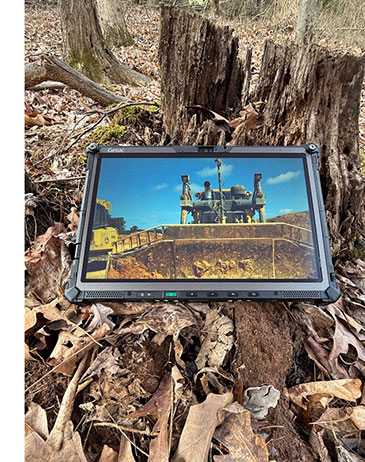 The F120's wide-format 16:10 aspect ratio gives the display a contemporary appearance while providing additional vertical screen space compared to the F110's 16:9 format. The increase from 1920 x 1080 to 1920 x 1200 resolution adds useful workspace, and to our eyes the slightly less elongated aspect ratio is more pleasant to use. The F120's wide-format 16:10 aspect ratio gives the display a contemporary appearance while providing additional vertical screen space compared to the F110's 16:9 format. The increase from 1920 x 1080 to 1920 x 1200 resolution adds useful workspace, and to our eyes the slightly less elongated aspect ratio is more pleasant to use.
That said, applications used in the field continue to become more sophisticated and often involve increasingly detailed graphics, maps, engineering drawings, and imagery. At the same time, smartphones and many consumer tablets now offer extremely high-resolution displays. Rugged tablet customers are beginning to expect similar display density, which may help explain why Panasonic and RuggON equipped their Toughbook 33 and SOL 7 tablets, respectively, with 2,160 x 1,440 pixel displays. Those screens provide a denser 216 pixels per inch and roughly 35% more pixels overall.
For everyday use, however, resolution is only part of the story. Rugged tablets are frequently used outdoors, often in bright sunlight where conventional displays can become difficult to read. Sunlight readability therefore remains a critical consideration. At present, the most effective solution combines optical treatments that minimize internal reflections with a powerful backlight capable of overcoming ambient light.
Continuous operation of a very bright backlight, unfortunately, comes at the expense of battery life. Getac addresses that issue by allowing users to assign the F120's enhanced sunlight-readable mode to either the P1 or P2 programmable button. 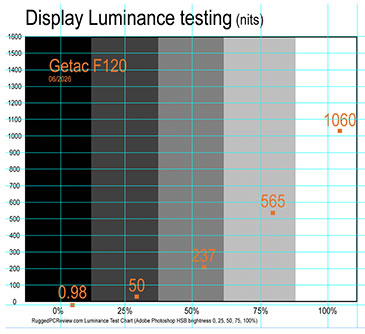 That dedicated hardware control makes practical sense. When maximum outdoor readability is required, users can instantly activate the brighter mode. When conditions improve, they can switch back just as quickly and conserve energy. While the same function is also accessible through software controls, a dedicated hardware button makes it far easier to manage brightness and power consumption in the field. That dedicated hardware control makes practical sense. When maximum outdoor readability is required, users can instantly activate the brighter mode. When conditions improve, they can switch back just as quickly and conserve energy. While the same function is also accessible through software controls, a dedicated hardware button makes it far easier to manage brightness and power consumption in the field.
How bright is bright? A typical consumer notebook display offers luminance in the 250-nit range (one nit equals one candela per square meter). Industrial monitors intended for outdoor use generally provide between 400 and 500 nits. High-end rugged notebooks typically range from 500 to well over 1,000 nits, with Getac's own B360 fully rugged notebook reaching as much as 1,400 nits. In practical terms, the F120's 1,200-nit specification makes it substantially brighter than almost all consumer tablets and dramatically brighter than the vast majority of consumer notebooks.
The graph to the right shows our luminance measurements of the F120 display. We recorded a maximum brightness of 1,060 nits, very similar to the F110 G7 we tested previously. While somewhat below Getac's published specification, the result remains excellent and is likely attributable to normal panel and optical transmission variations.
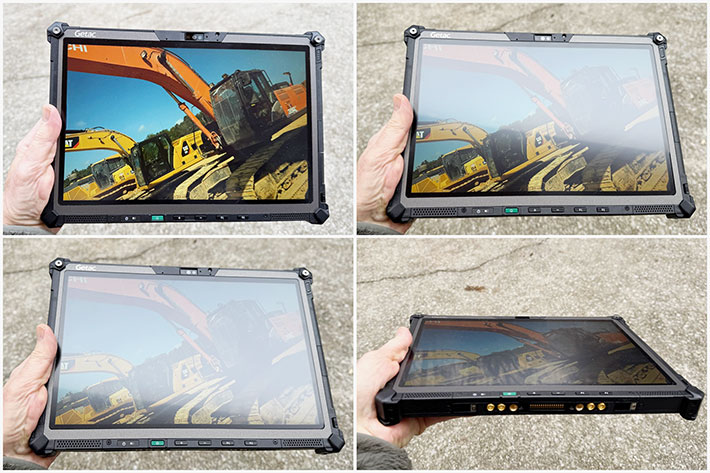
A few additional observations about the F120 display are worth mentioning. While we described it as glossy above, semi-matte is actually a more accurate characterization. Reflections are far more subdued than on most consumer tablets, nearly all of which use highly reflective glossy screens.
Another notable characteristic is the display's resistance to fingerprints and smudges. Many glossy displays quickly become covered with visible marks during normal use, but the F120 proved remarkably resistant in our testing.
Viewing angles are excellent as well. Nothing is more distracting than a display that shifts color or loses contrast when viewed from different angles. The F120's display maintains image quality very well across both horizontal and vertical viewing angles, with no noticeable color shifts even when viewed from extreme positions.
The images below show the F120 under a variety of lighting conditions and viewing angles. Note how effectively the semi-matte surface controls reflections. Rather than producing hard mirror-like reflections, incoming light is gently diffused, helping maintain readability even under challenging lighting conditions. The tradeoff is a slight reduction in perceived contrast compared to viewing the display straight on, but overall the approach works very well for a device intended for field use.
Multi-touch and an good narrow-tip capacitive stylus
On a laptop, touch is nice to have and increasingly common, but it is not absolutely necessary. On a tablet, good touch is mandatory. The F120 was designed as a pure tablet, though it can also be used as a laptop with its optional detachable keyboard, and comes with 10-point capacitive multi-touch. The tablet is also available with both touch and an active digitizer. This gives F120 users the best of both worlds: effortless tapping, panning, pinching, and zooming, combined with a highly precise active pen that does not require a battery.
 That said, even after all these years, touch remains something of a work in progress in Windows. Capacitive multi-touch works beautifully with iOS and Android devices and with applications specifically designed for touch interaction. Windows 11 has made considerable progress, but it still carries decades of legacy desktop software, much of it originally designed for mouse and keyboard operation. Tiny check boxes, narrow scroll bars, and densely packed menus can still make touch operation less than ideal. Microsoft continues to improve the touch experience, but there is still room for further refinement. That said, even after all these years, touch remains something of a work in progress in Windows. Capacitive multi-touch works beautifully with iOS and Android devices and with applications specifically designed for touch interaction. Windows 11 has made considerable progress, but it still carries decades of legacy desktop software, much of it originally designed for mouse and keyboard operation. Tiny check boxes, narrow scroll bars, and densely packed menus can still make touch operation less than ideal. Microsoft continues to improve the touch experience, but there is still room for further refinement.
Windows, however, remains the dominant platform in enterprise and government computing, and thus powers a great deal of rugged mobile hardware. Getac has done its part by equipping the F120 with a remarkably smooth and responsive capacitive touch screen and offering an optional active digitizer for users who require greater precision.
A word about the active pen. Digitizers with active pens have been part of tablet computing since the earliest days of the industry. Most pioneering pen-based systems used Wacom electromagnetic resonance (EMR) technology, which does not require a battery in the pen itself. That allows for a slim, lightweight pen design and eliminates concerns about battery maintenance or running out of power in the field.
One of the most useful features of this type of pen technology is "hovering." Because the digitizer can sense the pen tip before it touches the display, the cursor follows the pen even when it is held slightly above the screen surface. This allows users to position the cursor precisely before making contact, reducing accidental selections that can occur with finger touch or passive capacitive styluses.
 Microsoft also provides extensive support for active pens within Windows. Handwriting recognition, annotation, sketching, screen markup, note-taking, and other pen-centric functions are built directly into the operating system. Users who intend to make extensive use of the active pen should take the time to explore and install the various Windows pen utilities and applications available for the platform.
Works with gloves and when it's wet
One limitation of standard projected-capacitive touch technology is that, in its simplest form, it is designed primarily for bare fingers and, to a lesser extent, capacitive styluses. Rain, moisture, and gloves can interfere with normal operation. Unfortunately, those are exactly the conditions in which rugged tablets are often used.
Getac recognized that challenge early on and addressed it years ago in products such as the V110 convertible and F110 tablet. Most Getac rugged devices have long included special touch modes that allow users to optimize operation for different environmental conditions. On the F120, those capabilities have been further refined and expanded.
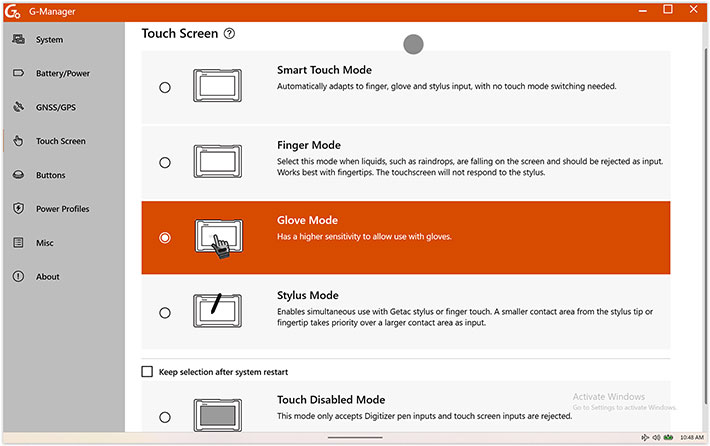
Smart Touch Mode" is designed to automatically adapt to changing conditions. The system can distinguish between finger touches, stylus input, and environmental effects such as water droplets, and respond appropriately. For many users, this mode will likely provide the best overall experience and may be all that is ever needed.
"Finger Mode" is intended for wet conditions where rain or splashing water might otherwise interfere with normal touch operation. In this mode, the system is optimized specifically for finger input and rejects other types of touch that could be mistaken for user commands. The optional active digitizer pen continues to function normally.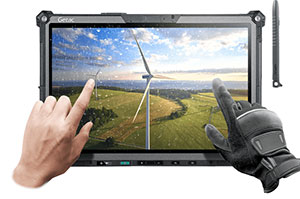
"Glove Mode" allows operation while wearing gloves. The touch controller becomes more sensitive so that it can recognize touches through glove material. During our testing, the system not only worked well with gloves, but also appeared capable of sensing a finger slightly above the screen surface, reducing the need for firm contact. The active digitizer pen remains fully functional in this mode.
"Stylus Mode" is optimized for situations where both touch and stylus input are being used. Because the contact area of a stylus tip is much smaller and more precise than a fingertip, the system gives stylus input priority whenever appropriate.
"Touch Disabled Mode" ignores all touch input and responds only to the optional active digitizer. This prevents accidental screen activation from palms, fingers, sleeves, or other unintended contact. Users who rely heavily on the active pen often find this mode particularly useful.
The variety of available modes illustrates just how complex touch interaction remains in rugged environments. Rain, gloves, styluses, and active pens all place different demands on the touch controller. While Smart Touch Mode will likely be sufficient for most users most of the time, the dedicated modes provide additional control for specialized situations where maximum reliability is required.?
G-Manager vs OSDC
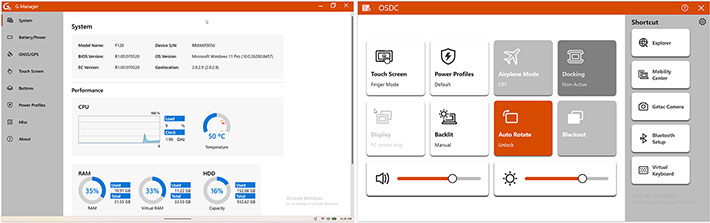
Like other rugged Getac computers, the F120 comes with both G-Manager and OSDC (On-Screen Display Control). Both are part of Getac's proprietary G-Utility suite. The confusing part is that the two utilities overlap. That's because G-Manager is designed to be an all-in-one desktop control center, whereas OSDC is a touch-friendly and touch-optimized overlay for the field.
G-Manager is designed to be an overall system control center. It looks a traditional desktop app that serves as a centralized dashboard for IT administrators and users to configure deep hardware settings. The idea here is to allow customizing device behavior, toggle power profiles (e.g., High Performance vs. Battery Economy), program physical function keys, and switch all the touchscreen input modes. Overall, G-Manager seems designed for administrative tweaking and configuration, like preparing a device before it is deployed to the field or when the user has access to a mouse, keyboard, and a standard desktop interface.
OSDC is designed as a screen overlay that can quickly be accessed in the field. It provides instant visual feedback of hardware settings. It may appear as a pop-up when using hardware buttons (like programmable keys) to quickly adjust screen brightness, switch touch modes, or adjust volume without opening a full settings window. OSDC lets workers make quick adjustments even with gloves or in the rain without leaving their main workspace.
Cameras
Given the incredible quality of the pictures and video that today's smartphones can generate — let alone the ease of use of those smartphone cameras — we don't expect many F120 customers to use a large rugged tablet as their primary camera. In addition, while rugged Android devices are generally capable of taking good images and video, cameras integrated into mobile Windows, devices have rarely fared nearly as well. It is not clear why that is, as the actual camera hardware is often similar or the same.
Below is a selection of test images taken with the F120's 13MP documentation camera, via Getac's G-Camera app, at its highest 4096 x 3072 pixel setting. Click on the image to see a full resolution version.

Interesting: while the image quality we got from the Getac F110 G7 a couple of years ago was unexceptional, the F120's 13mp documentation camera is MUCH better. And not only that, it is much better than most cameras integrated into rugged laptops or tablets.
Security
Like virtually all modern mobile computing hardware, the Getac F120 offers multiple layers of hardware and software security designed to prevent unauthorized access and protect sensitive data. Available security options include password protection, an optional fingerprint reader, Smart Card reader, HF RFID reader, and a Windows Hello-compatible facial recognition camera, allowing organizations to implement multifactor authentication policies.
Our review unit included Intel Trusted Platform Module (TPM) 2.0 hardware security. TPM provides a secure hardware-based foundation for protecting encryption keys, validating system integrity during the boot process, and supporting advanced authentication and certificate-management functions. Working together with Windows 11 security features, TPM can help protect sensitive credentials, biometric information, and encrypted data.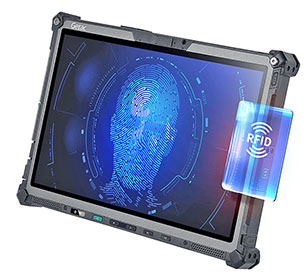
Fingerprint authentication is available via an optional capacitive fingerprint scanner. Unlike older swipe-style readers, capacitive sensors allow users to authenticate by simply placing a finger on the scanner.
New for the F120 is Getac Secure Erase, a built-in BIOS/system utility that can permanently and irreversibly erase data stored on the system's solid-state drive. This feature can be particularly valuable when systems are redeployed, retired, or transferred between users.
Security requirements vary considerably. Some users may rely only on standard passwords, while others may operate under strict enterprise, government, healthcare, public safety, or defense security policies that require multiple layers of authentication and device management.
Physical security should not be overlooked. The F120 includes a Kensington lock slot, allowing the tablet to be secured with a standard locking cable. While simple, it remains an effective deterrent against opportunistic theft.
Depending on the selected processor configuration, F120 systems can also support Intel vPro technologies for secure remote management and administration. In addition, Getac offers optional Absolute Persistence technology, which maintains a resilient connection between the device and enterprise management systems for tracking, recovery, and security management purposes.
Docking and vehicle mounting
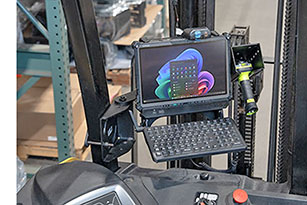 Rugged tablets such as the Getac F120 are often used in vehicles. To that extent, Gamber-Johnson and Havis are offering docks and cradles both for the F120 tablet. These can be mounted in numerous ways, using the dock manufacturers' solutions or the vast variety of RAM ball and joint components. Rugged tablets such as the Getac F120 are often used in vehicles. To that extent, Gamber-Johnson and Havis are offering docks and cradles both for the F120 tablet. These can be mounted in numerous ways, using the dock manufacturers' solutions or the vast variety of RAM ball and joint components.
The F120 has separate antenna pass-throughs for GPS, WLAN, WWAN, and WWAN MIMO. These are supported by the vehicle docks, which makes roof-mount antennae possible. A set of pogo docking pins on the bottom of the F120 allow the docks to provide port duplication and additional I/O functionality. The picture to the right shows a Gamber Johnson guard leg mount system for the Getac F120.
Ruggedness
The Getac F120 is a fully rugged tablet. That includes IP66 sealing, a wide operating temperature range, and certification to MIL-STD-810H environmental testing standards. Getac also claims an impressive six-foot drop specification. Three feet is generally sufficient to survive a fall from a desk. Four feet has become something of the industry benchmark because it approximates the height from which a device might fall while being used in the field. Six feet goes well beyond that and provides an additional margin of protection.
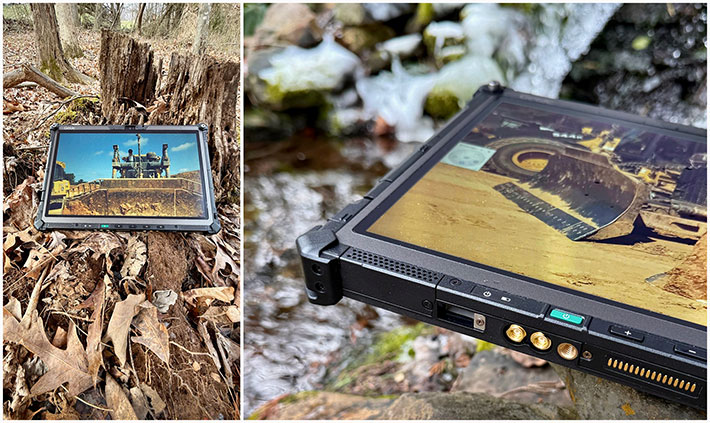
The F120 is rated for operation between -20°F and 145°F (-29°C to 63°C). That range is slightly wider than that of earlier F110 models and makes the tablet suitable for use in virtually any intended deployment environment. Such temperature tolerance can be particularly valuable in applications involving vehicles exposed to direct sunlight, refrigerated environments, or rapidly changing weather conditions.
As far as sealing goes, there has been steady progress since the original F110 was introduced. The first-generation model already carried an IP65 rating, which provided excellent protection against dust and water intrusion. The current F120 advances that to IP66. While the difference may appear minor, IP66 certification indicates protection against more powerful water jets than IP65. In real-world field deployments, where equipment may be exposed to pressure washing, heavy rain, or other aggressive water exposure, that additional protection can prove valuable.
 Unlike modern smartphones, which often achieve IP67 or IP68 ratings through sealed, largely non-serviceable designs, a rugged Windows tablet presents a much greater engineering challenge. The F120 incorporates multiple ports, buttons, cooling components, externally accessible batteries, docking interfaces, and expansion options. Maintaining effective sealing while preserving that level of functionality requires considerable design effort. Unlike modern smartphones, which often achieve IP67 or IP68 ratings through sealed, largely non-serviceable designs, a rugged Windows tablet presents a much greater engineering challenge. The F120 incorporates multiple ports, buttons, cooling components, externally accessible batteries, docking interfaces, and expansion options. Maintaining effective sealing while preserving that level of functionality requires considerable design effort.
That said, it always takes a certain amount of courage to deliberately expose an expensive review unit to water. We passed on immersion testing this time because our F120 was still a pre-production sample. The tablet's sealing system nevertheless deserves mention, particularly the protective port covers. Those covers play a critical role in maintaining the device's environmental protection while still allowing easy access to ports and connectors.
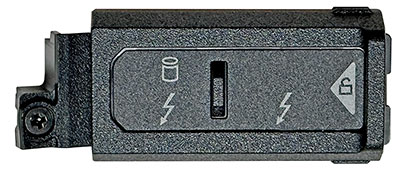
Getac's current design uses hinged covers with integrated rubber pressure seals. The covers slide in one direction to lock and the other to unlock. The mechanism works well, though each cover relies primarily on a small white arrow indicator whose meaning is not immediately obvious. A more explicit lock/unlock icon would make operation even clearer. It is a small detail, but details matter on equipment intended for demanding field use.
As always, we would like to see manufacturers provide more detailed information regarding ruggedness testing. Simply stating compliance with MIL-STD-810H does not tell the whole story. The standard encompasses numerous test methods and procedures covering shock, vibration, temperature extremes, humidity, altitude, and many other environmental factors. Customers purchase rugged systems specifically because they must withstand challenging conditions, and it should therefore be clearly documented exactly which tests were performed and to what levels the device was certified.
Bottom line: the Getac F120
The Getac F120 is a fully rugged Windows 11 tablet computer with a 12.2-inch capacitive multi-touch display and support for Microsoft's Copilot+ PC platform. Designed to handle both traditional mobile computing tasks and emerging on-device AI workloads, the F120 can be used as a standalone tablet or, with its optional detachable keyboard, as a compact laptop replacement.
Launched under a new model name, the F120 succeeds Getac's long-running F110 platform. Compared to previous F110 generations, the new tablet is slimmer and lighter, offers a larger 12.2-inch display, twice the standard memory, slightly greater battery capacity, dual Thunderbolt 4 ports, faster wireless connectivity, a higher-resolution camera, enhanced security features, and Getac's Smart Touch technology.
Based on Intel's Core Ultra V-series processors with integrated Intel Arc graphics, the F120 delivers both strong performance and excellent energy efficiency. In our testing, it achieved more than 14 hours of runtime on its standard batteries while simultaneously posting benchmark results that substantially exceeded those of earlier-generation platforms. As a Copilot+ PC, it is also well positioned to support the growing number of AI-assisted tools and applications now making their way into enterprise and field environments.
Between its generous selection of onboard and optional I/O, broad expansion capabilities, excellent display, sophisticated touch technology, strong security features, and highly recommended detachable keyboard, the F120 offers an unusually well-balanced combination of performance, efficiency, versatility, and ruggedness.
The result is not merely a replacement for the F110, but a meaningful step forward. The Getac F120 successfully combines the durability expected of a fully rugged tablet with the performance, battery life, connectivity, and AI readiness demanded by modern mobile computing.
-- Conrad H. Blickenstorfer, June 2026
|
Getac F120 fully-rugged tablet Specs
|
| Type |
Fully rugged tablet
|
| Review date |
F120 full review 06/2026
|
| Processor |
Intel Core Ultra 7 268V (5.0 GHz max turbo, 118 overall peak TOPS)
Intel Core Ultra 7 266V (5.0 GHz max turbo, 118 overall peak TOPS)
Intel Core Ultra 7 258V (4.8 GHz max turbo, 115 overall peak TOPS)
Intel Core Ultra 7 256V (4.8 GHz max turbo, 115 overall peak TOPS)
Intel Core Ultra 5 238V (4.7 GHz max turbo, 97 overall peak TOPS)
Intel Core Ultra 5 236V (4.7 GHz max turbo, 97 overall peak TOPS)
Intel Core Ultra 5 228V (4.5 GHz max turbo, 97 overall peak TOPS)
Intel Core Ultra 5 226V (4.5 GHz max turbo, 97 overall peak TOPS)
|
| Thermal Design Power |
17/37 watts (all available processors)
|
| Thermal Design Power |
15/55 watts (all)
|
| Graphics |
Ultra 7 processors: Intel Arc 140V
Ultra 5 processors: Intel Arc 130V
|
| OS |
Windows 11 Pro
|
| Memory |
16GB or 32GB 5600MHz LPDDR5x memory on package |
| Storage |
256GB / 512GB / 1TB / 2TB PCIe NVMe SSD, M.2 2280 form factor
|
| Display |
12.2-inch/1920 x 1200 pixel (186 ppi) Lumibond 2.0 IPS TFT with semi-matte surface and protection film, sunlight-readable (1,200 nits) |
| Digitizer |
Capacitive multi-touch; optional: Dual mode touchscreen (multi-touch and active digitizer) |
| Keyboard |
Power button and four programmable buttons; optional detachable 88-key full-scale keyboard
|
| Expansion slots |
Optional Smart Card reader
|
| Housing |
Getac ABS+PC and magnesium alloy |
| Size |
11.80 x 8.15 x 0.87 inches (300 x 207 x 22 mm)
|
| Weight |
Starting at 3.11 lbs; 3.41 lbs as tested with two batteries, scanner, smart card reader and stylus
|
| Operating temperature |
-20° to 145° Fahrenheit (-29° to 63° C) |
| Ingress protection |
IP66
|
| Drop |
6-foot drop
|
| Humidity |
95% RH, non-condensing
|
| Other environmental |
e-Mark certified for vehicle usage; optional: ANSI / UL 121201, CSA C22.2 NO. 213
|
| Power |
Hot swappable dual 7.74V 4,070 mAH 31.5 whr Li-Ion batteries; optional dual 11.61V 4,070 mAH 47.25 whr Li-Ion batteries |
| Security |
TPM 2.0, cable lock slot; optional: fingerprint reader OR smart card reader OR HF RFID reader, Windows Hello face-authentication camera
|
| Camera |
Front-facing 5MP camera; 12MP auto-focus rear camera
|
| Interface |
1 x USB 3.2 gen2 Type-A
2 x Thunderbolt 4 Type-C
1 x DC-in jack
1 x docking connector
1 x Tri RF antenna pass-through for 4G (GPS, WLAN, WWAN) (opt.)
1 x Quad RF antenna pass-through for 5G (GPS, WLAN, WWAN, WWAN MIMO) (opt.)
Optional (top side): 1D/2D imager barcode reader OR MicroSD card OR serial port OR RJ45 LAN
Optional (Right side): USB 2.0 OR HF RFID reader OR Fingerprint reader
Optional (back side): Smart card reader
|
| Wireless |
Intel Wi-Fi 7 BE201, 802.11be
Bluetooth 5.4
Optional: 10/100/1000 base-T Ethernet
Optional: dedicated GPS with L1/L5
Optional: 4G LTE WWLAN with integrated GPS
Optional: 5G Sub-6 with integrated GPS
Optional: Dual SIM (Nano-SIM 4FF and e-SIM)
|
| Price |
Inquire |
| Contact |
GETAC us.getac.com |
| Web |
F120 web page |
| Spec sheet |
F120 spec sheet (PDF) |
| Warranty |
3 years Bumper-to-Bumper
|
|
Contact
|
GetacSales_US@getac.com
www.getac.com/us
949.681.2900
Getac, Inc.
15495 Sand Canyon Ave., Suite 350
Irvine, CA 92618
|
(copyright 2026 RuggedPCReview.com)
|
| | |