Panasonic Toughbook 56
Faster, more efficient, and more configurable, Panasonic's new Toughbook 56 advances the semi-rugged laptop platform.
(by Conrad H. Blickenstorfer; photography by Carol Cotton)
Mid-April 2026, Panasonic introduced the next generation of its perennially best-selling semi-rugged business notebook for enterprise and mobile professionals. Having found much success with the Toughbook 55's relatively slim profile, moderate weight, and exemplary configurability, Panasonic's latest iteration gets a new model number — 56 — along with an evolved design, a higher-resolution display, numerous refinements, and a major performance boost courtesy of Intel Core Ultra processors. Despite the changes, the Toughbook 56 remains backward-compatible with Toughbook 53 and 54 docks, a continuation of Panasonic's longstanding emphasis on protecting customer investment.

Panasonic Toughbooks hardly need an introduction. Few computers have the history and pedigree of the rugged Toughbook line, which has long held a special place as one of the most recognizable and successful rugged notebook families ever made. There is an uninterrupted lineage going back to the last millennium, with each generation building on the one before it.
Initially there was essentially just one Toughbook: the rugged laptop. Over time Panasonic expanded the family with semi-rugged models, convertibles, business-oriented notebooks, and, for a while, tablets and handhelds that were initially marketed under the Toughpad name.
The Toughbook 56 is the successor to a long line of semi-rugged Toughbooks — beginning with the venerable Toughbook 51 at the start of the millennium, followed by the 52, 53, 54, and 55 — all intended to provide lighter and more affordable alternatives to Panasonic's heavier fully rugged models while still retaining robust construction and durability. Over the years, the 5x Series has evolved in response to changing customer expectations: higher-resolution and wide-format displays, greater performance, lower weight, improved connectivity, and increasingly flexible configuration. The picture below shows how Panasonic also subtly evolved the styling of the magnesium exterior from generation to generation.

It's fair to say that Panasonic almost singlehandedly helped create the market for notebooks that not only were built tougher, but also looked tougher. Panasonic didn't invent descriptive branding for special-purpose product lines, but "Toughbook" remains one of the clearest examples of a name that became virtually synonymous with its category.
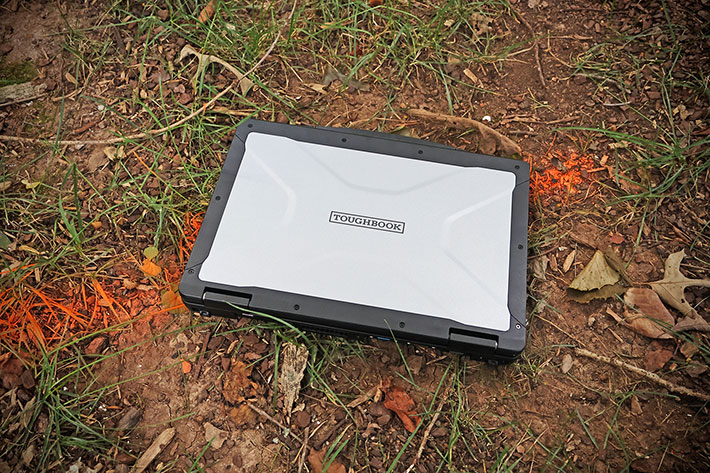
Interestingly, Panasonic's original rugged notebook was not initially called a Toughbook at all; it was simply the CF-25. Even later CF-27, CF-28, CF-29, and CF-30 models were at times described as "semi-rugged." That illustrates how fluid ruggedness terminology has always been. To this day there is no universally accepted definition that cleanly separates "rugged," "semi-rugged," and the many intermediate categories used to describe durable mobile computers.
|
Generations
|
Toughbook 55 Mk1
|
Toughbook 55 Mk2
|
Toughbook 55 Mk3
|
Toughbook 56 Mk1
|
|
Processors
|
Intel 8th gen
|
Intel 11th gen
|
Intel 13th gen
|
Intel Core Ultra
|
|
Std/Max RAM
|
8-64GB DDR4 2133
|
16-64GB DDR4 3200
|
16-64GB DDR4 3200
|
16-64GB DDR5 5600
|
|
Storage
|
512GB-1TB SSD
|
512GB-2TB SSD
|
512GB-2TB SSD
|
512GB-2TB SSD
|
|
2nd Storage
|
512GB-1TB SATA
|
512GB-1TB SATA
|
512GB-1TB NVMe
|
512GB-2TB NVMe
|
|
Slots
|
1 x MicroSDXC card
|
1 x MicroSDXC card
|
1 x MicroSDXC card
|
1 x MicroSDXC card
|
|
Display res
|
1366x768 or 1920x1080
|
1366x768 or 1920x1080
|
1366x768 or 1920x1080
|
1920x1200
|
|
Discrete GPU
|
Radeon Pro WX 4150
|
Radeon Pro WX 4150
|
NA
|
Radeon Pro W7500M
|
|
Touch
|
Optional
|
Optional
|
Optional
|
Optional
|
|
luminance
|
opt. 1000 nits
|
opt. 1000 nits
|
opt. 1000 nits
|
opt. 1000 nits
|
|
Camera
|
1080p IR (Win Hello)
|
1080p IR (Win Hello)
|
1080p IR (Win Hello)
|
5MP IR (Win Hello)
|
|
Privacy cover
|
Yes
|
Yes
|
Yes
|
Yes
|
|
Microphones
|
4
|
4
|
2 (AI noise reduction)
|
2 (AI noise reduction)
|
|
Speakers
|
2 (max 92db)
|
2 (max 92db)
|
2 (max 92db)
|
2 (max 98db)
|
|
Battery
|
70/140 whrs
|
70/140 whrs
|
70/140 whrs
|
70/140 whrs
|
|
Thunderbolt 4
|
No
|
Yes
|
Yes
|
Yes
|
|
Serial
|
Yes (opt.)
|
Yes (opt.)
|
Yes (opt.)
|
Yes (opt.)
|
|
Bluetooth
|
Class 1 v5.0
|
Class 1 v5.1
|
Class 1 v5.3
|
Class 1 v5.4
|
|
WiFi
|
AC 9560 (1.7 Gbps)
|
6 AX201 (2.4 Gbps)
|
6e AX211 (2.4 Gbps)
|
7 BE201 (5.8 Gbps)
|
|
Height
|
1.3"
|
1.3"
|
1.3"
|
1.4"
|
Even without a precise definition of what "semi-rugged" means, Panasonic understood early on that not every customer needed the weight, bulk, and cost of a fully rugged laptop. The 5x Series became the company's answer: lighter and more business-oriented, yet still engineered for life well beyond the office.
Panasonic has also traditionally been good at listening to customer feedback and evolving the platform accordingly. Existing and prospective Toughbook users told the company they valued class-leading performance, comprehensive service and support wherever systems are deployed, and — because even semi-rugged notebooks are considerably more expensive than standard-issue laptops — as much future-proofing as possible.
The Toughbook 56 addresses those priorities in several ways. The latest processor, memory, storage, wireless, and I/O technologies bring the expected generational improvements, while the jump from 13th-generation Core processors to Core Ultra Series 2 provides a particularly substantial performance increase. Secondary storage capacity has also doubled from 1TB to 2TB of PCIe NVMe storage, making it possible to mirror a 2TB primary SSD with a 2TB secondary SSD in RAID 1. If either drive fails, the system can continue operating from the other.
But making a ruggedized laptop lighter, more compact, more powerful, and more configurable all at once is not easy. At some point, conventional optimization runs into physical limits. Panasonic's answer has increasingly been modularization.
Impressive customization potential
In enterprise computing, one size rarely fits all. Different departments have different requirements, and even individuals performing similar jobs often have different preferences and styles of work. In an earlier Toughbook — the 54 — Panasonic tried to address that by offering four different versions of the laptop, named Lite, Prime, Gloved Multi Touch, and Performance.
 The limitation of that approach was that no matter how many predefined models Panasonic offered, they still represented fixed configurations. Customer requirements vary widely, and they often change over the life of a laptop.
With the Toughbook 55, Panasonic took a different approach. The company fundamentally changed the way customers configure the platform. That was made possible by modular design with user-accessible expansion packs on the left and right sides of the laptop, as well as in the back.
That approach, by and large carried over from the Toughbook 55 to the new Toughbook 56. The basic concept carried over unchanged. There are still three expansion areas, and they are still left side, right side, and on the back. The Toughbook 56, however, has a redesigned chassis, and that means that some older xPaks can be used in the new Toughbook 56, but not all of them. Panasonic has not published a definitive compatibility matrix, but, by and large, modules such as barcode readers, optical drives, authentication readers, and additional I/O ports may work. Others, like cellular models, batteries, and encrypted storage will not.
As is, the new Toughbook 56 has the following expansion areas:
- Left side: Barcode reader, Insertable Smart Card, 2nd SSD, DVD Drive, Blu-ray Drive, and LAN
- Right side: Fingerprint scanner, Fingerprint Active Dir scanner, Contact-less SmartCard, Insertable Smart Card, 2nd battery
- Back: VGA/Serial/USB-A, VGA/Serial/LAN, USB-C/USB-A
The guessing game of what may or may not work across different generations of the platform takes away a bit of the modular design appeal. That said, designing a next-generation platform while maintaining complete backward compatibility is no easy task. Technology evolves. For example, the Toughbook 55 Mk1 and Mk2 offered a discrete graphics xPAK. Panasonic eliminated that option in the Mk3, arguing that Intel's integrated graphics had become powerful enough to make a separate GPU unnecessary. The arrival of Intel Core Ultra processors in the Toughbook 56 changed that equation once again. Even though the integrated Intel Arc 140T GPU is considerably more capable than before, Panasonic again offers an optional discrete GPU — this time an AMD Radeon PRO W7500M with 8GB of memory.
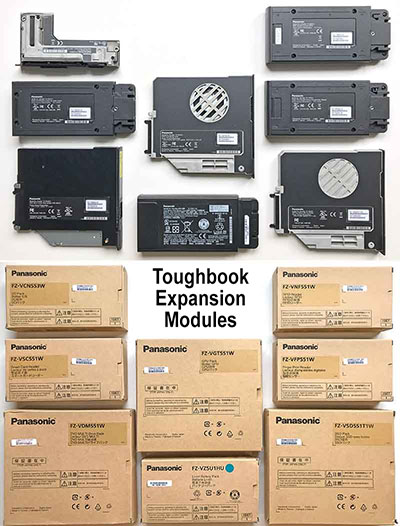
Still, Panasonic's modular approach treats the Toughbook 56 as a platform rather than as a fixed product. And not only that, but since most of these xPAKs, as Panasonic calls them, are user installable and changeable, units can be reconfigured in the field as job requirements change. Do note, though, that each of the three expansion areas only accommodates one xPAK, so it's either/or.
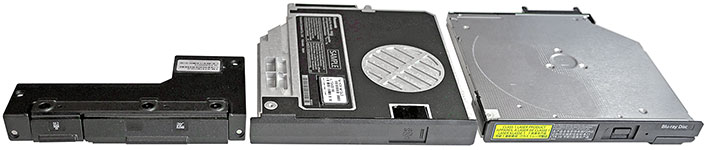
The image above illustrates one of the strengths of Panasonic's modular concept. Rather than requiring customers to order different notebook models, additional functionality is packaged into standardized expansion modules that can be installed, exchanged, or upgraded in minutes.
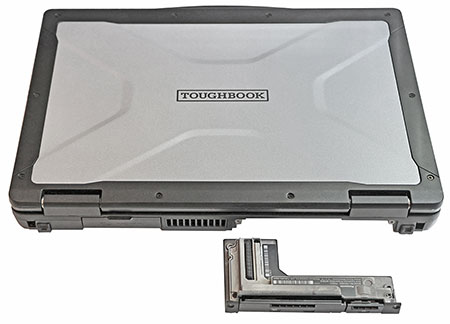 All modules easily glide into their respective expansion bay, snap into place, and, optionally, can be secured with a screw. To remove a module, undo the screw (if one is used), push the spring-loaded quick-release lever that keeps the module in place, and pull it out. Simple as that.
The modular approach offers two important advantages. First, the available xPAK modules make dozens of different hardware configurations possible. Second, customers don't have to buy everything up front. Functionality can be added later as needs evolve.
Between conventional configuration choices — processors, memory, storage, WWAN, and display — and the xPAK ecosystem, Toughbook 56 customers can tailor the laptop very precisely to their requirements. More importantly, unlike most notebooks, the system does not remain locked into its original configuration. It can continue evolving throughout its service life as applications, users, and job requirements change.
Design, look, and feel
Having followed the evolution of Panasonic Toughbooks ever since I was running Pen Computing Magazine back in the 1990s, what always impressed me was Panasonic's single-minded dedication to the ongoing improvement of the platform. It seemed almost a quest for perfection, with Panasonic engineers agonizing over every detail. There was no badge engineering, no uncertainty about mergers or acquisitions or sudden changes in product strategy. All of that combined to generate quality, exemplary longevity, and, perhaps most important of all, peace of mind for Toughbook customers.
But even icons change over time, and that includes the Toughbook brand with its signature design language and materials. Recent generations of Panasonic's semi-rugged laptops increasingly emphasized lower weight and a sleeker profile, appealing to smartphone- and tablet-toting mobile professionals accustomed to everything being as thin and light as possible. A stripped-down "Lite" version of the Toughbook 54 got all the way down to just 4.2 pounds, in part thanks to an undersized battery that compromised battery life.
That took slenderizing a step too far, and a course correction was needed. Light weight, yes, but not at the cost of performance, battery life, and functionality. The Toughbook 55 addressed that, and the new 56 continues in the same direction. Below is a look at the laptop from the top and sides:
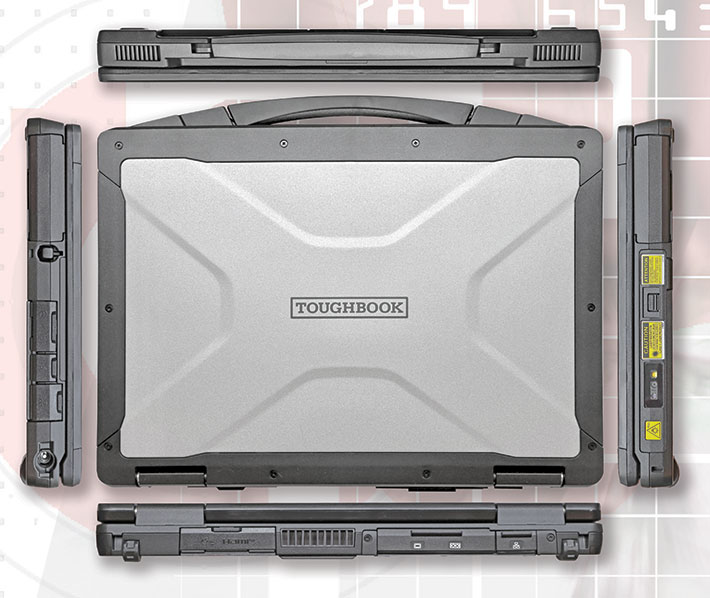
The Toughbook 56 is a stunning piece of equipment. Pictures don't do the beautifully powder-coated magnesium top justice. This laptop is virtually all metal. It's both sleek and substantial, both tough and beautiful. The overall Toughbook design language remains instantly recognizable, but Panasonic has subtly reshaped and refined the chassis, including its edges, handle, port covers, and internal magnesium structure.
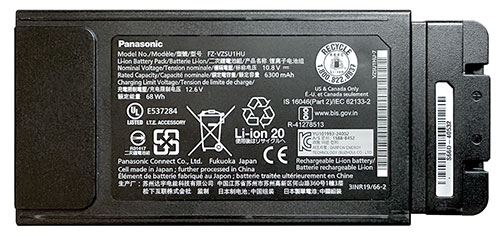
Compared to its Toughbook 55 predecessors, the redesigned chassis adds about a tenth of an inch in thickness. Weight starts at roughly 4.7 pounds, also just slightly more than the Toughbook 55 Mk3. Our nicely equipped review model weighed in at 5.5 pounds. Battery capacity remains unchanged from the predecessor at 70.2 watt-hours for the main battery, with an equal-capacity optional secondary battery.
The picture below shows the backside of the Toughbook 56. From left to right there's a USB 3.2 Gen2 Type-A port, a standard HDMI 4k port, and a SIM card slot protected by a screw-on metal cover. Next is the exhaust vent for the Toughbook 56's cooling system. Beyond that is the rear expansion area for one of several I/O xPAKs. Panasonic sent us one with DB-15 VGA, DB-9 serial, and RJ45 LAN ports. It literally takes just a couple of minutes to remove the cover, pop in the expansion module, and secure it with four small screws.

On the right side, from left to right, is the bay for the optional secondary battery, followed by the garage for the stylus and three separate protective covers. Beneath the first are the 3.5mm audio jack and a USB-C Thunderbolt 4 port. The second protects another Thunderbolt 4 port, while the third covers the standard gigabit RJ45 LAN jack. Finally, there's the power jack.

Note that the protective port covers are not individually waterproof seals. They are part of the Toughbook 56's overall IP53 protection and keep dust, debris, and splashing away from the connectors. They snap securely into place and can easily be replaced if damaged.
Also of note are the strong LCD hinges of the Toughbook 56. The Toughbook 55's spring-loaded latch that secured the display case against the system unit — and released with a light push on the upper portion of the latch —is gone, replaced by Panasonic's redesigned latch mechanism. The new design works, but we miss the 55's particularly elegant and effective solution.
A closer look at the Toughbook 56
Panasonic has historically emphasized the low failure rates of its Toughbooks — a result of decades of experience building laptops for work in the field. Those low failure rates are also testimony to Panasonic's rigorous testing (we've visited their "torture labs" more than once) and to the inherent quality of the product. That quality remains instantly obvious when you look at a Toughbook, even though they are now made in Taiwan rather than by the mothership in Japan. Everything looks well thought out, meticulously engineered, and refined until it works just right. And there are thoughtful touches that you rarely find anywhere else.
The image below show the backside of the Toughbook 56 with all of its access doors and covers, as well as the rear expansion pack removed.
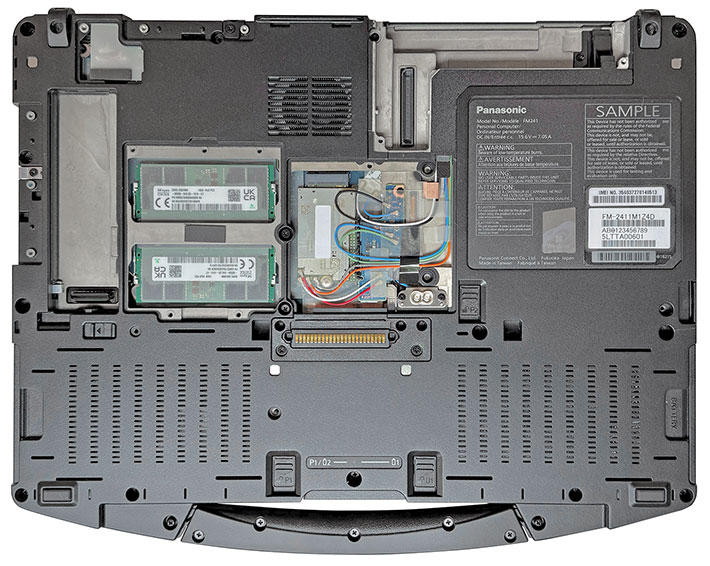
The modular design of this latest semi-rugged Toughbook is evident everywhere. Panasonic has essentially separated components required for the basic operation of the computer from functionality that may be desirable or necessary for certain applications, but isn't needed by everyone.
The former includes RAM, Wi-Fi, Bluetooth, primary storage (which now uses a different caddy from that in the predecessor 55 Mk3), and so on. Those are implemented as cards and modules using industry-standard sockets and interfaces. Most are easily accessible simply by removing an access cover.
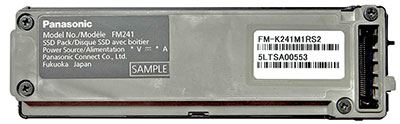 Optional functionality is handled differently, through the xPAK expansion modules discussed above. Those make it possible to add specialized capabilities without having to open up or otherwise modify the machine.
Panasonic considers that a better approach than simply building every possible feature into every unit, which would add cost and weight while eliminating the ability to change or retrofit functionality after the initial sale. With xPAKs, specialized capabilities can be added, removed, or exchanged without taking the machine apart.
There are, as with almost everything, pros and cons to this approach. The advantage is that customers only pay for what they need, and that the laptop can easily be configured and reconfigured in numerous ways. The limitation is that customers are restricted to the xPAK modules Panasonic makes available, and each of the three expansion areas can accommodate only a single xPAK.

The chassis of the Toughbook 56 is made of magnesium alloy, a material whose use in laptop computers Panasonic pretty much pioneered. Magnesium is light, strong for its weight, provides good electromagnetic shielding, and is readily recyclable. With decades of experience working with the material, Panasonic can produce extremely thin magnesium castings that are thinner than many plastic parts and weigh very little. Parts of the chassis and subframes are so thin that it's hard to believe they are made of metal. Yet they are completely rigid and strong.
Cooling has always presented an additional challenge in rugged laptop design. A fan requires ventilation openings where dust or liquids might potentially enter, and it adds a mechanical component that may fail under extreme conditions. For those reasons, rugged computer designers have traditionally preferred fanless cooling whenever processor performance and thermal requirements allowed it.
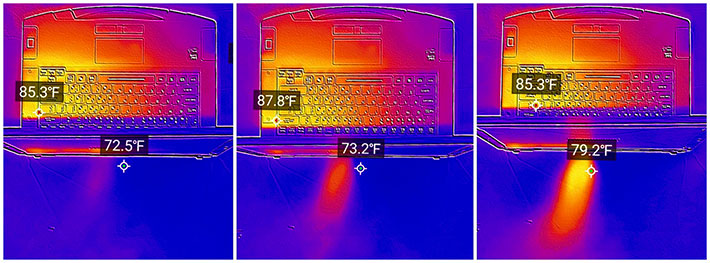
The Toughbook 56 does have a small, unobtrusive system fan. In the Panasonic PC Hub, users can select among three fan modes: "Quiet," which reduces fan speed at the cost of some CPU performance; "Standard," which balances CPU performance and fan speed; and "Cool," which increases fan activity while reducing CPU performance to keep the system cooler. The thermal images below show the Toughbook 56 operating in Quiet (left), Standard (center), and Cool (right) modes.
As far as storage goes, between the primary SSD and an xPAK storage module, the Toughbook 56 can accommodate up to 4TB — up to 2TB primary and now up to 2TB secondary storage. Both use the very fast PCIe NVMe interface; older Toughbook versions still used the slower SATA interface for secondary storage. With equal-capacity primary and secondary SSDs, RAID 1 mirroring is possible, providing redundancy should one of the drives fail. Both SSDs use OPAL encryption as standard, with FIPS 140-2 encrypted storage optionally available.
Wireless connectivity gets an upgrade as well. The Toughbook 56 moves to Wi-Fi 7, with support for the 2.4, 5, and 6GHz bands, higher potential throughput, lower latency, and more efficient use of available spectrum. Bluetooth 5.3 has given way to Bluetooth 5.4.
The Toughbook 56 is also certified for use on FirstNet, the nationwide wireless communications platform dedicated to first responders and public safety, and it supports Band 48 CBRS. CBRS stands for Citizens Broadband Radio Service and is often used for private LTE and 5G networks, allowing organizations to deploy dedicated cellular infrastructure with greater control over coverage, capacity, and security.
On the ever-important USB connectivity front, there are now two USB-C Thunderbolt 4 ports. Thunderbolt 4 provides up to 40Gbit/s data transfer, supports external displays and USB4 devices, and can carry power as well as data and video over a single connection. There's also a conventional USB-A port, HDMI with 4K output, RJ45 LAN, docking connectivity, and audio in/out. Additional I/O is available through xPAK expansion modules, while the MicroSDXC card slot is now optional.
Overall, the Toughbook 56 combines Panasonic's traditional emphasis on rugged construction and serviceability with a significant modernization of the technologies inside.
Keyboard and touch pad
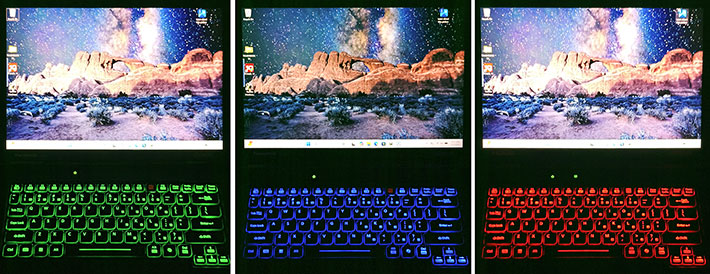
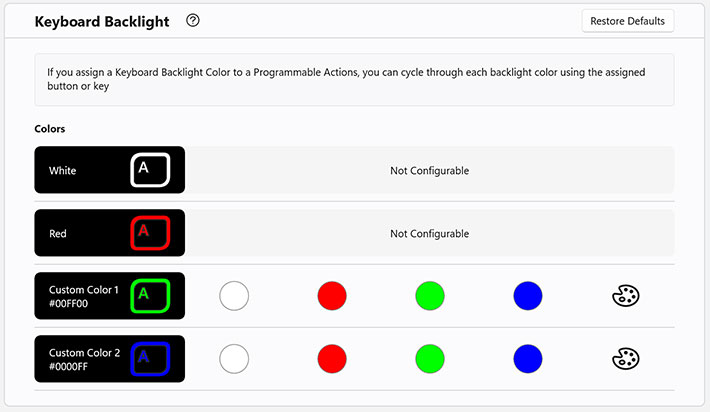
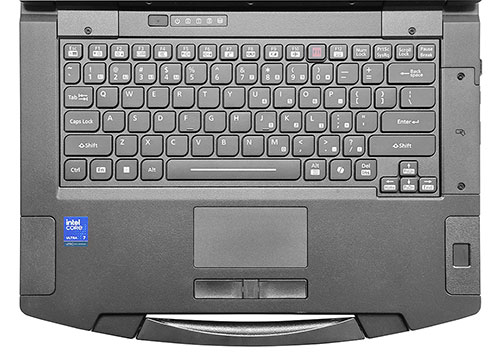 The Toughbook 56's keyboard seems largely unchanged from its immediate 55-Series predecessor. It is still a full-scale QWERTY island-style layout with 82 keys. The flat keys are black with white letters, numbers and symbols. The keys are backlit and go, via keyboard control, from off to full-bright in four steps. The key backlight color can be set in the Panasonic PC Hub utility to white, red, green, blue, or any other RGB color.
There is no separate numeric keypad, but keypad functionality is available via the usual number keys assigned to 7, 8, and 9, and the letters UIO, JKL, and M. All those additional labels and icons make the keyboard look a little busy, but regular users will get the hang of it in no time. In use, the keys offer just the right amount of travel and nice tactile feedback.
In addition to the standard F1 through F12 function keys, the Toughbook 56 also has four "virtual" programmable function keys — A1, A2, A3, and A4. These are invoked by depressing the FN function key, and then numbers 1, 2, 3, and 4. The four virtual function keys can be programmed in the Panasonic PC Hub to perform from a list of 20 actions via short and long press of the key. This means that up to eight separate functions can be assigned to the four virtual function keys.
Below the keyboard is the touchpad, a 3-3/8 x 1-3/4 inch flush-mounted electrostatic pad with multi-touch support. Separate left and right mouse buttons are positioned in front of it and are now slightly concave. The pad works well. In our Toughbook 55 Mk3 review, we noted that getting the cursor to move required a relatively firm touch. On the new 56, the cursor responds smoothly to light touch and finger movements.
For applications that use voice input or recognition, the Toughbook 56 provides a dual-microphone array that uses AI processing to reduce background noise pickup. That can make a significant difference in the noisy environments where Toughbooks are often used. And since hearing the computer can be just as challenging as having it hear you, Panasonic has also increased maximum speaker output to 98 decibels, six decibels louder than the already loud predecessor.
Below is the Toughbook 56 Mk1 in complete darkness, showing several of the available keyboard backlight colors.
Keyboard backlight colors are set in a special panel in the Panasonic PC Hub utility:
Powered by Intel "Arrow Lake" Core Ultra Series 2 processor technology
Due to their mobile nature, all laptops represent a compromise between performance, size, weight, battery life, and cost. High performance is always good, but it generally means more heat and higher power consumption. You can compensate with a higher-capacity battery, but that adds size and weight. Conversely, a small, quiet computer without a fan will generally offer less performance. More speed, more heat, less battery life. More battery life, less performance, less heat. If you want both more performance AND more battery life, you're likely looking at more weight and more heat. It seems like a no-win situation, one where compromise is the only solution.
 As of this writing (July 2026), among the 14-inch semi-rugged laptop competition, the Getac S410 remains on 13th-generation Intel Core processors, while Dell's Pro Rugged 14 and the Durabook S14I have moved to Intel Core Ultra, albeit Series 1 rather than the Series 2 processors used in the new Toughbook 56.
Overall, the "Raptor Lake" 13th generation of Intel Core processors that powered the predecessor Toughbook 55 Mk3 was hardly obsolete. Raptor Lake was a very good processor generation, one that retained and further refined the hybrid architecture of performance and efficiency cores Intel had introduced with 12th-generation "Alder Lake." By the time Raptor Lake arrived, the hybrid concept was mature and well understood, and it delivered an excellent combination of performance and efficiency.
But time doesn't stand still. AI happened, and nothing's been the same. Everything is AI-ready, AI-enhanced, AI-capable, and so on. Whether it's necessary or not. AI even added a new key to the standard QWERTY keyboard, the "Copilot key," generally taking the place of the old Menu key or right-hand Control key and providing direct access to Microsoft's Copilot. Integrated AI capabilities remain fairly limited for now, but new features and functions are being added all the time.
|
|
Toughbook 56 Mk1 CPU options
|
Intel Core Ultra 7
|
Intel Core Ultra 5
|
|
|
Model
|
265H
|
235H
|
|
|
Performance Cores
|
6
|
4
|
|
|
Efficient Cores
|
8
|
8
|
|
|
Low Power Efficient Cores
|
2
|
2
|
|
|
Total Threads
|
16
|
14
|
|
|
Max Turbo Performance Cores
|
5.30 GHz
|
5.00 GHz
|
|
|
Max Turbo Efficient Cores
|
4.50 GHz
|
4.40 GHz
|
|
|
CPU Base/Turbo power
|
28/115 watts
|
28/115 watts
|
|
|
Smart Cache
|
24MB
|
18MB
|
|
|
Integrated graphics
|
Intel Arc 140T
|
Intel Arc 140T
|
|
|
Graphics max speed
|
2.30 GHz
|
2.25 GHz
|
|
|
GPU Peak TOPS
|
75
|
74
|
|
|
NPU Peak TOPS
|
13
|
13
|
For now, by using Core Ultra Series 2 processors, the Toughbook 56 pulls ahead of its primary semi-rugged 14-inch laptop competition in terms of processor technology. Intel's next generation — Core Ultra Series 3 — is already here, but Series 2 remains state-of-the-art in this class. The table to the right shows the two CPUs Toughbook 56 customers can choose from:
Now, what does all of that mean? First, you'll notice that both processor options for the Toughbook 56 Mk1 are Intel "H" Series chips — processors designed for high-performance laptops. They are the same processors available in Panasonic's fully rugged Toughbook 40. These H-Series chips use a hybrid architecture with Performance-cores and Efficient-cores, but also include Low Power Efficient-cores for very low-power background tasks.
 You'll also note that the Performance-cores in these chips no longer use Hyper-Threading, so the total number of processor threads now equals the total number of physical cores. The Core Ultra 7 option has six Performance-cores compared to four in the Core Ultra 5, which should contribute to a measurable performance difference, as should the Ultra 7's larger cache and slightly higher clock speeds.
Both processor options also use Intel Arc 140T integrated graphics with eight Xe cores and roughly similar maximum clock speeds, so graphics performance should be quite close. The NPUs in the two processor options are likewise identical, delivering up to 13 TOPS.
To get a sense of where the Toughbook 56 Mk1 stands in terms of raw performance compared with its Toughbook 55 Mk3 predecessor and its primary semi-rugged laptop competition from Dell, Durabook, and Getac, we ran our standard benchmark suites, including PassMark Software's PerformanceTest 6.1 and 9.0, CrystalMark, UL Solutions' PC Mark 10, GeekBench 5 and one of the most often used 3DMark graphics benchmarks, Time Spy. The results are as follows:
|
Panasonic Toughbook 56 Benchmarks and Comparisons
|
|
Manufacturer
|
Panasonic
|
Panasonic
|
Dell
|
Durabook
|
Getac
|
|
Model
|
Toughbook 56 Mk1
|
Toughbook 55 Mk3
|
Pro Rugged 14
|
Durabook S14I
|
S410 G5
|
|
Year tested
|
2026
|
2024
|
2024
|
2025
|
2023
|
|
Type
|
14-inch laptop
|
14-inch laptop
|
14-inch laptop
|
14-inch laptop
|
14-inch laptop
|
|
CPU Type: Intel
|
Core Ultra 7
|
Core i7
|
Core Ultra 7
|
Core Ultra 7
|
Core i5
|
|
CPU Model and generation
|
265H (15th)
|
1370P (13th)
|
165U (14th)
|
155U (14th)
|
1350P (13th)
|
|
CPU base/max turbo power
|
28/115 watts
|
15/55 watts
|
15/57 watts
|
15/57 watts
|
28/64 watts
|
|
Discrete Graphics
|
NA
|
NA
|
NA
|
NA
|
NA
|
|
Battery power
|
70.2 whr
|
136.0 whr
|
107.0 whr
|
149.0 whr
|
149.0 whr
|
|
PassMark 6.1
|
12,846
|
10,714
|
10,201
|
10,543
|
9,503
|
|
PassMark 9.0
|
6,963
|
7,020
|
6,343
|
5,191
|
6,392
|
|
CrystalMark
|
611,445
|
569,420
|
522,901
|
442,548
|
567,465
|
|
PCMark 10 overall
|
8,123
|
5,956
|
5,742
|
5,450
|
5,710
|
|
- PCMark 10 Essentials
|
10,713
|
11,088
|
9,925
|
8,802
|
10,555
|
|
- PCMark 10 Productivity
|
14,395
|
7,406
|
9,590
|
8,093
|
6,918
|
|
- PCMark 10 Content Creation
|
9,433
|
6,983
|
7,327
|
6,169
|
6,919
|
|
PCMark 10 Drive
|
2,437
|
2,383
|
2,104
|
1,697
|
1,817
|
|
PCMark 10 Battery
|
12:10 hrs
|
17:00 hrs
|
11:35 hrs
|
20:21 hrs
|
16:12 hrs
|
|
PCMark 10 Whr/hr
|
5.77
|
8.00
|
9.42
|
7.32
|
9.20
|
|
3DMark Time Spy
|
3,010
|
1,772
|
2,336
|
2,050
|
1,685
|
|
GeekBench 5 Single Core
|
2,772
|
1,833
|
1,769
|
2,169
|
1,622
|
|
GeekBench 5 Multi Core
|
14,049
|
9,723
|
8,787
|
6,358
|
9,136
|
|
GeekBench 5 Open CL
|
33,490
|
17,674
|
19,270
|
18,010
|
16,815
|
|
GeekBench AI OpenVINO quant
|
15,119
|
no NPU
|
no NPU
|
18,922
|
no NPU
|
When, back in 2021, we reviewed the Toughbook 55 Mk2, we concluded that with its Intel Core i7-1185G7 processor it was "very, very fast." Three years later, in 2024, we found the Toughbook 55 Mk3 with its Core i7-1370P considerably faster yet. And now the new Toughbook 56 raises the bar again, in many areas by a lot. For now, it is also faster in almost every one of our benchmarks than its direct competition.
Competition is fierce in this segment of ruggedized laptops that aren't as costly as fully rugged models, so it's no surprise that there's a fair amount of leap-frogging going on. As of this writing in August 2026, however, the Toughbook 56 is on top, sometimes by a little and often by a lot.
Does it matter all that much? For some, it very well may. For others, a slight difference in benchmark performance may not matter much. There may be enough brand loyalty to stay the course even in years where one of the others comes out on top. Or it simply may not matter who "wins" among the semi-rugged 14-inch laptops because, for now, none of these five qualifies as a Microsoft Copilot+ PC.
To earn that designation, a system needs a compatible NPU delivering at least 40 TOPS, among other requirements. In this group, three don't have an NPU at all. Two do, but neither comes anywhere near the required 40 TOPS.
That's because the new Toughbook 56 — even with its very fast and remarkably power-efficient Core Ultra 7 265H — isn't primarily an AI platform, nor does its 13-TOPS NPU meet Microsoft's Copilot+ requirement. That's not really what this class of laptop is about. These machines are designed to reliably provide a well-balanced combination of performance, battery life, durability, connectivity, configurability, and long-term support across a wide range of jobs.
Perhaps even more impressive than the raw performance increase is the Toughbook 56's power efficiency. In our PCMark 10 battery testing, the 56 consumed just 5.77 watt-hours per hour, compared to 8.00 for the Toughbook 55 Mk3 and between 7.32 and 9.42 watt-hours per hour for the competition. Its 12:10 runtime doesn't lead the group, but that's with a battery of just 70.2 watt-hours — less than half the capacity of some of the others. So Panasonic and Intel have managed to substantially increase performance while actually reducing power consumption. And if longer runtime is desired, simply pop in an optional second (and identical) battery to double the run time.
But what if a request for proposal or list of job requirements specifies Microsoft Copilot+ PC compatibility? Then the Toughbook 56 won't qualify. Neither will current semi-rugged laptops from Dell or Durabook.
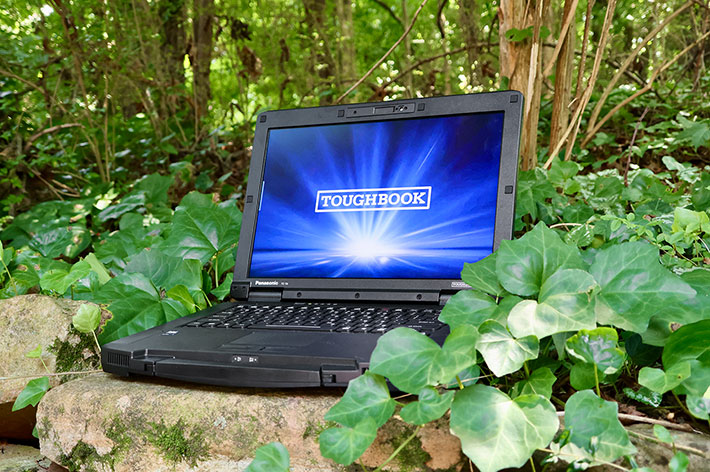
Anyone interested in the Toughbook 56 should pay particular attention to the memory and graphics configuration, as it can have a significant impact on graphics performance. In its default configuration with just one RAM DIMM, the Toughbook 56 operates with basic Intel Graphics. Adding a second DIMM enables the more powerful Intel Arc 140T graphics that's part of both available processor options. For applications requiring still more sustained graphics performance, Panasonic also offers optional AMD Radeon PRO W7500M discrete graphics with 8GB of dedicated GDDR6 VRAM.
Battery life -- modern tech gets you more for less
When rugged notebooks first came on the market, they struggled with battery life. It was next to impossible to combine enough performance for field work and a screen bright enough to be viewable outdoors in a package that wasn't too heavy to carry around. The earliest rugged notebooks lasted less than two hours on a charge, and some barely an hour.
Compared to those early notebooks, the Toughbook 56 Mk1 is lightyears more advanced. And it's also more advanced than earlier semi-rugged Toughbooks. While the predecessor Toughbook 55 used the same 70.2 watt-hour battery, Panasonic now estimates up to 12 hours on a charge, up from ten. Anything that makes it through a regular full shift of operation is good. And since the Toughbook 56 has two battery bays, estimated battery life doubles with the optional second battery.
 Back in the day, poor battery life was often blamed on hot-running, power-inefficient processors. At first glance, the Toughbook 56's new processors don't appear particularly frugal. The predecessor Toughbook 55 Mk3 used processors rated at 15 watts base power and up to 55 watts maximum turbo power, whereas the chips available for the Toughbook 56 are rated at 28 and up to 115 watts, respectively. You might therefore expect the new model to use more battery power and run down its battery much more quickly. Instead, the opposite happens. Far more sophisticated processor and system design results in substantially more performance while actually using less energy in everyday operation. Sort of like modern cars making much more power while using less gas (or electricity) in the process.
We still wanted to measure the actual idle power draws of the new design. In the Windows "Best Power Efficiency" mode, with backlight at the lowest level (which is really only visible in a very dark room), BatteryMon showed a minimum draw of just 1.9 watts!! With the backlight at 50%, it was only 2.4 watts, and with the backlight at 100% a still very low 5.5 watts.
Dividing the full available 68 watt-hours of a fully charged battery by the lowest observed battery draw of 1.9 watts would indicate a theoretical battery life of 35.6 hours! Having the backlight at 50% and at 100% would yield theoretical battery life of 28.3 and 12.4 hours, respectively.
In Windows "Best Performance" mode, with the backlight at its lowest level, we still saw a draw of only 2.6 watts. With the backlight at 50%, it was 2.8 watts, and with the backlight at 100%, about 6.5 watts. That means that even in "Best Performance" mode, the numbers translate into a theoretical maximum of 26.2 hours with the display at minimum brightness, and 10.5 hours even at full brightness. All of these power draws are less than half of what we measured in the Toughbook 55 Mk3 predecessor model.
Toughbook 56 Mk1 BatteryMon Power Draws (at idle)
| Operating mode |
Lowest (0%) |
50% |
Maximum (100%) |
| Best Power Efficiency |
1.9 W
35.8 hrs theoretical
|
2.4 W
28.3 hrs theoretical
|
5.5 W
12.4 hrs theoretical
|
| Best Performance |
2.6 W
26.2 hrs theoretical
|
2.8 W
24.3 hrs theoretical
|
6.5 W
10.5 hrs theoretical
|
Lowest observed idle draw: 1.9 watts •
Full-brightness draw: 5.5–6.5 watts
Theoretical runtimes are based on approximately 68Wh of available battery capacity.
Real-world battery life "mileage," of course, depends on numerous variables. Measuring minimum draw at idle in a test lab is not an accurate predictor of actual battery life. Today's processor designs are so sophisticated and their power management so dynamic that conventional idle power-draw and drawdown tests really can't tell you exactly what you'll get in actual use. Then again, it's much the same with today's vehicles. You may be able to coast along the highway getting 60mpg in a hybrid, but step on the gas and that figure quickly drops into the teens and below.
For a more realistic standardized workload, in the PCMark 10 Battery Test, the Toughbook 56 ran for 12 hours and 10 minutes. With the Toughbook 56's 70.2Wh battery, that translates into an average draw of just 5.77 watt-hours per hour. That's substantially less than the 8.00Wh/hr we measured with the Toughbook 55 Mk3, and also the lowest consumption of any of the semi-rugged 14-inch laptops in our comparison table.
Excellent display
The Toughbook 56 display measures 14 inches diagonal — currently the standard size for most semi-rugged notebooks. While the Toughbook 55 Mk3's standard display still offered only 1366 x 768 pixel resolution, which we considered nowhere near enough, the new Toughbook 56 comes standard with 1920 x 1200 WUXGA resolution and a considerably sharper, albeit still not exceptional, 162 pixels per inch. The standard display, however, doesn't have touch, and its 350-nits luminance makes it best suited primarily for indoor use. We highly recommend the optional 10-point capacitive multi-touch display with 1,000-nits luminance for much better outdoor viewability as well as greater functionality.
 As far as aspect ratio goes, 1920 x 1200 pixels makes for, to us, an eye-pleasing 16:10 ratio. Interesting how aspect ratios change over time. For many years, both TVs and computer monitors used the tall and boxy 4:3 ratio. With the advent of 1920 x 1080 high-definition television, laptops also migrated to the wider 16:9 format. More recently, there's been a trend back toward somewhat taller displays, with 16:10 and 3:2 increasingly common in tablets and laptops.
But resolution isn't all that matters, especially in displays used outdoors. There, daylight viewability matters, and Panasonic was an early pioneer in that technology. Over the years the company used marketing terms such as TransflectivePlus, DayBrite ARX, and "CircuLumin," all referring to proprietary combinations of anti-glare and anti-reflective treatments, circular polarizers, and direct layer bonding designed to eliminate as many potentially reflecting surfaces as possible. Combine those optical measures with a powerful backlight, and a conventional LCD can remain usable under remarkably difficult lighting conditions. Panasonic no longer uses those terms, but the displays themselves are better than ever.
What constitutes a strong backlight? That's where luminance, the amount of light emitted from a surface in a given direction, comes in. Luminance is officially measured in candelas per square meter (cd/m²). Since that's a cumbersome term, display specifications generally use "nits" instead. One nit equals one candela per square meter.
Conventional laptop displays generally fall somewhere in the 250 to 400-nits range. Premium tablets and notebooks may reach 500 to 1,000 nits or more, while displays specifically designed for outdoor use in rugged systems can reach 1,500 nits and beyond.
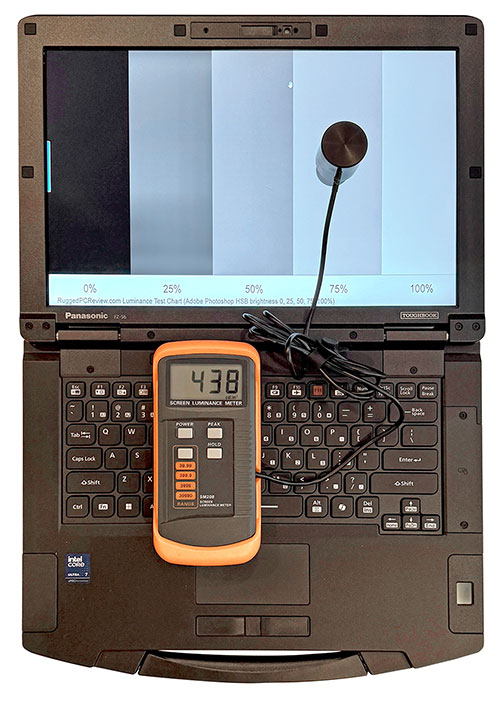
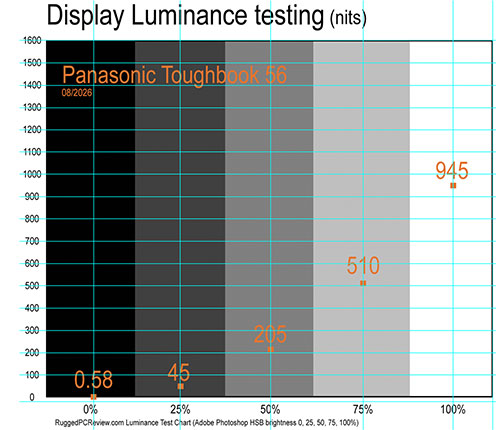 The Toughbook 56's optional outdoor-viewable screen is rated at 1,000 nits, and we measured a very respectable 945 nits (see graph to the right). No backlight can completely overpower direct sunlight, of course, but a very bright display combined with effective reflection control makes a device substantially more usable outdoors under difficult lighting conditions.
Interestingly, the display also does very well at the opposite extreme. Its backlight can be throttled down to a nominal two nits; we actually measured just 0.58 nits at the lowest setting. That's enough to view the screen in complete darkness, but dim enough not to illuminate the user's surroundings or make the screen easily visible from a distance.
How well does it all work outdoors? Very well. Under virtually all circumstances, the Toughbook 56 display remains viewable, usable, and readable. It accomplishes that through a combination of high brightness and very good reflection control.
The pictures below were shot outdoors on a bright Tennessee summer afternoon. Viewed head-on, the display is brilliant, with excellent brightness, color, and contrast. Changing the viewing angle affects perceived brightness somewhat, but there's no noticeable color or contrast shifting.
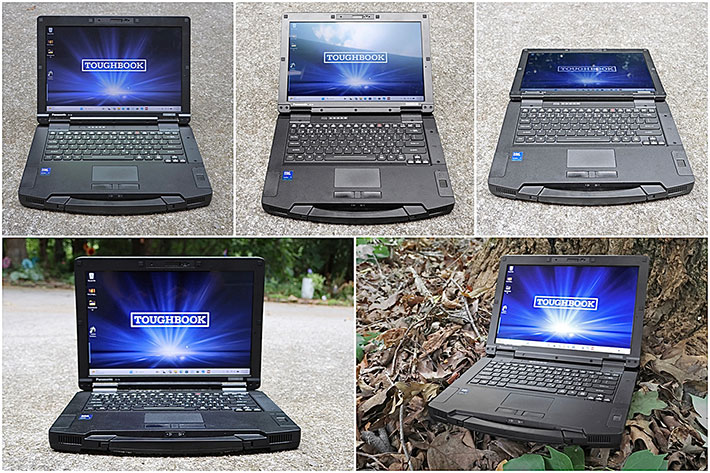
The picture above on the left shows the type of reflections common to this kind of glossy display. How noticeable they are depends largely on viewing angle and what's being reflected. Modern tablets and smartphones use the same general glossy-display approach. We've all learned to live with reflections and have become adept at avoiding them, changing the viewing angle, or simply tuning them out.
Touch and stylus
As stated, our review unit came with the optional 1920 x 1200 pixel, 1,000-nit display with 10-point capacitive multi-touch and a stylus. Interestingly, while the Toughbook 33 offers capacitive multi-touch as well as an optional active Wacom digitizer for hovering and superior accuracy, the touchscreen-equipped Toughbook 56 makes do with a passive 3mm-tip solid plastic stylus. The 4-5/8 inch stylus can be stowed in a spring-loaded garage on the right side of the laptop.

Some users may miss the option of an active digitizer on the Toughbook 56, especially since Wacom pen technology remains very well supported by Windows 11 and offers much greater precision. On the other hand, precise pen input may simply not be a priority on this type of laptop. The 56 has its own touchpad, can easily be used with a mouse, and its passive stylus is adequate for tapping small interface elements or applications where finger touch isn't precise enough.
 Capacitive multi-touch, on the other hand, is very useful. Everyone knows and expects the effortless tapping, dragging, pinching, and zooming that's available on every smartphone and tablet today. And it works just as effortlessly here.
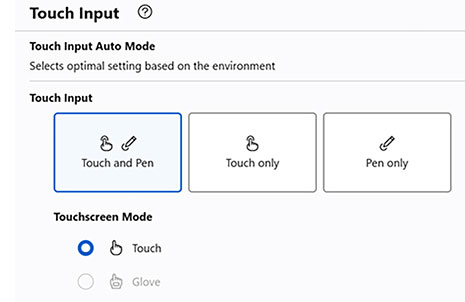
The Toughbook 56 Mk1 comes with the Panasonic PC Hub utility that includes a Touch Input section. Users can let the system automatically recognize the operating environment and select the optimal touch setting, or manually configure it for touch and pen input, touch only, pen only, or touch while wearing gloves.
Note that the (completely touch-optimized) Panasonic PC Hub utility allows configuration of numerous device settings, system settings as well as checking for system updates.
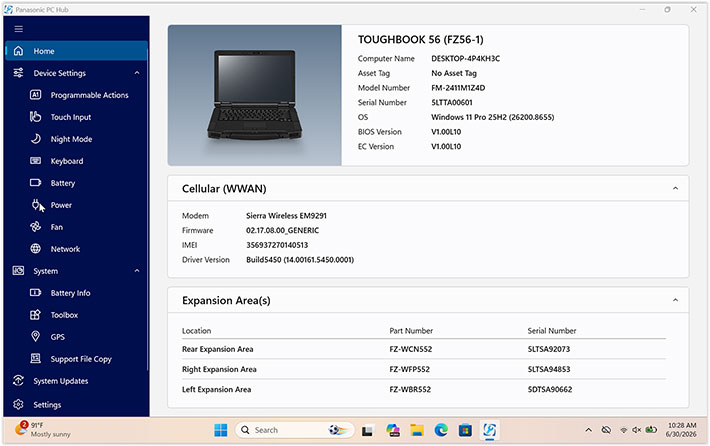
PC Hub itself is fully touch-optimized and serves as Panasonic's central utility for configuring numerous hardware and system settings, checking for updates, and accessing diagnostic and support functions. Its Toolbox can also configure the camera, manage asset-tag information and the 2D barcode key emulator, recalibrate the battery, set emergency notifications, and display pertinent system information.
Tough and rugged
As far as ruggedness goes, Panasonic practically defined the rugged notebook category and over the years has continually pushed its boundaries. Which isn't easy when your products are not only supposed to be tough, but also carry a signature design language and choice of materials. It's relatively easy to encase a product in loads of industrial plastic and rubber to protect it. It's much more difficult to make rugged products that are also elegant and attractive. Panasonic's trademark powder-coated magnesium is a primary example. How can a machine that looks almost jewel-like also be light and rugged?
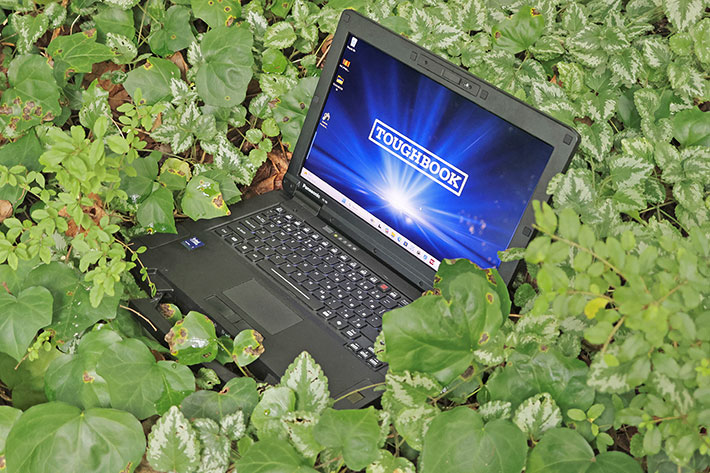
Having toured Panasonic's factories in Japan twice and having had numerous discussions with Panasonic engineers and designers, I know how seriously Panasonic takes its task and the Toughbook legacy. I recall long discussions over certain finishes, over the scratch resistance of this or that material, over the implications of using one type of rubber or foam rather than another. It's always give and take and a degree of compromise, right at the dividing line between form and function.
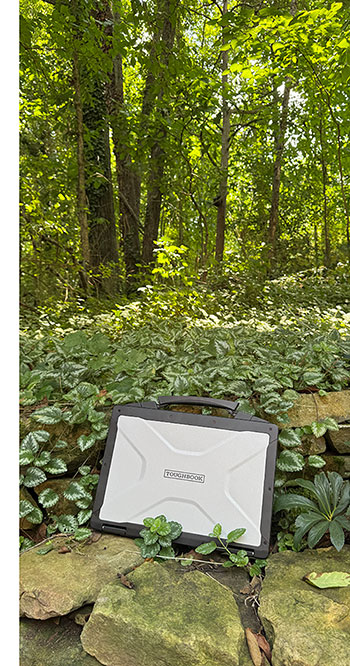 What has changed over time are the standards of ruggedness within the various ruggedness classifications. Ruggedness costs, and there are inevitable compromises in size and weight. The question then becomes how rugged a "semi-rugged" laptop should be. There's always the temptation to beat competitors on individual specifications, but ultimately it's a judgment call to find the optimal balance between ruggedness, size, weight, functionality, and cost.
Take ingress protection. Leading modern smartphones routinely carry IP68 sealing and can survive temporary submersion. Ideally, a field laptop would be equally impervious to water. But sealing a laptop with a keyboard, cooling vents, numerous ports, removable batteries, and expansion bays to that degree would have a major impact on design and cost.
The fully rugged Toughbook 40 carries IP66 sealing — it's dust-tight and protected against powerful water jets. The semi-rugged Toughbook 56 is rated IP53: protected against harmful dust ingress and against water sprayed at angles up to 60 degrees from vertical. In practical terms, it should handle substantial rain, but don't sit it in a puddle or submerge it.
Interestingly, only a few years ago, semi-rugged notebooks generally offered little or no rated ingress protection against liquids. Then, gradually, such machines moved to IP51, then IP52, and now leading semi-rugged systems such as the Toughbook 56 have reached IP53.
Another important measure of ruggedness is drop resistance. Notebook computers will inevitably get dropped; it's just a matter of time. The Toughbook 56 was tested to MIL-STD-810H Method 516.8, Procedure IV, including drops from 36 inches onto plywood. When you walk around with a notebook under your arm and drop it, it falls from roughly three feet. Drop it while standing and actually using it, however, and four feet is quite possible. Perhaps Panasonic can bake that extra margin into the next generation of its semi-rugged Toughbook.
Panasonic lists the Toughbook 56 as having been tested according to procedures outlined in MIL-STD-810H and other applicable standards covering such environmental conditions as shock, vibration, temperature, humidity, and altitude. Panasonic also makes available a summary of the Toughbook 56's certifications and test results [see here].
The only area where there is a bit of a disconnect is this: the Toughbook 56, like all Toughbooks, is almost jewel-like in its look and feel, with gorgeous surfaces and plenty of small details. The overall design certainly communicates strength and quality, but in the absence of obvious sacrificial protection such as substantial rubber bumpers or tough protective plastics, you can't help but wonder how those beautiful surfaces and details will hold up against the scratches, dents, and everyday abuse that are part of life in the field.
And that's maybe the inherent challenge Panasonic has set for itself: making a rugged laptop that doesn't have to look like one.
Security
Like virtually all modern mobile computing hardware, the Toughbook 56 offers multiple layers of hardware and software security designed to prevent unauthorized access and protect sensitive data. Available security options include password protection, an optional fingerprint reader, Smart Card reader, and a Windows Hello-compatible facial recognition camera, allowing organizations to implement multifactor authentication policies.
Our review unit included Intel Trusted Platform Module (TPM) 2.0 hardware security. TPM provides a secure hardware-based foundation for protecting encryption keys, validating system integrity during the boot process, and supporting advanced authentication and certificate-management functions. Working together with Windows 11 security features, TPM can help protect sensitive credentials, biometric information, and encrypted data.
Fingerprint authentication is available via an optional capacitive fingerprint scanner. Unlike older swipe-style readers, capacitive sensors allow users to authenticate by simply placing a finger on the scanner.
The Toughbook 56 also comes with "Local platform erase" — a specialized emergency security feature that allows a user or administrator to completely and securely wipe all data from the device's storage drives in less than ten seconds. The feature was already available on the Toughbook 55 as a corporate manageability configuration; on the Toughbook 56, NIST BIOS-compliant local platform erase features are more deeply built into the baseline security stack by default.
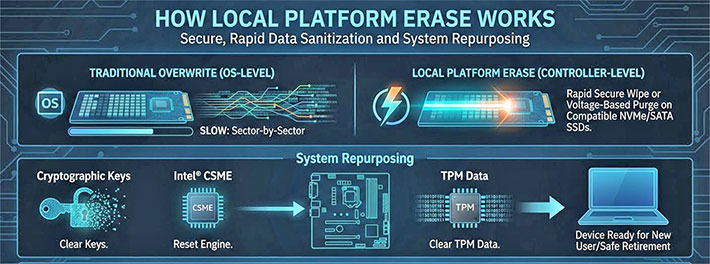
Security requirements vary considerably. Some users may rely only on standard passwords, while others may operate under strict enterprise, government, healthcare, public safety, or defense security policies that require multiple layers of authentication and device management.
Physical security should not be overlooked. The Toughbook 56 includes a Kensington lock slot, allowing the laptop to be secured with a standard locking cable. While simple, it remains an effective deterrent against opportunistic theft.
Both CPU options available for the Toughbook 56 systems support full Intel vPro Enterprise, which is Intel's highest commercial grade specification. It provides deep, hardware-level tools for remote management, security, reliability, and recovery.
Finally, Absolute Persistence technology in the BIOS maintains a resilient connection between the laptop and enterprise management systems for tracking, recovery, and security management purposes.
Summary: The Panasonic Toughbook 56
Panasonic's Toughbook 56 Mk1, introduced in 2026, is designed for users who can't afford to have their laptop fail on the job. They may not need the additional weight and considerably higher cost of a fully rugged computer, but they do want the reassurance that comes with a durable, reliable tool built for work well beyond the office.

With the Toughbook 56, which weighs as little as 4.66 pounds with one battery, customers get an exceptionally well-built notebook that strikes a very good balance between form and function. It is an elegant design with beautiful details and finish — no one does powder-coated magnesium better than Panasonic — backed by the company's decades of experience designing rugged mobile computers.
Performance is excellent thanks to a choice of two Intel Core Ultra Series 2 "Arrow Lake" processors. In our testing, the Toughbook 56 was faster than its Toughbook 55 Mk3 predecessor by a substantial margin in many areas and, as of this writing, also leads most of its direct semi-rugged 14-inch competition. Equally impressive is how efficiently it delivers that performance, with remarkably low power draw for a system this fast.
The 14-inch 1920 x 1200 IPS display is sharp, vibrant, and offers excellent viewing angles. We especially recommend the optional 1,000-nit daylight-viewable version with glove-capable 10-point capacitive multi-touch. It performed very well outdoors in our testing and can also be dimmed to extremely low levels for use in darkness.
One of the Toughbook 56's greatest strengths remains its modular design. Three xPAK expansion areas allow customers to configure the system for specific applications and, just as importantly, reconfigure it later as requirements change. There is no need to purchase functionality that isn't required for the job, and many capabilities can be added or exchanged without taking the computer apart.
The Toughbook 56 comes standard with one 70.2 watt-hour battery and has two identical battery bays. With just one battery, our review unit ran continuously for 12 hours and 10 minutes in the PCMark 10 battery test. That's excellent, especially given the system's high performance and relatively modest battery capacity. Users who need substantially more runtime can simply add the optional second battery.
The Toughbook 56 starts at $3,325. That's a good chunk of money, but reasonable for what you get. Anyone in need of a powerful, highly configurable, remarkably efficient and relatively light semi-rugged laptop that can go where ordinary consumer and enterprise notebooks shouldn't will find the Toughbook 56 a very attractive option. – Conrad H. Blickenstorfer, August 2026
Panasonic Toughbook 56 Mk1 Specs
| Added/changed |
Released April 2026, full review 07/2024
|
| Type |
Semi-rugged notebook computer
|
| Processor |
Intel Core Ultra 5 vPro 235H 14-core processor, 18MB Intel Smart Cache
Intel Core Ultra 7 vPro 265H 16-core processor, 24MB Intel Smart Cache
|
| Processor speed |
Intel Core Ultra 5 vPro 235H: 5.00GHz max turbo frequency
Intel Core Ultra 7 vPro 265H: 5.30GHz max turbo frequency
|
| TDP |
Both CPU options: 28/115 watts
|
| OS |
Microsoft Windows 11 Pro |
| Graphics |
Intel Graphics (units with 1 DIMM)
Intel Arc 140T (units with 2 DIMM)
Optional: 8GB AMD Radeon PRO 7500M
|
| Memory |
User-upgradeable RAM (up to 2 DIMMs) 16-64GB total (DDR5-5600MHz)
|
| Display type |
IPS LCD with LED backlight, anti-glare treatment (touch model with anti-reflective coating), direct bonding |
| Display size/res |
14.0" 1920 x 1080 pixel (350 nits -- 162 pixels per inch) w/o touch, anti-glare
14.0" 1920 x 1080 pixel (1000 nits -- 162 pixels per inch) with touch, anti-glare, anti-reflective>
|
| Digitizer/Pens |
Stylus on optional 1,000 nits multi-touch screen |
| Keyboard |
Integrated 87-key, 100%-scale, electrostatic touchpad with multi touch support, multi-color backlit keyboard |
| Storage |
Quick-release 512GB, 1TB, or 2TB OPAL PCIe NVMe M.2 SSD with heater
optional 2nd 512GB, 1TB, or 2TB quick-release OPAL NVMe SSD with heater |
| Multimedia Pocket |
Yes (optional Blu-ray or DVD drive via xPAK expansion pack)
|
| Slots |
Dual SIM (Nano-SIM 4FF and eSIM)
Optional MicroSDXC Card UHS-I
|
| Housing |
Magnesium alloy
|
| Temperature |
MIL-STD-810H 501.7/502.7 Proc II: -20° to 140°F (-29° to 60°C) |
| Humidity |
MIL-STD-810H 507.6: 95% relative humidity |
| Salt fog |
unknown
|
| Enclosure Class |
IP53 dust-protected design, protected to spray to 60%deg; from vertical |
| Drop spec |
MIL-STD-810H 516.8 Proc IV: 26 x 3-foot drops to 2-inch plywood, non-operating, all to same unit |
| Security |
Secured-core PC, Kensington lock slot, NIST BIOS compliant, TPM 2.0, Persistence technology by Absolute in BIOS, encrypted OPAL SSDs; optional: fingerprint reader xPAK, insertable SmartCard CAC reader xPAK, 13.56MHz contactless SmartCard CAC reader xPAK
|
| Size |
13.6 x 10.7 x 1.4 inches
|
| Weight |
Starting at 4.66 pounds; our test unit weighed 5.5 pounds with one battery, capacitive multi-touch display, stylus, scanner and optional ports
|
| Power |
One 10.8V 6,500mAH 70.2 whr battery ("12 hours") or two 10.8V 6,500mAH 68.0whr batteries ("24 hours, hot-swappable")
|
| Wireless Communication |
Intel Wi-Fi BE201 (up to 5.8Gbps)
Class 1 Bluetooth v5.4
Optional: 4G EM7595 or 5G EM9291
Optinal: dedicated u-blox NEO-M9N, high-gain antenna
|
| Wired Interface |
1 x USB 3.2 Type-A
2 x USB-C Thunderbolt 4
1 x HDMI 4K
1 x Gigabit RJ45
Docking
3.5mm audio in/out
Optional 1 x VGA
Optional 1 x true RS232
Optional 2nd Ethernet RJ-45 (1 or 2.5Gbps)
Optional 3rd Ethernet RJ-45 (10Gbps)
|
| Price |
Inquire
|
| Web page |
Panasonic Toughbook 56 Mk1 page |
| Spec sheet |
 Panasonic Toughbook 56 Mk1 spec sheet Panasonic Toughbook 56 Mk1 spec sheet |