|
|
|
|
Winmate W07IAN3S-OFT1 and Winmate W07IAN3S-POT1
The tale of two 7-inch Winmate Panel PCs
(by Conrad H. Blickenstorfer, Ph.D.)
Some time ago, Winmate sent us a couple of products for review: two small industrial Panel PCs. Most of our reviews cover rugged mobile products, but during our 20-year history we have also tested and analyzed a considerable amount of rugged embedded and industrial computing equipment. So it should have been easy to review these systems and present them to our readers.
It should have been, but somehow it wasn't.
Many of the products we review are state-of-the-art systems that define or advance their category. They give us something new to explore, measure, and evaluate. We describe what's new and exciting. We run benchmarks to see how they perform and how power-efficient they are, often examining performance under several different operating scenarios.
Industrial products such as the two small Winmate Panel PCs Winmate are different. Industrial computers are generally purchased for very different reasons than consumer PCs. A factory may standardize on a particular panel computer for many years because it has been qualified for a production line, certified for use in a machine, or integrated into custom software that may remain unchanged for a decade. In such environments, stability, predictable behavior, long-term product availability, and compatibility often outweigh raw performance or the latest processor generation.
Industrial computers, of course, also come in many different varieties, just like rugged mobile computers. Instead of laptops, tablets, and handhelds, they may take the form of embedded systems, Box PCs, Panel PCs, gateways, and other specialized designs.
How does this relate to the two Panel PCs Winmate we had in our lab for review? Quite a bit, as it turns out.
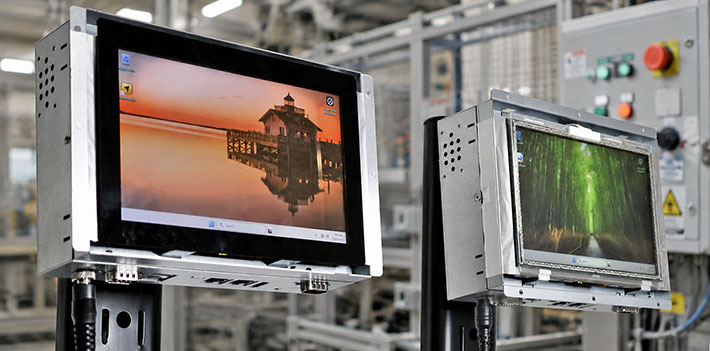
On the surface, the two systems look much the same. Although one is described as a PO Series HMI — a Human-Machine Interface — and the other as an Open Frame Panel PC, they are actually quite different. The hardware, however, is not the main story. In that respect, these two small industrial PCs share just about everything.
Both run on Intel N100 or N150 processors — ultra-low-power, entry-level mobile and embedded processors built entirely around efficiency cores. Both use DDR5 RAM, SSD storage, 2.5Gb Ethernet, USB-C with DisplayPort Alt Mode, serial ports, and HDMI. Both have 7-inch displays with 1024 x 600 pixel resolution. Neither needs a fan, and both can run Windows or Linux.
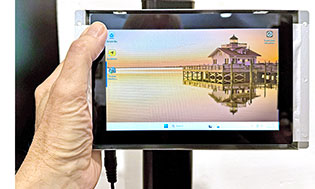 From the hardware specs alone, one might conclude that the two products are essentially the same. They pretty much are. But that would miss the point. Their real differences have very little to do with processors or ports, and almost everything to do with how and where they are intended to be used. From the hardware specs alone, one might conclude that the two products are essentially the same. They pretty much are. But that would miss the point. Their real differences have very little to do with processors or ports, and almost everything to do with how and where they are intended to be used.
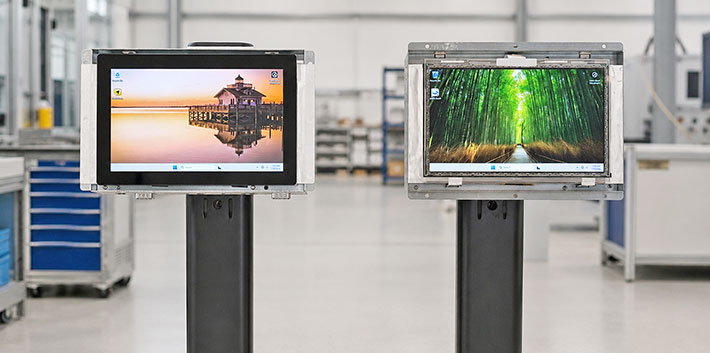
The picture to the right shows the relative size of these panels. They are full-function Windows 11 computers, but 7-inch screens make for small and compact devices. Do note, though, that the PO Series HMI (with the W07IAN3S-POT1 as its smallest model) comes in a large range of display sizes, all the way from seven to 27 inches. The Open Frame Panel PC series (of which the W07IAN3S-OFT1 is part of) starts even lower. You can get those with displays as small as 5.7 inches diagonal, and they go up to 24 inches.
The W07IAN3S-OFT1 Open Frame panel
Let's start with the W07IAN3S-OFT1. Industrial computer vendors have never been known for particularly poetic model names, but in this case the "OFT" portion refers to "Open Frame."
What sets the OFT1 apart from the POT1 is that the former is essentially a computer module intended to be used as part of, or inside, customer equipment and systems. In that sense, it is clearly an embedded type of product that will likely become part of a third-party integrator's design and brand.
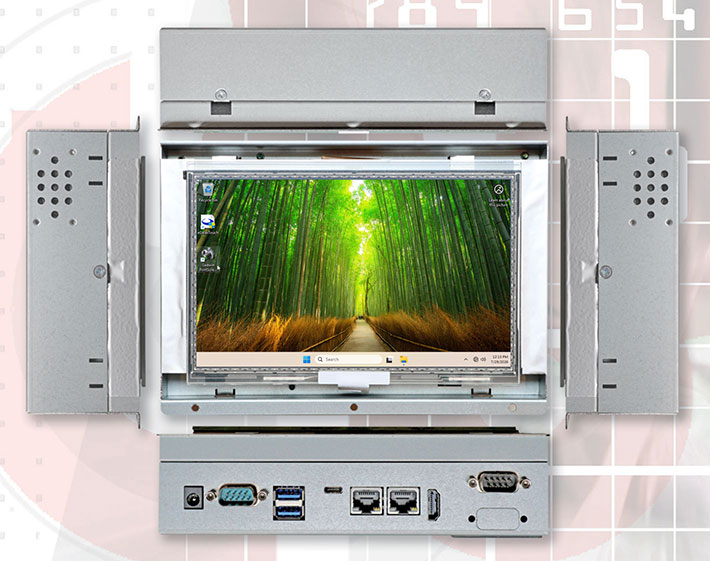
An open-frame design gives equipment manufacturers considerable flexibility. They can integrate the computer behind their own front panel, add custom buttons, emergency-stop controls, indicator lights, readers, sensors, or other components, and design the enclosure to match the appearance and environmental requirements of the finished product. In many cases, the eventual user may never realize that a Winmate computer is inside.
What kinds of uses will a W07IAN3S-OFT1 likely see? It could become part of CNC equipment, laboratory instrumentation, factory automation systems, medical analyzers, custom kiosks, or various other types of OEM machinery. The Panel PC provides the computing and display platform, while the equipment manufacturer determines how it is mounted, protected, presented, and incorporated into the finished system.
The W07IAN3S-POT1 HMI Panel PC
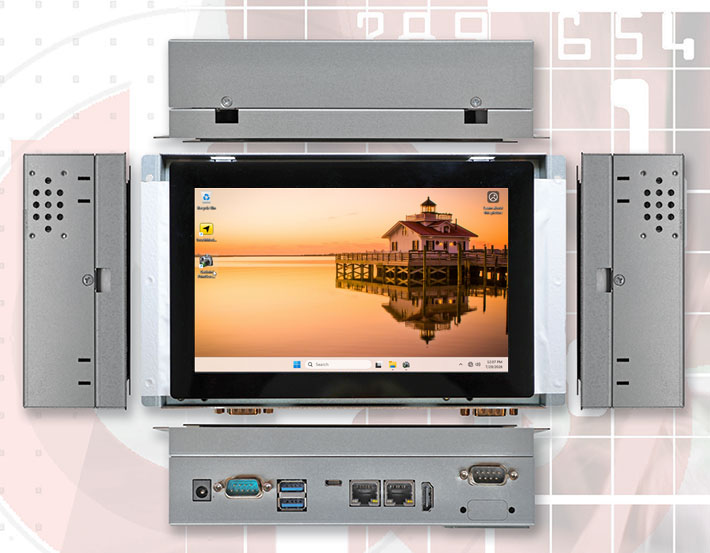
The W07IAN3S-POT1, on the other hand, is a more finished type of Human-Machine Interface computer. Its elegant front panel looks more like that of a modern consumer tablet. The PO Series is intended for situations where the Panel PC itself becomes the operator interface. It may be mounted on a machine, attached to a production line, or installed in a control cabinet where workers interact with it throughout the day. Here, appearance, ease of cleaning, and a sealed front surface become important considerations.
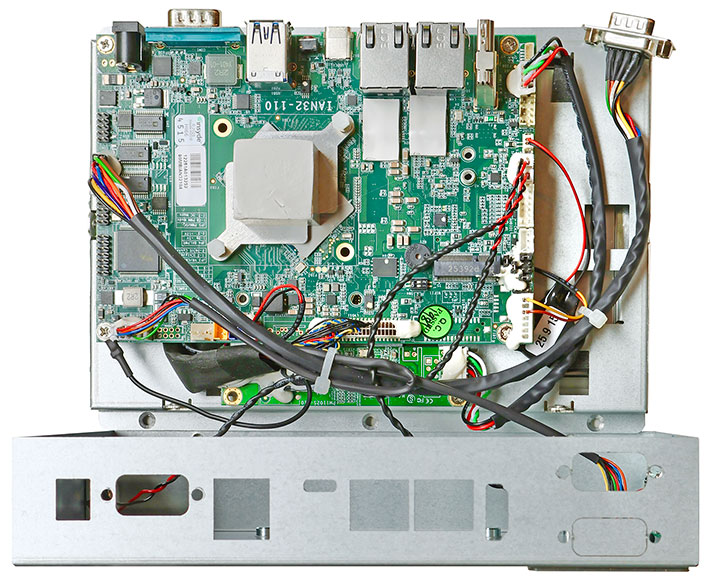
And below a look at the insides of the 7-inch version of Winmates PO Series HIMs. It's pretty much identical to what's inside the open frame versions.
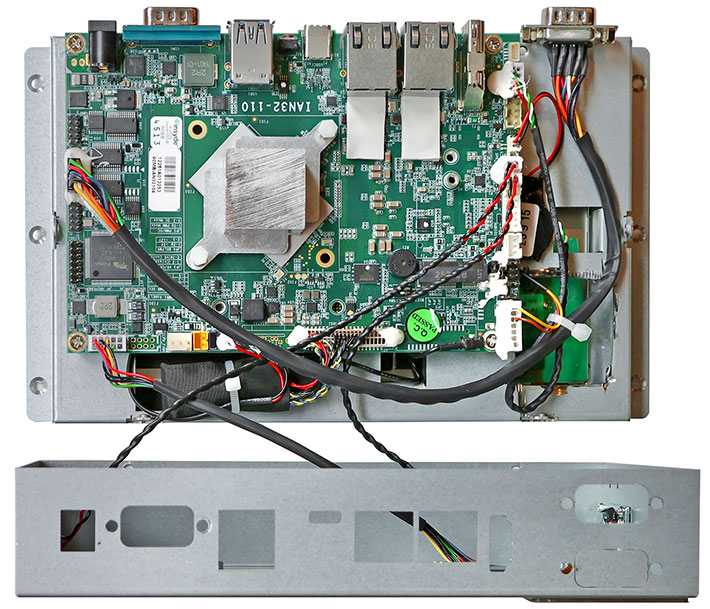
With the overall size and design, as well as the interior design and specs being almost identical, one could therefore argue that it really is the display and touch interface that represent the most visible distinction between the two products.
The type of touch screen matters
The display and touch interface are integral parts of any Panel PC, of course, but there are important nuances.
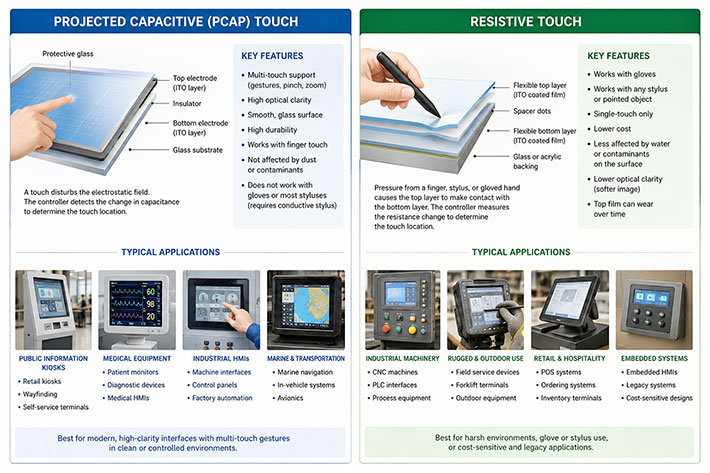
For example, Winmate offers the open-frame OFT1 with an optional resistive touchscreen, a technology that once dominated rugged mobile computing but has long since been replaced there by projected capacitive multi-touch. Resistive touch, however, continues to offer advantages in certain industrial settings. It can be operated while wearing virtually any type of glove, works with almost any stylus or pointed object, can provide precise single-point input, generally costs less, and may be better suited to legacy software designed around small controls and mouse-like interaction. Winmate also offers the OFT1 with protective glass instead of touch input.
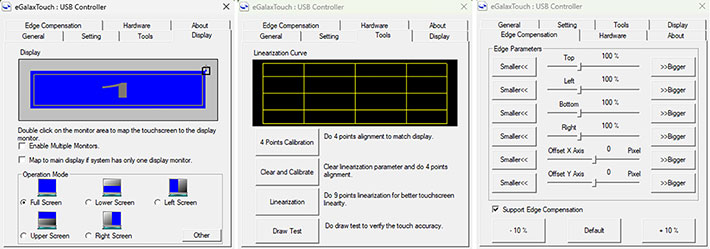
Our open-frame OFT1 panel came with the eGalax settings utility that allows very detailed calibration, configuration, and customization of its resistive touch screen. This can further increase ease of use as well as productivity of the resistive touch screen option. See some of the eGalax utility's settings screens below:
 The PO Series, on the other hand, is thoroughly modern. It uses projected capacitive multi-touch and has no other touch or digitizer options. With billions of people now using smartphones and tablets every day, capacitive touch has become the expected interface even on much industrial equipment. It supports familiar gestures, provides a smooth glass surface, and gives the POT1 the appearance and feel of a contemporary finished product. The PO Series, on the other hand, is thoroughly modern. It uses projected capacitive multi-touch and has no other touch or digitizer options. With billions of people now using smartphones and tablets every day, capacitive touch has become the expected interface even on much industrial equipment. It supports familiar gestures, provides a smooth glass surface, and gives the POT1 the appearance and feel of a contemporary finished product.
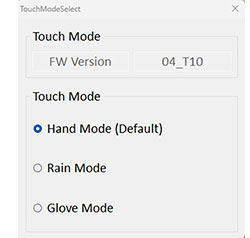
That said, the capacitive display of the PO Series does have some optimizing settings as well. Since PO Series panels may be used in kiosks or other outdoor applications where the display may get wet, it can be set into "Rain Mode." And since it may get cold outside, or a panel is deployed where personnel wears gloves, the panel can be set to "Glove Mode" as well.
Finally, the illustration below shows the inherent nature functionality, and typical applications for both capacitive as well as resistive touch screens.
Ingress protection -- necessary or not?
There is another important difference in the display area. The front of the POT1 is designed to meet IP65 ingress protection standards. That means the front panel is dust-tight and protected against water jets from all directions. Such protection has become a common expectation for industrial operator interfaces, especially where equipment may be exposed to dust, moisture, spills, or frequent cleaning.
The Open Frame OFT1, by comparison, does not list an ingress protection rating. That is not necessarily a shortcoming. The system is designed to become part of a custom installation, making the environmental protection of the finished assembly the responsibility of the equipment manufacturer or systems integrator.
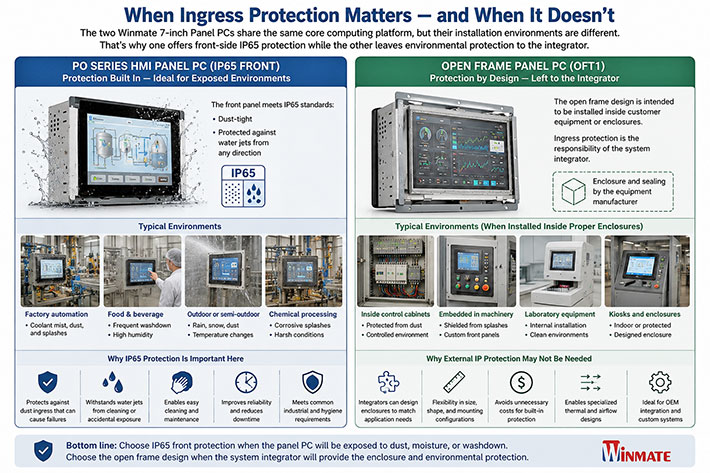
What really matters when selecting the right panel PC
That, really, is the primary difference between the two products: a design philosophy focused on customer and application requirements.
We are therefore not looking at high-end performance specifications. That is not what these small Panel PCs are about. Their specifications are deliberately conservative. The 1024 x 600 resolution is not meant for complex graphics or expansive desktop applications. The 320-nit display luminance is not intended for outdoor use under difficult lighting conditions. The Intel N100 and N150 processors are not designed to compete with high-performance Core processors. They do not have to.
What matters in industrial Human-Machine Interface systems is reliability, predictable operation, compatibility, low power consumption, and long-term availability.
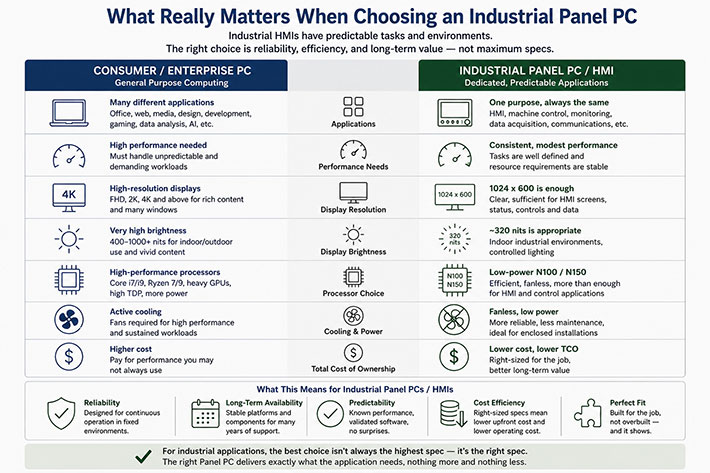
Still, isn't higher performance generally better? Isn't that why consumers and enterprises frequently upgrade to newer and more powerful systems?
Yes, but there is an inherent difference between general-purpose computing, where a system may be expected to handle whatever new applications come along, and specialized industrial computing, where tasks are fixed and well defined. It makes little sense to pay for additional performance that an application will never use, especially if that performance also brings greater heat generation, higher power consumption, more complex cooling requirements, or increased cost.
This explains why specifications that may appear modest by consumer standards are often deliberate design choices. Industrial equipment is expected to remain in service for many years, sometimes decades. Software may have been validated with a particular processor generation, display resolution, operating system, or interface. Changing any of those elements may require expensive redevelopment, testing, or recertification. In that environment, evolutionary improvements are often preferable to revolutionary change.
 Intel's N100 and N150 processors may not attract benchmark enthusiasts, but they are very well suited for applications such as HMIs, machine control, monitoring, data acquisition, and communications. Their low power consumption permits completely fanless operation, an important advantage in dusty or vibration-prone industrial environments where moving parts are undesirable. Their cost is also only a fraction of that of the processors used in mainstream consumer and enterprise PCs. Intel's N100 and N150 processors may not attract benchmark enthusiasts, but they are very well suited for applications such as HMIs, machine control, monitoring, data acquisition, and communications. Their low power consumption permits completely fanless operation, an important advantage in dusty or vibration-prone industrial environments where moving parts are undesirable. Their cost is also only a fraction of that of the processors used in mainstream consumer and enterprise PCs.
Fanless operation itself is more important than it may initially appear. Fans draw in dust and contaminants, create noise, require ventilation openings, and represent an additional mechanical component that can eventually fail. Eliminating the fan simplifies enclosure design and makes it easier to create dependable systems for continuous operation.
Closing thoughts
In this article, I set out to examine and discuss two small industrial panel PCs that, at first sight and even after spending some time using them and looking at them, seemed almost identical. Same size, same packaging, almost identical specs. A casual observer, or potential customer, might wonder why the company — Winmate — invested the time and cost of developing two products instead of one with some extra options.

Then I realized that these two Winmate 7-inch Panel PCs are not almost identical, yet competing products within the company's lineup. They are complementary ones. They share the same efficient and proven computing platform but are addressing distinctly different integration philosophies.
One is designed to be integrated inside another manufacturer's equipment. The other is designed to become the visible and tactile interface between people and machines. Makes perfect sense. -- Conrad H. Blickenstorfer, Ph.D., July 2026
|
Winmate 7-inch Panel PC specifications
(green where specs differ)
|
| Version
|
W07IAN3S-POT1
|
W07IAN3S-OFT1
|
| Status
|
Added 07/2026
|
Added 07/2026
|
| Product type |
PO Series HMI Panel PC
|
Open Frame Panel PC
|
| Processor
|
Intel Processor N100 (4 cores, up to 3.4 GHz)
Intel Processor N150 (4 cores, up to 3.6 GHz)
|
Intel Processor N100 (4 cores, up to 3.4 GHz)
Intel Processor N150 (4 cores, up to 3.6 GHz)
|
| Graphics
|
Intel Processor N100: Intel UHD Graphics
Intel Processor N150: Intel Graphics
|
Intel Processor N100: Intel UHD Graphics
Intel Processor N150: Intel Graphics
|
| OS
|
Windows 11 Pro or
Windows 11 IoT Enterprise or
Linux Ubuntu 24.04
|
Windows 11 Pro or
Windows 11 IoT Enterprise or
Linux Ubuntu 24.04
|
| Memory
|
4, 8, or 16GB DDR5-4800 RAM
|
4, 8, or 16GB DDR5-4800 RAM
|
| Storage
|
128GB up to 4TB NVMe SSD, or
Up to 2TB 2.5-inch SATA III SSD/HD
|
128GB up to 4TB NVMe SSD, or
Up to 2TB 2.5-inch SATA III SSD/HD
|
| Display type
|
7.0-inch TFT LCD, 320 nits luminance
|
7.0-inch TFT LCD, 320 nits luminance
|
| Display resolution
|
WSVGA 1024 x 600 pixel (170 ppi)
|
WSVGA 1024 x 600 pixel (170 ppi)
|
| Viewing angles
|
75, 75, 75, 70 degrees
|
75, 75, 75, 70 degrees
|
| Touch
|
Projected Capacitive multi-touch
|
Projected Capacitive multi-touch, or
Resistive touch, or
Protection glass w/o touch functionality
|
| Buttons
|
Power and Reset buttons in the back
|
Power and Reset buttons in the back
|
| Slots
|
One M.2 2230 E-key slot for Wi-Fi module
|
One M.2 2230 E-key slot for Wi-Fi module
|
| Operating temperature
|
32° to 122°F (0° to 50°C) |
32° to 122°F (0° to 50°C)
|
| Humidity
|
10-90% non-condensing |
10-90% non-condensing
|
| Enclosure Class
|
IP65 for the front panel |
No IP rating
|
| Size (inches)
|
8.18 x 4.96 x 1.81 inches (208mm x 126mm x 46mm) |
7.48 x 5.51 x 2.36 inches (190mm x 140mm x 60mm)
|
| Enclosure type
|
Metal |
Metal
|
| Mounting
|
Open frame (default)
Panel mount (optional)
VESA mount (optional)
|
Open frame (default)
Panel mount (optional)
VESA mount (optional)
)
|
| Weight
|
2.6 lbs (1.2kg)
|
2.6 lbs (1.2kg)
|
| Power
|
12Volt DC
|
12Volt DC |
| Wireless
|
Optional WLAN and Bluetooth
|
Optional WLAN and Bluetooth
|
| Interface
|
2 x USB-A 3.2 Gen1
1 x USB-C 3.2 Gen 2 with DP Alt mode
2 x 2.5Gb RJ45 LAN/Ethernet
1 x HDMI 2.0b (optional)
1 x RS232/422/485 DB9
1 x RS232 DB9
Power jack
|
2 x USB-A 3.2 Gen1
1 x USB-C 3.2 Gen 2 with DP Alt mode
2 x 2.5Gb RJ45 LAN/Ethernet
1 x HDMI 2.0b (optional)
1 x RS232/422/485 DB9
1 x RS232 DB9
Power jack
|
Price
|
Inquire
|
Inquire
|
| Product page
|
Winmate W07IAN3S-POT1 product page |
Winmate W07IAN3S-OFT1 product page
|
| Data sheet
|
Winmate W07IAN3S-POT1 data sheet |
Winmate W07IAN3S-OFT1 data sheet
|
| Contact |
Winmate Headquarters
No. 18, Zhongxing South Street
Sanchong District, New Taipei City 241017
Taiwan (R.O.C.)
|
|
|